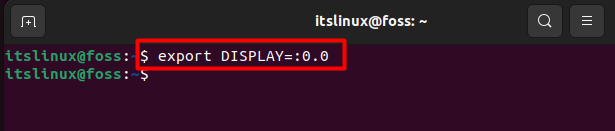
Mac Terminal Display Environment Variable tkinter TclError No Display Name And No DISPLAY Environment Variable tkinter Tclerror No Display Name And No Display Environment Variable How To Use Environment Variables In Linux Systran Box Linux Set Display Environment Variable For Mac Os X Newinbox resolvido Tkinter TclError No Display Name And No DISPLAY You don t have to set a hostname just a number in the display variable An example would be DISPLAY 0 export DISPLAY If you do this local UNIX apps will connect to the local X11 server via a UNIX socket whereas if you use a fully qualified domain name they will try to connect via a TCP network connection
Environment Variables Managing application execution parameters with environment variables is an important command line functionality Learn how to view and create variables in the following sections Display Variables Display the list of all the variables on the system with the printenv command printenv Use echo to print the value of a Restart your Terminal Unset an Environment Variable Syntax unset VAR NAME Usage unset MY NAME Persist on Mac Add unset MY NAME to your shell config file Restart your Terminal Persist on Linux Add unset MY NAME to your bashrc file Restart your Terminal Related List Get Set and Unset Windows Environment Variables in Command
resolvido Tkinter TclError No Display Name And No DISPLAY How To Set The Display Variable For Oracle Installation On Linux Python tkinter TclError No Display Name And No DISPLAY Environment tkinter TclError No Display Name And No DISPLAY Environment Variable tkinter TclError No Display Name And No DISPLAY 51CTO Python open3d Error The DISPLAY Environment Variable Is Missing How To Fix tkinter TclError No Display Name And No DISPLAY Solved Error No DISPLAY Environment Variable Specified 9to5Answer Tcl Error No Display Name Or Display Environment Variable How To Fix It
Mac Terminal Display Environment Variable
 Mac Terminal Display Environment Variable
https://pic1.zhimg.com/v2-c05c1e822ce8846809e83c693a1eadac_1440w.jpg?source=172ae18b
There are several places where you can set environment variables profile use this for variables you want to set in all programs launched from the terminal note that unlike on Linux all shells opened in Terminal app are login shells bashrc this is invoked for shells which are not login shells Use this for aliases and other things which need to be redefined in subshells not for
Pre-crafted templates offer a time-saving option for developing a diverse variety of documents and files. These pre-designed formats and layouts can be used for various individual and professional projects, including resumes, invitations, flyers, newsletters, reports, presentations, and more, streamlining the material production procedure.
Mac Terminal Display Environment Variable

TclError No Display Name And No DISPLAY Environment Variable Bytemeta

How To Set The Display Variable For Oracle Installation On Linux
Python tkinter TclError No Display Name And No DISPLAY Environment
tkinter TclError No Display Name And No DISPLAY Environment Variable

Python open3d Error The DISPLAY Environment Variable Is Missing
How To Fix tkinter TclError No Display Name And No DISPLAY

The first part of the DISPLAY variable is just the address of the display server machine It follows the same rule as any other IP address it can be a resolvable DNS name including localhost or a specific IP address such as 192 168 10 55 The second part is X specific It gives the X display X server number and screen number to use

Permanent environment variables are added to the bash profile file 1 Find the path to bash profile by using 2 Open the bash profile file with a text editor of your choice 3 Scroll down to the end of the bash profile file 4 Use the export command to add new environment variables

1 yes that is what I meant by a GUI app 2 setting environment variables for GUI app s in OS X 10 8 appears to be quit difficult Some apps let you define environment variables which are to be passed to other applications in their preferences for example You can also use the open a Appname method in a Terminal session

To view all your environment variables open a terminal on macOS and type printenv Display Environment Variable In Mac We can also use the echo command to print the specific environment variable values Setting Up Temporary Environment Variable In Mac So the manually exported environment variable s scope is the active shell only
Stack Exchange network consists of 183 Q A communities including Stack Overflow the largest most trusted online community for developers to learn share their knowledge and build their careers Visit Stack Exchange
Setting Environmental variables in macOS Command Line with zsh The zsh shell sets environmental variables through the zshenv file located in the users home directory at zshenv Thus you can add zsh environmental variables by modifying that file with nano vim etc or by using echo like so echo export ENV VAR example zshenv The format for setting an environment variable in the bash shell is KEY value with no spaces around the equal sign In addition when putting it in a configuration file it is necessary to prepend it with export The following is an example of how to set an environment variable in one of the configuration files it also works on the command line
Export VARIABLE URL example appVersion osVersion deviceType deviceId somethingelse You don t want the characters there they change the meaning in irrelevant and useless ways You can define a bunch of environment variables in a single export command by separating them with spaces