Mac Root Password Dayscas blogg se May 2023 How Do I Fix The Mac Root Password Bug The Big Tech Question Gba Emulator Mac Os Sierra Kumcorp Access Every Part Of Your Mac By Enabling The Root User ChrisWrites Descargar Data Pack Pes 2018 Ps3 Bestefil By default the root user is not enabled in Mountain Lion Which means unless you have enabled the account and set the password you probably do not have the root user even enabled Per the link above Enable the root user 1 Choose Apple menu System Preferences and then click Users Groups 2
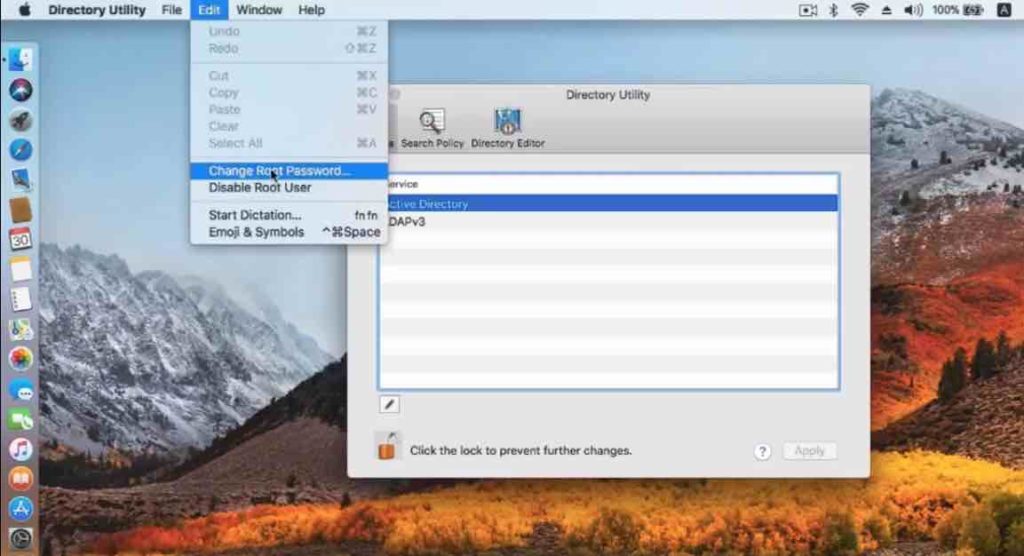
If you see Shut Down Restart and Sleep buttons you re at the login window If you see a Switch User button click it to switch to the login window If you see different buttons or no buttons restart your Mac or press and hold its power button for up to 10 seconds until it turns off When your Change the root user password on Mac If you need to keep the root user account open but need to change the password this is pretty simple Again follow the same steps one and two mentioned above When you get to step three select Edit Change Root Password from the menu bar Finally enter and verify the new root
Descargar Data Pack Pes 2018 Ps3 Bestefil Fix Mac Root Password Bypass In High Sierra YouTube Appium Doctor When And How To Use It Waldo Blog Apple Says It s Auditing Development Processes In Wake Of Mac Root Access Flaw The Mac Observer How To Install Appium On Mac And Get Started Using It Waldo Blog Mac Root Library Treepayment Unpatched Mac OS X Zero day Bug Allows Root Access Without Password Root Labs Mac Mac
Mac Root Password
 Mac Root Password
https://urcomputertechnics.com/wp-content/uploads/2018/10/change-mac-root-password-1024x556.jpg
Click on the lock icon in the Directory Utility window then enter an administrator name and password to make Configuration changes From the menu bar in Directory Utility choose Edit and select Enable Root User A prompt will come up instructing you to enter the password that you want to use for the root user
Pre-crafted templates provide a time-saving option for developing a diverse range of files and files. These pre-designed formats and layouts can be utilized for various individual and professional projects, including resumes, invites, leaflets, newsletters, reports, presentations, and more, improving the material creation procedure.
Mac Root Password

Hacking A Lg Smart Tv Mac Electronicsever

Fix Mac Root Password Bypass In High Sierra YouTube

Appium Doctor When And How To Use It Waldo Blog

Apple Says It s Auditing Development Processes In Wake Of Mac Root Access Flaw The Mac Observer

Mac Root Library Treepayment
Unpatched Mac OS X Zero day Bug Allows Root Access Without Password

Create or enter your root user password Click OK or press Enter to enable the root user Note you won t get a prompt alerting you that the root user is enabled How to Log In as the Root User Once it s enabled you can log in to the root account from the login screen Log out of your current user account Select Other on

In the Users Groups window click the lock at bottom left enter your password and then click the Login Options link just above the lock Next click the Join button next to the Network Account Server entry In the popup window click the Open Directory Utility button and yet another window will open

May 6 2013 at 21 30 2 I ve worked on mac and Linux for many years and I have very rarely needed to log in as root Tell us what you re trying to do and we ll tell you a better way most likely use sudo instead Kevin

Select Login Options Click Join as shown in the figure below Click the Open Directory Utility button The Directory Utility window appears Click the lock icon and authenticate with an administrator account From the Edit menu select Enable Root User Enter the password for the root user in the Password and Verify fields

To learn how to enable the root user see the Apple Support article How to enable the root user or change the root password on Mac When you create a password for the root user choose a complex password that contains alphanumeric and special characters to prevent the password from being compromised
[desc-11] [desc-12]
[desc-13]