Log Command Prompt Output To File Command Prompt Tutorial How To Save Command s Output To A File YouTube This Simple Trick Saves Command Prompt Output To A Text File How To Save Command Prompt Output To Text File In Linux BEST GAMES Command To Find File In Command Prompt Lasopalp How To Redirect Windows Command Line Output To A Text File Windows Examples This example creates a new log file cmdlog and starts the command log Windows Command Prompt Tools LogCommandWindowOutput cmdlog This example stops logging commands Windows Command Prompt Tools LogCommandWindowOutput off This example resumes the logging of commands in the previously used log file Windows Command Prompt
11 Answers Sorted by 1707 Yes it is possible just redirect the output AKA stdout to a file SomeCommand SomeFile txt Or if you want to append data SomeCommand SomeFile txt If you want stderr as well use this SomeCommand SomeFile txt or this to append SomeCommand SomeFile txt 4 Answers Sorted by 19 Powershell 2 0 comes with the Tee Object cmdlet which does exactly that If you re using Windows 7 it comes with Powershell 2 0 installed If you re using an older version of Windows Powershell 2 0 is available for download The benefit of Powershell is that it can run the commands that cmd can as well Example
How To Redirect Windows Command Line Output To A Text File Windows How To Use The Continuous Ping Command To Save Timestamped Results To A How To Save The Command Output To A File Using The Command Prompt How To Redirect Command Prompt Output To A File Easy How To Copy Command Prompt Output Text To Clipboard Or Save To File How To Save The Command Prompt Output To A Text File In Windows SaveTube How To Save The Command Prompt s Output To A Text File In Windows Event Viewer Windows Logs Benisnous How To Delete Log Files With An Complete List Of Cmd Commands For Windows 10 8 7 Vista And Xp Command
Log Command Prompt Output To File
 Log Command Prompt Output To File
https://i.ytimg.com/vi/xdXnM3XHaMo/maxresdefault.jpg
1 Its possible to first write it to the textfile and then displaying it by using the following command dir a txt type a txt It may have problems including the first few lines If you need those too you can use dir a txt type a txt The only downside is that if the dir command takes a long time its going to take a while before you
Templates are pre-designed files or files that can be used for numerous purposes. They can conserve effort and time by providing a ready-made format and design for producing different sort of material. Templates can be used for individual or expert jobs, such as resumes, invitations, leaflets, newsletters, reports, presentations, and more.
Log Command Prompt Output To File

How To Copy Command Prompt Output In Windows Vrogue

How To Use The Continuous Ping Command To Save Timestamped Results To A

How To Save The Command Output To A File Using The Command Prompt

How To Redirect Command Prompt Output To A File Easy

How To Save The Command Prompt Output To A Text File In Windows SaveTube

How To Save The Command Prompt s Output To A Text File In Windows

To save the command output to a file in a specific folder that doesn t yet exist first create the folder and then run the command Make folders without leaving Command Prompt with the mkdir command Export Ping Results to a File ping 192 168 86 1 C Users jonfi Desktop Ping Results txt

One of the most useful ways to log and troubleshoot the behavior of commands or batch jobs that you run on Windows is to redirect output to a file However there are a few different ways you can redirect command line writes to a file The option you choose depends on how you want to view your command output Table of Contents
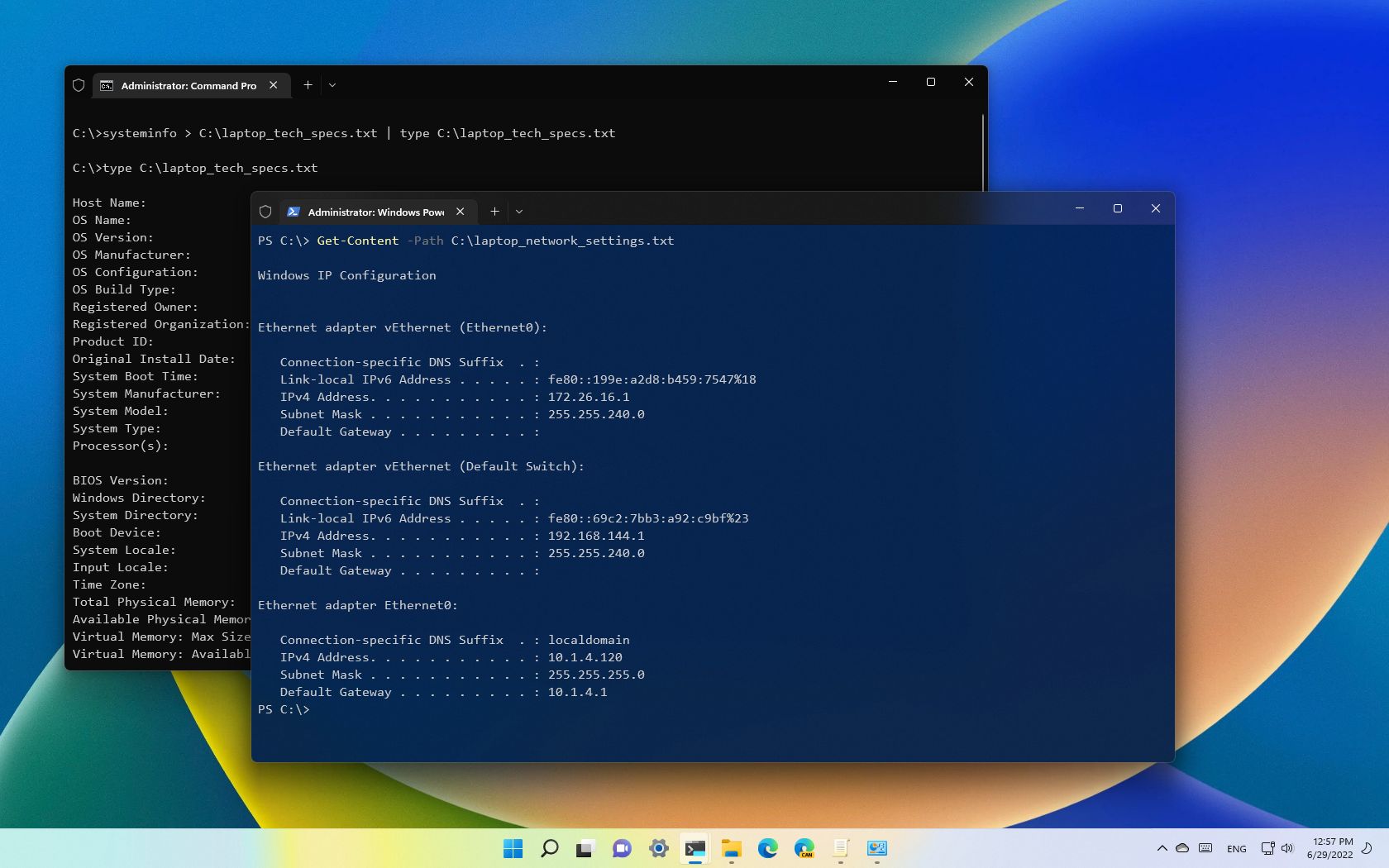
To save the command output to a text file with Command Prompt use these steps Open Start Search for Command Prompt Right click the top result and select the Run as administrator

To redirect the output of a command to a text file instead of printing it to the screen in the command window we simply need to execute the command and append it with the angle bracket symbol called appropriately enough a redirection

If the question asks for a script to be executed and the entire batch file be output to a log file in Windows 8 1 then here is the simple answer Include this at the start of your batch file echo off set LOGFILE batch log call LOG LOGFILE exit B LOG your script goes here Share Improve this answer Follow
To redirect the output of a command to a file type the command then specify the or operator and finally provide the path to a file you want to redirect the output to For example here s how you can save the output from the ls command which lists the contents of a directory ls path to file After running the command a message appears showing the file the output of all commands is logged to By default the log file is located in the current user profile Transcript started output file is C Users user Documents PowerShell transcript DESKTOP P2FHTKQ IzDgZiN 20210908163729 txt You can specify the path to the text file as follows
Before we see how to send command output to a text file in Command Prompt PowerShell or Terminal let us see how the command runs When you enter a command and hit enter its output will get