Linux Mint Recovery Mode Root Password How To Reset Forgotten Root Password In Ubuntu Linux How To Recover Root Password In Linux Mint Softhints Linux Mint 20 2 Cinnamon System Recovery Tips YouTube The Right Way To Reset A Forgotten Root Password In Linux Mint Lost Password Linux Mint User Guide Documentation Web Jan 11 2023 nbsp 0183 32 How to reset your root password on Linux Mint By Abraham January 11 2023 A password is used to authenticate any system whether a desktop or mobile device Setting a strong password that is difficult to guess is required when using the system Changing your password periodically will help you protect your system from assaults
Web Feb 15 2024 nbsp 0183 32 Boot into recovery mode Press Ctrl X or F10 to boot with the modified parameters Your system will boot up to a root shell prompt Step 3 Resetting the Root Password Now that you have root access resetting the password is straightforward Reset the root password Web Oct 12 2020 nbsp 0183 32 Did you forgot root password for Linux Mint Looking to recover or reset lost password If so this article is for you In this short tutorial we ll show you all the steps to reset your root password in Linux Mint 19 without current password it works for Ubuntu as well
Lost Password Linux Mint User Guide Documentation Linux Mint 17 Q A G d r Zs mbes Szem lyes Linux Mint Root sszeoml s V lik K zdelem SOLVED My Drive Already Has 4 Partitions What Do I Do Linux Mint Forgot Your Linux Mint Password Here Is A Way To Recover It Linux Shout Recovery Mint The Linux Mint Recovery Guide Systran Box Linux Mint Recovery Mode Or Advanced Boot Options R initialiser Le Mot De Passe Linux Mint Oubli 3 Fa ons Malekal
Linux Mint Recovery Mode Root Password
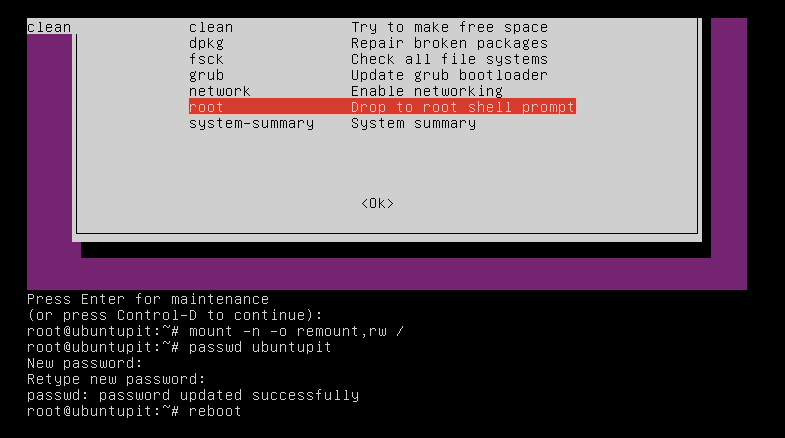 Linux Mint Recovery Mode Root Password
https://www.ubuntupit.com/wp-content/uploads/2020/07/Final-Reset-Root-Password-in-Ubuntu-Linux-EL.png
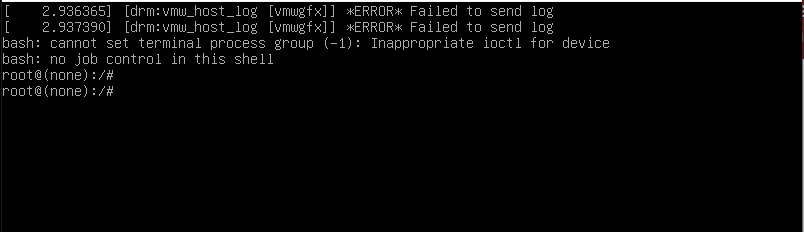
Web May 8 2022 nbsp 0183 32 From grub menu choose Advanced gt recovery mode gt select line quot root drop to root shell quot gt Enter On prompt at the bottom of the screen quot Give root password or press Cntrl D quot press Enter You ll get root shell prompt
Pre-crafted templates use a time-saving solution for creating a diverse range of files and files. These pre-designed formats and designs can be used for different individual and professional projects, including resumes, invitations, flyers, newsletters, reports, presentations, and more, enhancing the content production procedure.
Linux Mint Recovery Mode Root Password

The Linux Mint Recovery Guide Systran Box

Linux Mint 17 Q A

G d r Zs mbes Szem lyes Linux Mint Root sszeoml s V lik K zdelem

SOLVED My Drive Already Has 4 Partitions What Do I Do Linux Mint

Recovery Mint

The Linux Mint Recovery Guide Systran Box
Web Jul 17 2019 nbsp 0183 32 Set the root password 1 7 2 The root password is unfortunately no longer set by default This means that a malicious person with physical access to your computer can simply boot it into Recovery mode In the recovery menu he can then select to launch a root shell without having to enter any password After which your system is fully his
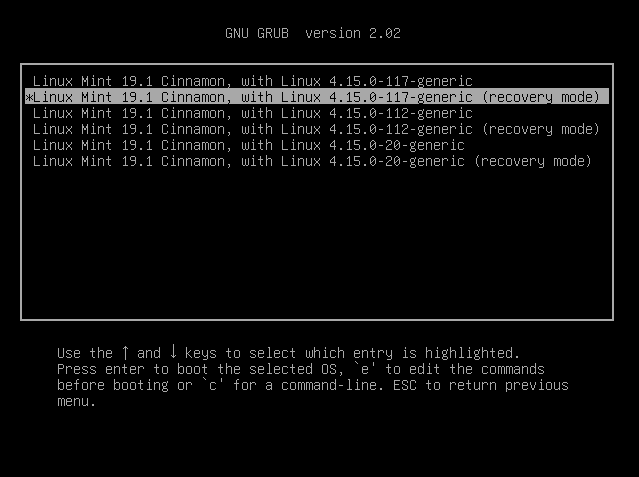
Web If you forgot your password and neither your partition nor your home directory are encrypted there are two ways to reset it Recovery mode Chroot from live ISO Recovery Mode Boot up the computer and after the BIOS screen hold down the left Shift key to force the boot menu to show up

Web Dec 20 2021 nbsp 0183 32 By default the root account is locked That doesn t disable the account but means it can t be logged in to with a password Recovery mode thus won t prompt for a password If you want it to prompt for a password open a
Web If there is a root password set and you have forgotten it but can boot normally and can use sudo try this from a terminal sudo passwd dl root It is not apparent if you are getting the normal and sudo password and a root one confused The links you have for resetting passwd whould normally work

Web May 12 2021 nbsp 0183 32 In this guide we ll take you through the step by step instructions of recovering a forgotten root password on Linux This will work regardless of the Linux distribution you re running as long as its using the GRUB bootloader Other bootloaders will have similar instructions
Web Feb 14 2022 nbsp 0183 32 Method 1 Changing the Root Password with the sudo Permissions This method can easily be used for changing a forgotten root password or for setting up a root password for the first time All you need to know is the sudo password of your system You need to execute the following command first sudo passwd root Web Mar 28 2019 nbsp 0183 32 Your system will boot up to a passwordless root shell Type in passwd yourusername if you have also forgotten your username type cat etc passwd first to get a list of all users yours should be at the end Set your new password Restart your system
Web Reset forgotten lost main user password in Linux Mint 12 SoWhy kernel version generic root UUID letters and numbers letters and numbers rw init bin bash Press F10 to boot your system In contrast to simply using the recovery mode entry of the menu this method will also let you recover the root password