Linux Mint Compatibility Mode Boot Compatibility Mode Linuxteaching Linux Mint Boot Repair Linux Mint Installation Guide Linux Mint 20 Beta Download Links Are Now Live How To Dual boot Linux Mint With Windows 10 Web Nov 26 2017 nbsp 0183 32 Linux mint needed to boot in compatibility mode but after install it does not boot Explained i booted from the cd it failed so i did it in compatibility mode i successfully installed mint it does not boot from the disk it displays a few glitchy lines of random colors and halts
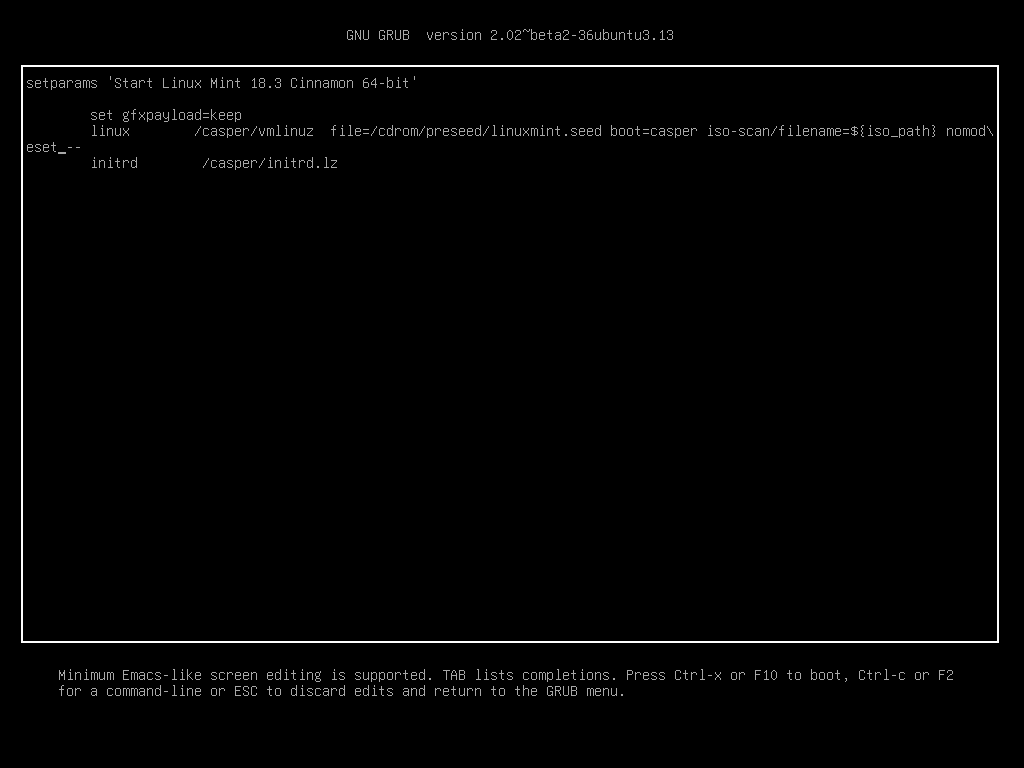
Web The EFI icon leads to a grub boot screen allowing me to choose between regular mint boot vs compatibility mode Both run for a while then hang Okibo in my case linux mint 17 boots when usb key connected I don t need to type or press anything If usb key isn t connected MacOS boots from SSD drive no need to type anything either Web If Linux Mint freezes during boot time use the quot Compatibility Mode quot boot option In this mode you should be able to boot Linux Mint and install it on your computer After the installation reboot the computer and wait for the boot menu to appear
How To Dual boot Linux Mint With Windows 10 Windows Over Linux Mint Dual Boot Mode TechSolvePrac How To Use Linux Mint s Compatibility Mode For Running Other Linux Mint 119 Linux Mint 19 2 Kledgeb Dual Boot Windows Linux Mint Grub Menu Not Appearing At Startup Linux Mint Won t Boot More Info In The Comments R linuxmint Linux Mint Diskless Boot YouTube Linux Mint 14 Released Leaves Fresh Taste In Our Mouths Ars Technica Step By Step To PXE Boot Linux Mint Over NFS Erwan s Blog
Linux Mint Compatibility Mode Boot
 Linux Mint Compatibility Mode Boot
https://linuxmint-installation-guide.readthedocs.io/ru/latest/_images/efi-nomodeset.png
Web May 4 2014 nbsp 0183 32 Boot up your new installation of Mint 13 Press and hold down the shift key to call up the Grub menu On this menu is an option quot Linux MInt 13 MATE XXbit 3 2 0 23 generic dev sda1 recovery mode quot according to your particular installation and setup Select this recovery mode option and hit Return A Recovery menu will then be displayed
Pre-crafted templates offer a time-saving option for developing a diverse series of documents and files. These pre-designed formats and designs can be used for different personal and professional tasks, including resumes, invites, leaflets, newsletters, reports, presentations, and more, streamlining the content creation procedure.
Linux Mint Compatibility Mode Boot

Instalaci n Y Configuraci n Linux Mint 8 Helena

Windows Over Linux Mint Dual Boot Mode TechSolvePrac

How To Use Linux Mint s Compatibility Mode For Running Other
Linux Mint 119 Linux Mint 19 2 Kledgeb

Linux Mint Won t Boot More Info In The Comments R linuxmint

Linux Mint Diskless Boot YouTube

Web Apr 15 2016 nbsp 0183 32 Press Escape as soon as you see the boot splash screen Choose recovery mode in the advanced boot options Choose resume to continue booting into the system In my case this approach is needed because the default kernel does not work for the built in wifi and crashes the boot

Web Jul 16 2021 nbsp 0183 32 Compatibility mode simply switches some kernel options that are used to boot the machine from a live media if you are having problems booting it What you ve been told in the post above has to do with Windows the Linux compatibility mode has nothing to do with Windows

Web Compatibility mode 182 The easiest option is to select compatibility mode from the USB stick or DVD boot menu Grub menu EFI mode Isolinux menu BIOS mode If that doesn t work you can try the nomodeset boot option

Web Nov 6 2020 nbsp 0183 32 Only way I can get Mint 20 to boot from the USB is from Compatibility Mode At that point I complete the install open terminal and run quot xed admin etc initramfs tools initramfs conf quot change COMPRESS gzip and save Reboot remove the USB and then message 1 amp 2 appear again
Web May 29 2022 nbsp 0183 32 For the compatibility mode problem I suggest you try the latest Linux kernel which will have much later drivers That fixed it for me Administration gt Update Manager View gt Linux Kernels Choose the latest 5 13 and queue install
Web Jun 3 2017 nbsp 0183 32 1 If you have create the bootable USB through Rufus to boot Legacy and UEFI Clic on the quot Boot option 1 quot you will see your USB listed 2 time the first to boot on the EFI mode and the 2 nd to boot the legacy mode GAD3R Jun 3 2017 at 20 13 Web If you ve had to use Compatibility mode to overcome driver issues blank screen can t load the Live Session etc then you are probabl y familiar with this screen Here also is the option for OEM Install It says it is for manufacturers but don t let that scare you Here s how it works It goes directly to the installer
Web Each mode has its own boot loaders and boot managers In BIOS mode you ve got LILO GRUB Legacy GRUB 2 BURG SYSLINUX and a few others for Linux In EFI mode you ve got ELILO Fedora s patched GRUB Legacy GRUB 2 the Linux kernel s EFI stub loader rEFInd gummiboot and one or two very exotic boot loaders