Linux List Open Ports Firewall Check Open Ports In Linux 2 Simple Commands Netatalk Ports Firewall Intelligentfreeloads Application Level Linux Firewall OpenSnitch 1 3 0 Adds A Process The Windows Firewall A Few Bricks Loose IsleVue How To List Open Ports On Linux Technology Information Jobs To list the open ports in firewalld you can use the firewall cmd command with the list ports option To do so execute the below script sudo firewall cmd list ports The output displays the 443 tcp and 80 tcp ports that are currently open in firewalld
List all allowed ports firewall cmd list ports Add a port to the allowed ports to open it for incoming traffic firewall cmd add port port number port type The port types are either tcp udp sctp or dccp The type must match the type of network communication Make the new settings persistent 1 Log in to your Linux server and or open a Terminal window Most Linux distributions including Ubuntu Debian CentOS Fedora and Red Hat come with IPtables already installed You can open ports in Iptables using simple commands 2 Run service iptables status to make sure your firewall is active
How To List Open Ports On Linux Technology Information Jobs Open And Close Ports With FirewallD On Rocky Linux 8 OrcaCore Overview Of Port And Firewall Settings For BeyondTrust RS How To Open Ports In Linux Server Firewall 14 Steps How To Check If Firewall Is Blocking A Port Or A Program MiniTool How To Open Ports In Linux Server Firewall 14 Steps How To Open And Close Ports On RHEL 8 Linux LinuxConfig Manually Open Ports In Windows Firewall How To Install Firewall And Open Ports In Kali Linux YouTube
Linux List Open Ports Firewall
 Linux List Open Ports Firewall
https://linuxhandbook.com/content/images/size/w1600/2022/03/check-port-linux.png
A beginner s guide to firewalld in Linux The firewall is essential for controlling the flow of network traffic in and out of the Linux server In this article you ll display add and remove firewalld rules Posted September 10 2020 Tyler Carrigan Editorial Team Red Hat Image by Pexels from Pixabay Advanced Linux commands cheat sheet
Templates are pre-designed files or files that can be used for various functions. They can save effort and time by offering a ready-made format and layout for creating different sort of content. Templates can be utilized for individual or expert projects, such as resumes, invitations, flyers, newsletters, reports, presentations, and more.
Linux List Open Ports Firewall

How To Open Firewall Ports In Windows 10 YouTube

Open And Close Ports With FirewallD On Rocky Linux 8 OrcaCore
Overview Of Port And Firewall Settings For BeyondTrust RS

How To Open Ports In Linux Server Firewall 14 Steps

How To Open Ports In Linux Server Firewall 14 Steps

How To Open And Close Ports On RHEL 8 Linux LinuxConfig
How to configure a firewall on Linux with firewalld Enable Sysadmin How to configure a firewall on Linux with firewalld Learn how to install configure and use firewalld to restrict or allow a computer s access to services ports networks subnets and IP addresses Posted July 12 2022 Evans Amoany Sudoer

Use the following command to list all open ports on the system netstat lntu In the above command Option l list only listening sockets Option n show the port number Option t list the TCP ports Option u list the UDP ports netstat lntu Using the ss tool to find Open Ports in Linux

Get a list of Open Ports in Linux Ask Question Asked 10 years 11 months ago Modified 8 months ago Viewed 662k times 269 I need a Linux command to list all free open ports for use in an application lsof i TCP fgrep LISTEN Does not seen to be helping as the Ports it lists are not necessarily free for use How do I list free open ports not in use

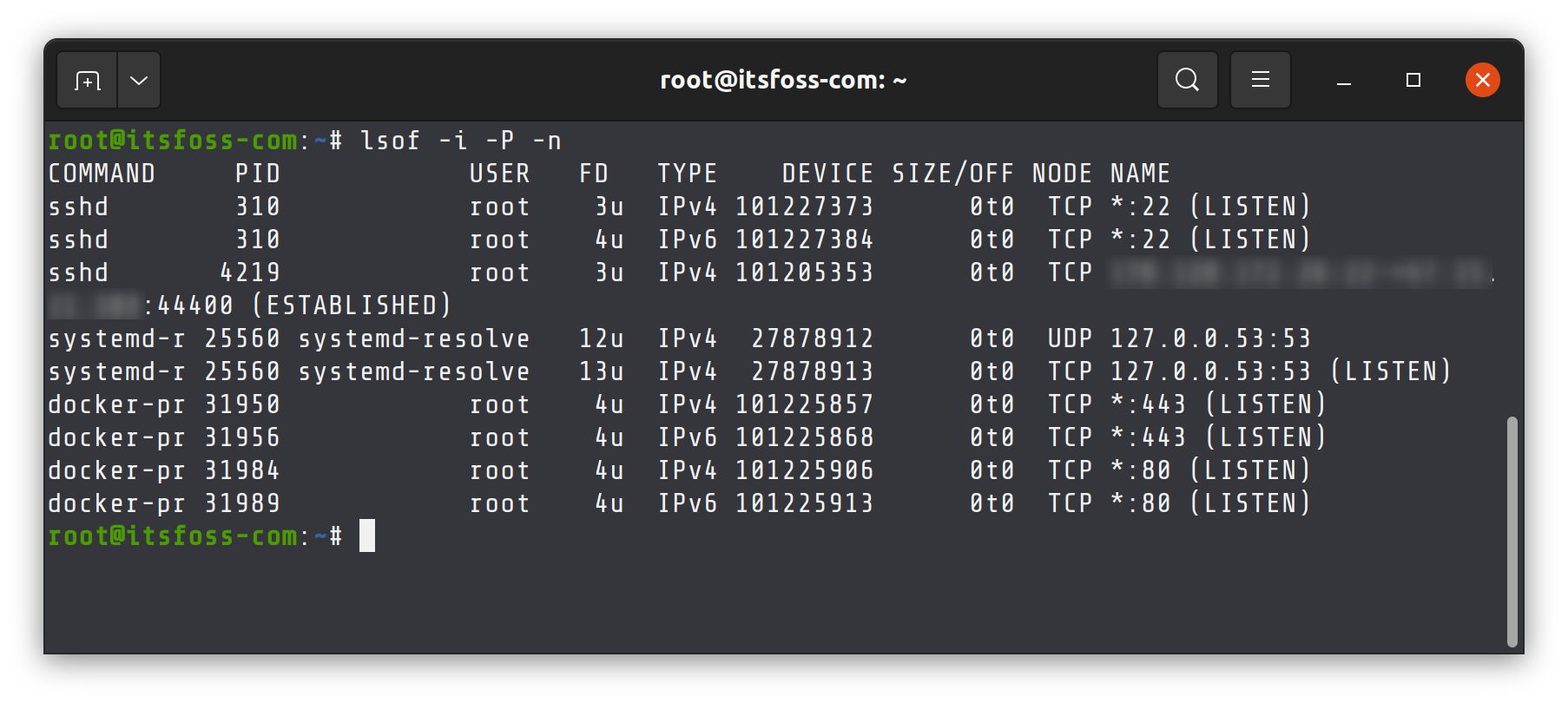
Use the lsof command to Display a list of ports in use sudo lsof nP iTCP sTCP LISTEN The command outputs a list of the connections that use the TCP protocol Check a specific port number with this syntax sudo lsof nP i port number For example to check if port 5054 is in use type sudo lsof nP i 5054

When checking for open firewall ports on RHEL 8 CentOS 8 Linux it is important to know that firewall ports can be opened in two main different ways Firstly the firewall port can be opened as part of a pre configured service For example firewall cmd zone public permanent add service http
List all allowed ports firewall cmd list ports Add a port to the allowed ports to open it for incoming traffic firewall cmd add port port number port type The port types are either tcp udp sctp or dccp The type must match the type of network communication Make the new settings persistent Use the netstat command to list all open ports including TCP and UDP which are the most common protocols for packet transmission in the network layer netstat lntu This will print all listening sockets l the port number n TCP ports t UDP ports u Output
To list all TCP or UDP ports that are being listened on including the services using the ports and the socket status use the following command sudo netstat tunlp The options used in this command have the following meaning t Show TCP ports u Show UDP ports n Show numerical addresses instead of resolving hosts