Linux Get Ethernet Link Status Hisense Broand Multimedia Technologies 002 Gigabit Capable Passive Ethernet Switches And The Changing Face Of Networking By BN Cables What Do Ethernet Link Lights Mean NetWork From Home A Realizing Method For Notifying Downstream Device In Case Of Switch Of DP83640 Ethernet Link Status Interface Forum Interface TI E2E Task View network interface card Let type the following ip command on latest version of the Ubuntu Linux server or desktop ip l show Sample outputs 1 lo LOOPBACK UP LOWER UP mtu 65536 qdisc noqueue state UNKNOWN mode DEFAULT group default qlen 1000 link loopback 00 00 00 00 00 00 brd 00 00 00 00 00 00
12 You ve asked two different questions To check if it has an IP address you can use ip addr ls dev eth0 the new iproute tools ifconfig eth0 old ifconfig A down interface can still have an IP address To check if the Ethernet link is up you can ip link ls dev eth0 look for LOWER UP ethtool eth0 look for Link detected yes 2 Answers You can get link up down events via netlink You would create a PF NETLINK socket bind to the RTMGRP LINK group and wait for RTM NEWLINK RTM DELLINK messages Link up events have IFF RUNNING and IFF LOWER UP set in ifinfomsg flags while link down events have both flags cleared funnily enough I m getting RTM NEWLINK messages
DP83640 Ethernet Link Status Interface Forum Interface TI E2E D Link 24 Port Unmanaged Switch Gjergji Kompjuter Why Is My Ethernet Cable Blinking Orange Outdoor Discovery Ethernet Migration Solution For OC3 Microwave Links TC Communications Ethernet Status 5 6 Download MacOS SFP Connecting Details Hackaday io Chapter 4 SGI 2100 Interface And Cabling Information DUB 1312 USB 3 0 Gigabit Ethernet Adapter D Link UK Added Ethernet Link Object s Counter Attributes And GetAndClear Service
Linux Get Ethernet Link Status
 Linux Get Ethernet Link Status
https://usermanual.wiki/Hisense-Broand-Multimedia-Technologies/002/User-Guide-2280743-Page-2.png
The Netlink is a socket based Linux kernel interface used for inter process communication IPC between both the kernel and userspace processes and between different userspace processes in a way similar to the Unix domain sockets Like the Unix domain sockets unlike INET sockets Netlink communication cannot traverse host boundaries
Templates are pre-designed files or files that can be used for various functions. They can conserve effort and time by supplying a ready-made format and design for developing various sort of material. Templates can be used for individual or expert tasks, such as resumes, invitations, leaflets, newsletters, reports, presentations, and more.
Linux Get Ethernet Link Status

Markiert Gehorsam berleben Connect Laptop To Router With Ethernet

D Link 24 Port Unmanaged Switch Gjergji Kompjuter
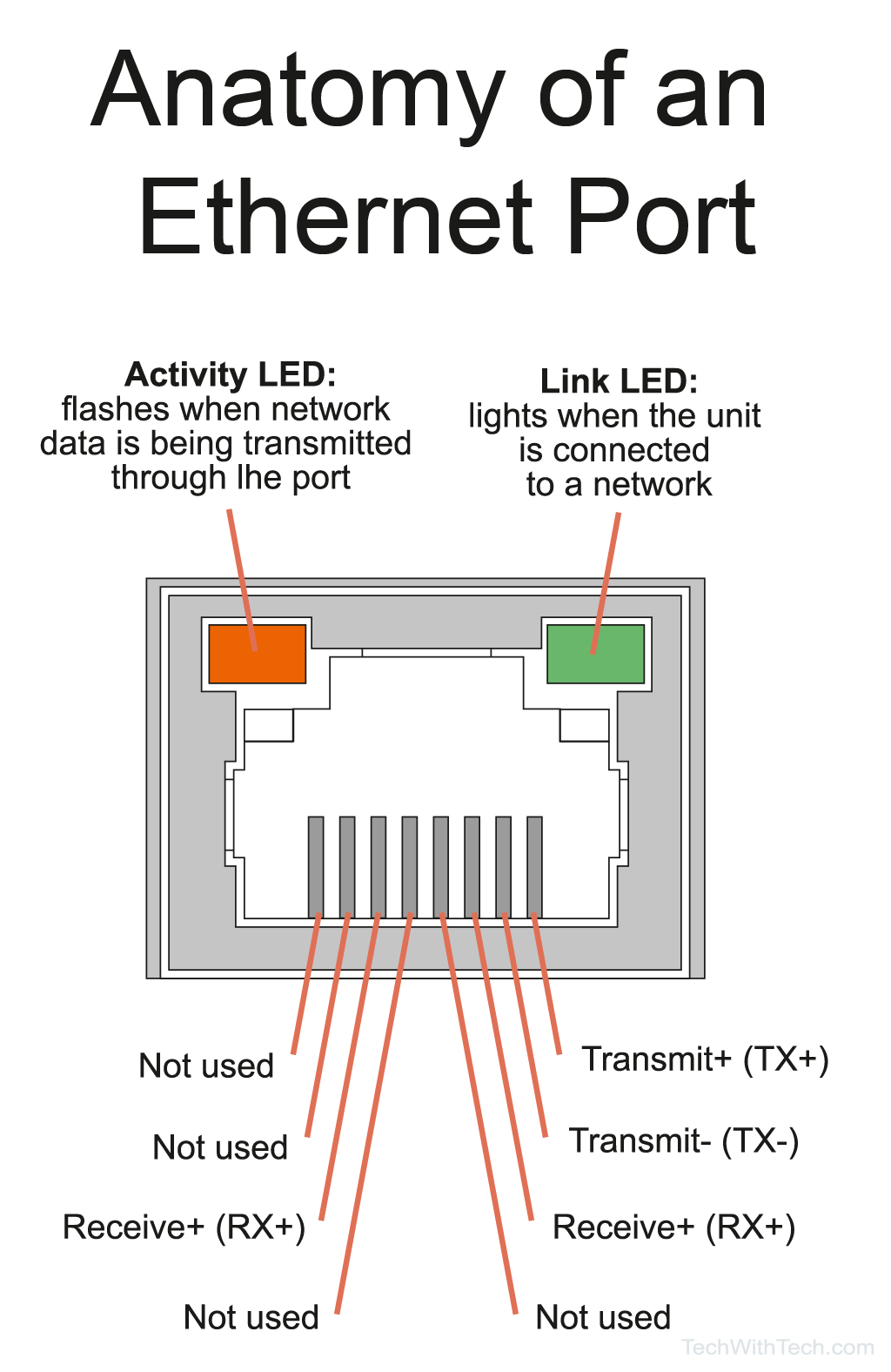
Why Is My Ethernet Cable Blinking Orange Outdoor Discovery
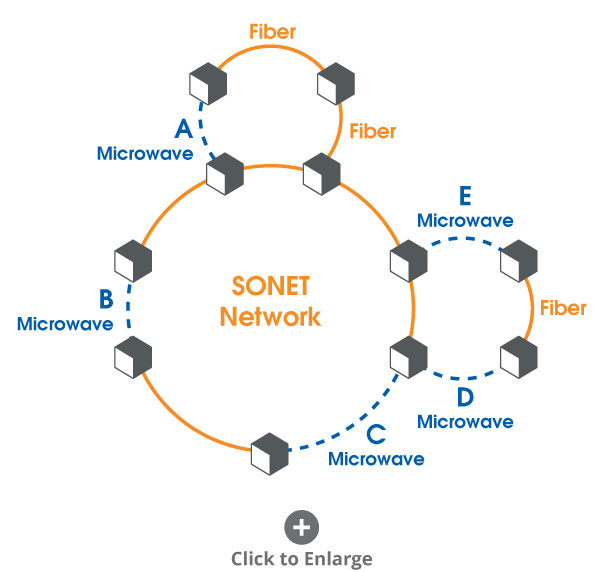
Ethernet Migration Solution For OC3 Microwave Links TC Communications

SFP Connecting Details Hackaday io

Chapter 4 SGI 2100 Interface And Cabling Information

Finally this port is working normally 2 eth0 BROADCAST MULTICAST UP LOWER UP mtu 1500 qdisc fq state UP mode DEFAULT group default qlen 1000 It is administratively UP the LOWER UP indicates the physical layer is working i e there is a carrier and the second UP confirms in effect the IP layer is up Share

Networkctl is a command line utility for viewing a summary of network devices and their connection status It allows you to query and control the Linux networking subsystem It is one of the new commands in the new release of systemd which is present in Ubuntu 18 04 It displays the state of the network links as seen by systemd networkd
These commands are safe to run without changing any of our network configurations Check network status using ifconfig command in Linux Layer 1 The physical layer Layer 2 The data link layer Layer 3 The network internet layer Layer 4 The transport layer

Command to check network adapter names in Linux Prerequisite By default lshw command may not be installed on your system Hence use the apk command on Alpine Linux dnf command yum command on RHEL co apt command apt get command on Debian Ubuntu co zypper command on SUSE OpenSUSE pacman command on Arch Linux to install the lshw

3 ip link Command The ip link command can also show the status of network devices When we use the show argument with the network device name we get ip link show enp0s25 2 enp0s25 NO CARRIER BROADCAST MULTICAST UP mtu 1500 qdisc fq codel state DOWN mode DEFAULT group default qlen 1000
Fig 01 Ubuntu Linux verify the speed of my NIC network card You can also use the following two commands dmesg grep eth0 grep up dmesg grep bond0 grep up OR use the command line utility called mii tool to checks or sets the status of a network interface s Media Independent Interface MII unit mii tool v eth0 Iperf c 192 168 10 If you want to see the full duplex speed try this instead iperf d c 192 168 10 Substitute 192 168 10 for the servers IP address 2 On Ubuntu systems var log kern log has limited logging of kernel events It will record link speed and status of a NIC when it changes
Cloud Linux Linux provides a number of commands to manage network interfaces In this post we will discuss 4 different commands ifconfig ip addr ip link show dmesg The ifconfig command displays information about all active network interfaces on your system However this command has been deprecated in favor of ip command