Linux Check Swap Space Processes How To Create Swap Space In Linux Tamil YouTube How To Back Up Linux Terminal History How To Assign Swap Space In Kali Linux Systran Box Add Swap Space In Linux Swapping Mechanism How do I determine which process is using swap space Solution Verified Updated June 16 2022 at 2 18 PM English Issue System is utilising swap heavily and need to determine which processes are swapping How do I check which process is using swap space on my system Environment Red Hat Enterprise Linux 5 update 3 2 6 18 128 el5 and newer
What is Swap space How Do I Check Swap Space Usage in Linux 1 Using swapon Command Check Swap Usage 2 Using proc swaps Measures Swap Space 3 Using free Command Show Swap Usage 4 Using top Command 5 Using atop Command 6 Using htop Command 7 Using the Glances Command 8 Using the vmstat Command Summary What is Swap space The procedure to check swap space usage and size in Linux is as follows Open a terminal application To see swap size in Linux type the command swapon s You can also refer to the proc swaps file to see swap areas in use on Linux Type free m to see both your ram and your swap space usage in Linux
Swapping Mechanism How To Assign Swap Space In Kali Linux Systran Box How To Increase Linux Swap Space Documentride5 Swap S O Swap No Esta Es La Cuesti n Linux Find Out What Process Are Using Swap Space NixCraft How To Increase Swap Space In Linux Server Systran Box Solved Increase Swap Space In Linux Through Terminal 9to5Answer Managing And Monitoring Swap On Linux Example 01 DevopsRoles Save Solved Ubuntu 16 04 Failing To Create Swap Space 9to5Answer
Linux Check Swap Space Processes
 Linux Check Swap Space Processes
https://i.ytimg.com/vi/FIA6G4lcgRA/maxresdefault.jpg
Command cat proc swaps You can also view the swap size information through the swap configuration file proc swaps It also displays device wise swap information so that you can see the device name partition logical volume or file its type and how much swap it contributes to the system
Templates are pre-designed files or files that can be used for various purposes. They can save effort and time by providing a ready-made format and design for producing different type of material. Templates can be utilized for individual or expert tasks, such as resumes, invitations, flyers, newsletters, reports, presentations, and more.
Linux Check Swap Space Processes

How To Add Swap Space On Ubuntu 22 04 Cloudbooklet

How To Assign Swap Space In Kali Linux Systran Box
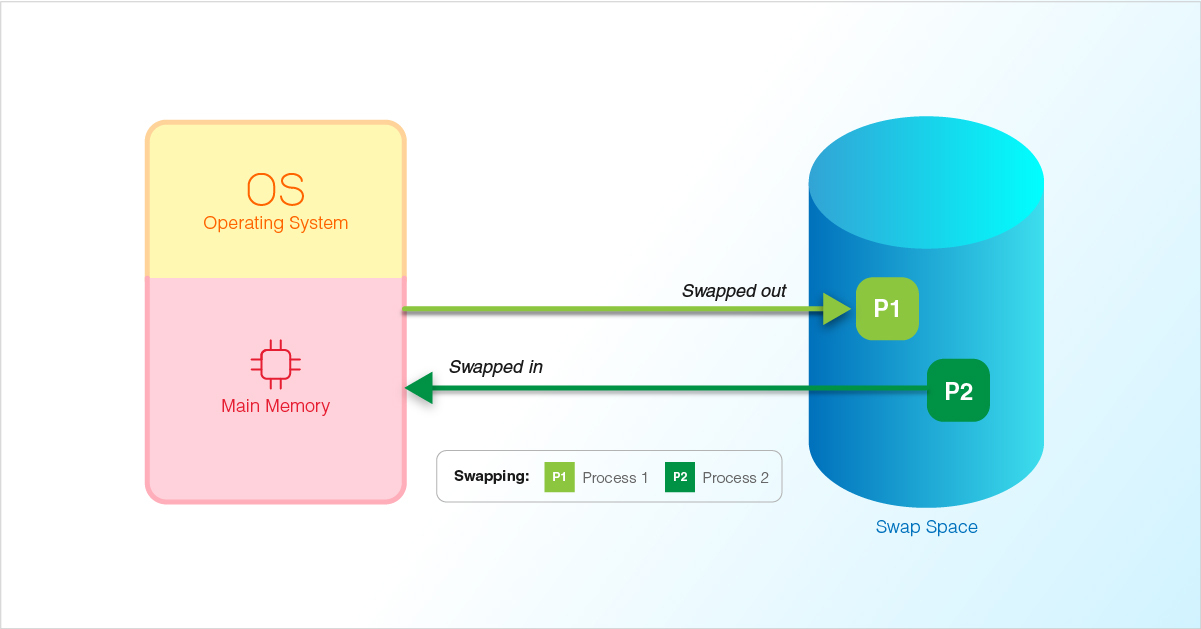
How To Increase Linux Swap Space Documentride5

Swap S O Swap No Esta Es La Cuesti n

How To Increase Swap Space In Linux Server Systran Box

Solved Increase Swap Space In Linux Through Terminal 9to5Answer

Check which processes are eating swap on Linux Ask Question Asked 2 years 2 months ago Modified 2 years 1 month ago Viewed 9k times 2 To see some memory info I can watch it in top of through cat proc meminfo In proc meminfo I can see the swap usage of the whole system like this SwapCached 4 kB SwapTotal 33460220 kB SwapFree 33460216 kB

Type the following pidof command to find the process ID of a running program called memcached pidof memcached Alternatively use pgrep command to lookup process PID enter pgrep memcached Sample outputs note down PID number 1 48440 To see swap space used by memcached PID 48440 enter number 2

1 Overview In this tutorial we ll discuss how we can check for processes that use swap memory First we ll cover the proc directory to see what it contains and how we can extract processes information from it Afterward we ll write a shell script that will automatically extract the swap usage information used by the processes

This is a command dedicated for handling swap memory Apart from giving accurate information about the swap space being used it also tells you if the swap space is a partition or a swap file You can use it like this swapon show
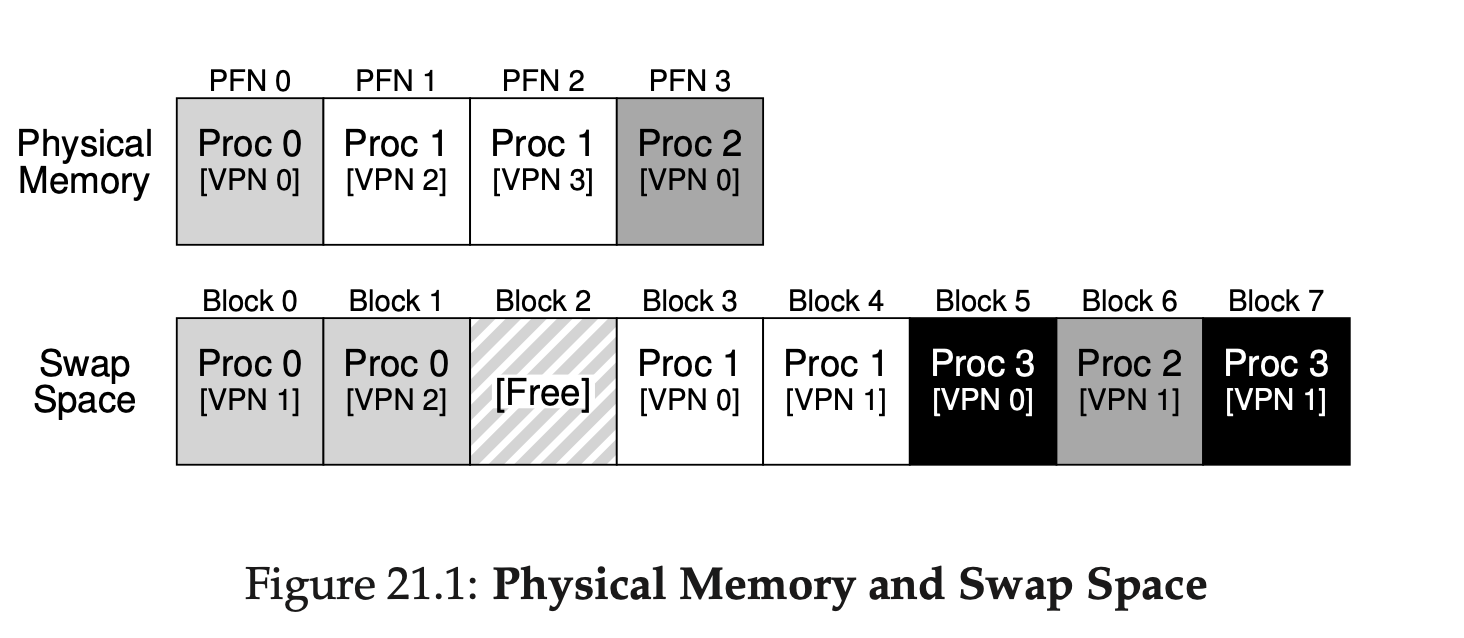
Swap space in Linux is an extension of physical RAM offering virtual memory that helps maintain system stability and performance It allows processes to continue running when RAM is fully used and prevents memory errors Swap space also enables hibernation and safeguards critical processes by temporarily offloading data
The procedure to check swap space in Linux is as follows Open the terminal application Type cat proc swaps Press Enter to run the command The output will show you a list of all the active swap devices on your system as well as their size and status Check swap space from proc swaps file in Linux Swap space might be configured as its own disk partition or be set up as a file These days most Linux installations create a partition during installation and this is optimal You can
How to Create a Swap File Now that we ve scrutinized the existing swap space let s move on to the next step increasing it One common way to increase swap space in Linux is by creating a swap file Chiefly a swap file is a regular file in the file system that serves as additional virtual memory