Kill All Process On Port 8080 Kill Process On Port 8080 In Windows JavaByPatel Data Structures And Identify And Stop The Process That s Listening On Port 8080 Or Bont sa Kibogoz Eltitkol s And Port Visszat r s F szek Referencia How To Check Process Running On Port 8080 In Linux Ubuntu Kill Process On Port 8080 In Windows LaptrinhX Web 3 Answers Sorted by 58 You can try fuser fuser k 4990 tcp Or using lsof to get the process id then feed to kill kill sudo lsof t i 4990 Share Improve this answer Follow
Web Jun 24 2014 nbsp 0183 32 top o prt The highest port in use in 1360 If I run the following command netstat tulpn grep 8080 I receive netstat n unknown or uninstrumented protocol If I run the following command lsof i 8080 I receive no output If I restart my computer the port is now available and I can now vagrant up Web Feb 19 2012 at 3 06 Honestly you should use fuser as it is very simple but whatever CrazyVideoGamer Feb 2 2021 at 16 11 just for myself sudo kill 9 sudo lsof t i 3000 Sasha Kos
Kill Process On Port 8080 In Windows LaptrinhX How To Find And Kill Process On A Port In Windows 10 Windows Bulletin Identify And Stop The Process That s Listening On Port 8080 Or How To Kill A Process On A Port On Windows 11 Technipages Identify And Stop The Process That s Listening On Port 8080 Or Description Web Server Failed To Start Port 8080 Was Already In Use Kill Process Running On Port 8080 On Windows YouTube Kill The Process Running On Port 8080 Mac
Kill All Process On Port 8080
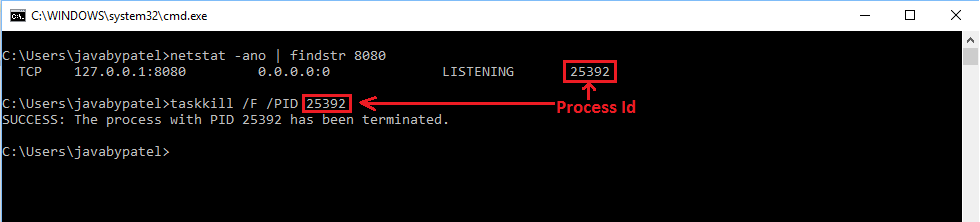 Kill All Process On Port 8080
https://4.bp.blogspot.com/-3ssgWSZ4qWA/WehMsQMt5FI/AAAAAAAACJs/Sk3qVSgtIH85lRdiqI3AlDtPC--h_37pwCLcBGAs/s1600/kill-process-on-port-8080-windows.png
Web Dec 2 2015 nbsp 0183 32 1 Answer Sorted by 4 Take a look at fstat and lsof from ports packages Installing lsof PKG PATH depends on your OS version su root c quot PKG PATH ftp ftp openbsd pub OpenBSD 5 8 packages amd64 pkg add r lsof quot lsof 4 88 ok Using fstat
Templates are pre-designed files or files that can be utilized for various functions. They can save effort and time by offering a ready-made format and design for producing various sort of content. Templates can be utilized for personal or expert tasks, such as resumes, invitations, leaflets, newsletters, reports, presentations, and more.
Kill All Process On Port 8080

Kill Port 8080 In Windows
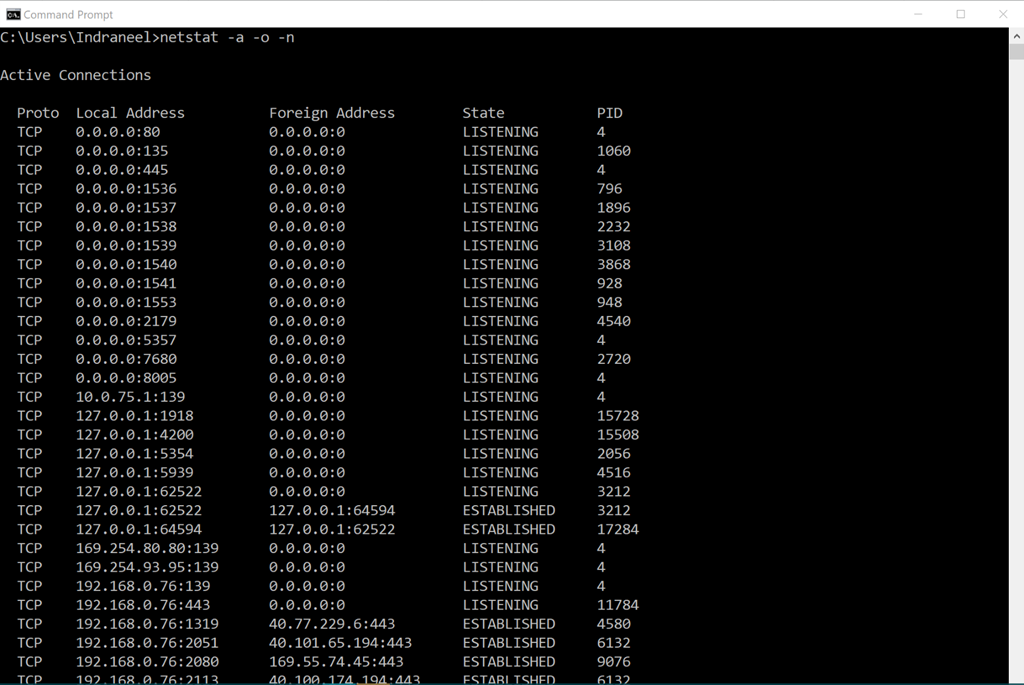
How To Find And Kill Process On A Port In Windows 10 Windows Bulletin

Identify And Stop The Process That s Listening On Port 8080 Or

How To Kill A Process On A Port On Windows 11 Technipages

Description Web Server Failed To Start Port 8080 Was Already In Use

Web Jul 20 2012 nbsp 0183 32 34 Answers Sorted by 1 2 Next 1692 This fuser 8080 tcp will print you PID of process bound on that port And this fuser k 8080 tcp will kill that process Works on Linux only More universal is use of lsof i4 or 6 for IPv6

Web Mar 5 2019 nbsp 0183 32 4 Answers Sorted by 107 You can track down the process running on port 8080 and kill it For macOS or Linux sudo lsof iTCP 8080 sTCP LISTEN You should get an output something like COMMAND PID USER FD TYPE DEVICE SIZE OFF NODE NAME yarn 12017 user 12u IPv6 1876683 0t0 TCP 8080 LISTEN

Web Aug 30 2016 nbsp 0183 32 First of all find all the process which are running ona port For that use following command in cmd netstat ano findstr lt port number gt After finding all the process running on a port just use below command to terminate the process you want to terminate taskkill F pid 10608

Web 17 I am trying to run a GAE app on localhost 8080 but it was apparently occupied even after shutting down and restarting my computer I ran sudo lsof i 8080 Lo and behold there is something sill running with PID 66 What can I do to kill that process and free up 8080 again macos port localhost Share Improve this question Follow

Web Sep 14 2021 nbsp 0183 32 How can I kill off this process once and for all to free up port 8080 linux process port Share Improve this question Follow asked Sep 14 2021 at 4 10 Alan 1 2 you will have to configure the other service to use a different port there isn t another good solution to this problem Frank Thomas Sep 14 2021 at 4 15
Web Jun 14 2023 nbsp 0183 32 For example if the process is using port 8080 you would use the following command lsof i 8080 t Killing a process using a port in Linux involves finding the PID of the process using the lsof command and then using the kill or killall command to terminate the process This can be a useful tool for freeing up resources and Web May 30 2023 nbsp 0183 32 For processes listening on a TCP or UDP port the fuser command along with the k kill option will terminate the related processes for you Just specify the port type TCP or UDP and the port number in your command For example this would terminate processes utilizing TCP port 80 fuser k 8080 tcp
Web May 20 2017 nbsp 0183 32 Kill process running on port 80 Asked 7 years 11 months ago Modified 4 years ago Viewed 202k times 30 This is the process I want to kill sooorajjj Treako Desktop MerkMod sudo netstat tunap grep 80 tcp6 0 0 80 LISTEN 20570 httpd debian Share Improve this question Follow edited May 20 2017 at 4 45 Rui F Ribeiro