Kill A Process Using Command Prompt How To Kill A Process Using Command Prompt In Windows 8 1 YouTube How To Kill A Process In Linux Using Commands Site24x7 Taskkill CMD Command Kill Processes In Windows How To Kill A Process In Command Prompt 7 Steps with Pictures Basic Commands For Command Prompt Web Feb 16 2023 nbsp 0183 32 1 Open a command prompt or an elevated command prompt 2 Type tasklist into the command prompt and press Enter to see a list of all currently running processes Make note of the Image Name and PID of the process ex OneDrive you want to kill see screenshots below
Web Dec 24 2022 nbsp 0183 32 Traditionally Windows allows users to do so through Task Manager and Command Prompt In addition you can also use PowerShell Method 1 Use End Task in Task Manager Terminating a process from Task Manager is the most traditional and straightforward approach Web To kill a process by its name we use the IM option In the following example we run the taskkill command to terminate the notepad exe process taskkill im notepad exe The t option tells Windows to terminate the specified process and all child processes In the following example we force kill Microsoft Edge and its child processes
Basic Commands For Command Prompt Kill Process Using Command Prompt In Windows YouTube Linux Kill Process By PID How To Kill A Process By Name Linux Tutorials Learn Linux Configuration Command Prompt Commands Cd Example Montrealtide What Is Command Execution Rankiing Wiki Facts Films S ries Windows 10 Command Prompt Guide How To Create Files Clean PC Using Command Prompt Basics Kill Processes Tasks Tutorial 7 YouTube How To Kill Process From Windows Command Line Techno Digits
Kill A Process Using Command Prompt
 Kill A Process Using Command Prompt
https://i.ytimg.com/vi/JGYL0eUpFUM/maxresdefault.jpg
Web Jan 5 2022 nbsp 0183 32 Simply search for cmd in the Start Menu and select Run as Administrator To kill a process with the Taskkill command you need its name or its PID Entering tasklist will give you a complete list of all running processes along with
Templates are pre-designed documents or files that can be utilized for various functions. They can save effort and time by supplying a ready-made format and design for developing different kinds of material. Templates can be utilized for individual or expert projects, such as resumes, invitations, flyers, newsletters, reports, presentations, and more.
Kill A Process Using Command Prompt
How To Kill A Process In Linux With Kill Pkill And Killall PhoenixNAP KB

Kill Process Using Command Prompt In Windows YouTube
Linux Kill Process By PID

How To Kill A Process By Name Linux Tutorials Learn Linux Configuration

What Is Command Execution Rankiing Wiki Facts Films S ries

Windows 10 Command Prompt Guide How To Create Files Clean PC Using

Web Sep 19 2020 nbsp 0183 32 Press the Ctrl key the Shift key and the Esc key in consecutive order at the same time to open Task Manager 2 View the names of the running processes and identify the problematic process Click the Processes tab in Task Manager and find the name of the process that you want to kill

Web Dec 4 2022 nbsp 0183 32 We can use below command to kill a process using process id pid taskkill PID processId Example Kill a process with pid 1234 taskkill PID 1234 Kill processes consuming high amount of memory taskkill FI quot memusage gt value quot
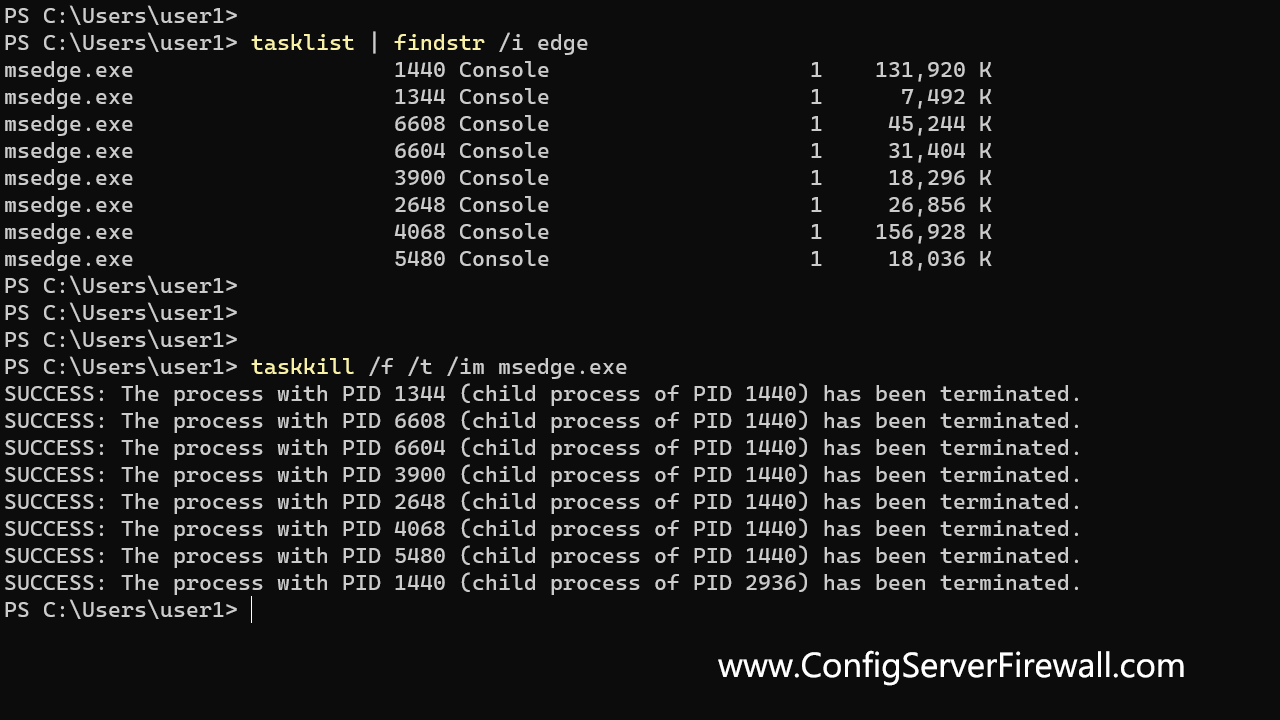
Web Jun 7 2023 nbsp 0183 32 Once you have either the name or the PID of the task use either of the following cmdlets to kill the process Kill task using process name in Command Prompt Replace ProcessName with the name of the process taskkill IM quot ProcessName quot F Kill process from Command Prompt using process name

Web Aug 17 2021 nbsp 0183 32 Using Command Prompt to Kill a Process in Windows If you prefer command line tools then you can kill a process using CMD too The Command Prompt gives access to many useful utilities including one called Taskkill As the name suggests you can use Taskkill to kill any running task or process

Web Nov 3 2023 nbsp 0183 32 If you want to kill a process by its name run the following command Stop Process Name ProcessName Force If you want to kill a process by its PID run the following command Stop Process ID PID Force
Web To kill or stop a process in Command Prompt Open the Command Prompt window Here type taskkill im process exe and press Enter Replace process exe with the actual process name You can also stop or kill a task using its Process ID Use the taskkill F PID pid number command Web May 5 2008 nbsp 0183 32 To kill a process from the command line we will use the taskkill command This command is available in Windows XP and later versions of Windows If you know the process ID PID you can use the following command cmd exe taskkill F PID lt pid gt For example consider that we need to kill a process that is blocking a TCP port
Web Feb 20 2024 nbsp 0183 32 How to Kill a Process in Windows 11 Task Manager How to Kill a Process with the Taskkill Command How to Terminate a Process with PowerShell How to Identify the Process of any Open