Keep 2 I 3 Forma Matt Mitchell YouTube MG Coin YouTube Loab Concept Art A Surreal And Abstract Character On Craiyon Czasow 445 Po cz W Pary Irregulars 1 Group Sort Please keep your phone on standby mode during the flight I will stand by you and support you no matter what 3 quot Standby quot
Stay hungry Stay foolish 1 183 2 Macintosh iMac If you re having trouble accessing a Google product there s a chance we re currently experiencing a temporary problem You can check for outages and downtime on the Google Workspace Status Dashboard
Irregulars 1 Group Sort Mischievous Renaissance Nobleman With A Charming Appearance On Craiyon District 2 Intergalactic Lock Mechanic On Twitter guys this Is EduTab Angielski Czasowniki Nieregularne ci ga Ceny I Opinie Parents Club Parent Teacher Association Logo Free Transparent Mizz Jada Thyck Copa Am rica 2024 Group C Bolivia Vs Panama TV Episode 2024 IMDb
Keep 2 I 3 Forma

https://yt3.googleusercontent.com/ZZmqF_r-ZV5V6TQ2aEUN_SPQsP18SvC8oiCbuPSHPHZv0F3R2i3F87Gj6cGzJl7ytYSdEtTR=s900-c-k-c0x00ffffff-no-rj
Why does google keep asking me quot I am not a robot quot Whenever I try searching something this always appears
Templates are pre-designed documents or files that can be utilized for different functions. They can conserve time and effort by offering a ready-made format and layout for creating various kinds of content. Templates can be utilized for personal or expert projects, such as resumes, invitations, flyers, newsletters, reports, discussions, and more.
Keep 2 I 3 Forma

Irina Antonenko



Mischievous Renaissance Nobleman With A Charming Appearance On Craiyon
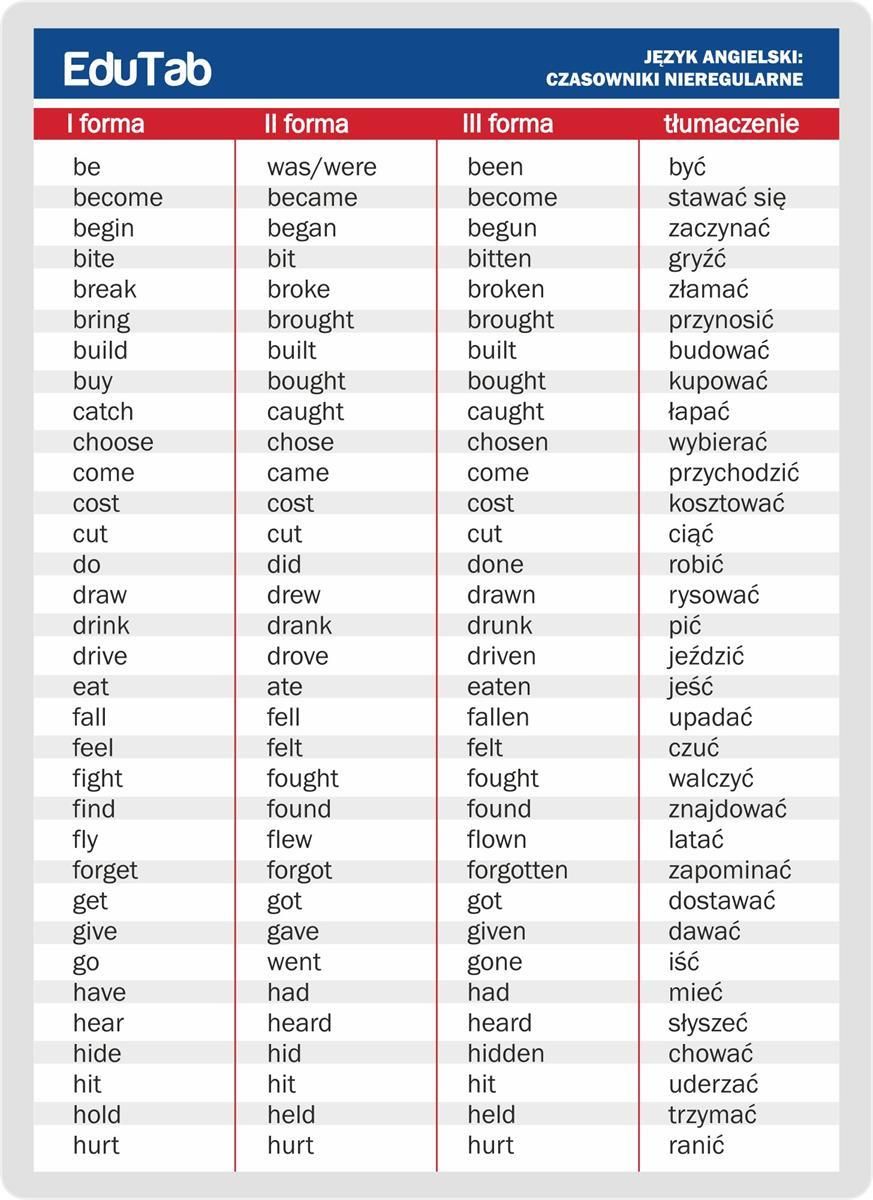
EduTab Angielski Czasowniki Nieregularne ci ga Ceny I Opinie

Parents Club Parent Teacher Association Logo Free Transparent

Keep doing 1 They keep talking about their favorite movies 2 She keeps eating ice cream every day keep to do

keep keep on 1 keep keep on

Oct 21 2023 nbsp 0183 32 keep 1 Keep 2
Aug 15 2018 nbsp 0183 32 Learn how to delete photos from your phone while keeping them safely backed up on Google Photos
Step 1 Create a note On your computer go to keep google At the top click Take a note Enter your note and click Done Step 2 Edit and format You can edit organize and archive notes Make a list Save a drawing as a note Label color or pin notes Archive notes amp lists Set up reminders for your notes Step 3 Share amp work with others To let someone see and edit your
[desc-11] [desc-12]
[desc-13]