Join Pdf Files In One File How To Join Pdf Files Foxit Canadian Tutorials Step by step Guide How To Download Pdf Files Want To Join Multiple Pdf Files In One Click Here Are 5 Tools To How To Join Pdf Files Foxit Canadian Tutorials Step by step Guide Mac OS X Windows 7 PDF Merge PDF Files Online Combine multiple PDFs and images into one Online no installation or registration required It s free quick and easy to use Below we show how to combine multiple PDF files into a single document Upload your files Files are safely uploaded over an encrypted connection Files stay secure
Increase your productivity All our online PDF editing tools are cloud based which enables you to merge PDF files in a split second Just add your files tweak the settings if needed and get the result straight away Create a shareable link for the output merged PDF or edit the file further All are 100 FREE and easy to use Merge split compress convert rotate unlock and watermark PDFs with just a few clicks Merge PDF Combine PDFs in the order you want with the easiest PDF merger available Split PDF Separate one page or a whole set for easy conversion into independent PDF files Compress PDF
Mac OS X Windows 7 PDF Claves Para Convertirte En Escritor Pdf EMBARQUE 1 EDELSA PDF Save Multiple Images As Single PDF On Windows OS For Scholars Great How To Join PDF Files With Foxit Reader Top 14 How To Collect Pdf Files In One File In 2022 G u y How To Combine Multiple PDF Files In One How To Merge Two PDF Files In One File Without Any App YouTube Merge Or Split PDF Files By Vishal Vora Can I Join PDF Files Without Adobe Acrobat Offer Madridejos Cebu
Join Pdf Files In One File
 Join Pdf Files In One File
https://postcardstocongress.org/blogimgs/https/cip/www.foxitsoftware.com/blog/wp-content/uploads/2017/11/Improve-contract-management.png
Merge your PDF online for free and wherever you want Merging PDF Files A How To Above you can simply drag and drop several files into the box above Of course you can also choose to upload them from your hard drive or even a cloud storage After your files are uploaded thumbnails of every document will be generated
Templates are pre-designed documents or files that can be used for different purposes. They can conserve time and effort by offering a ready-made format and layout for producing various sort of material. Templates can be used for individual or professional projects, such as resumes, invitations, leaflets, newsletters, reports, presentations, and more.
Join Pdf Files In One File

How To Merge Join PDF Files Into One Online 2020 YouTube

Claves Para Convertirte En Escritor Pdf EMBARQUE 1 EDELSA PDF

Save Multiple Images As Single PDF On Windows OS For Scholars Great

How To Join PDF Files With Foxit Reader

How To Combine Multiple PDF Files In One

How To Merge Two PDF Files In One File Without Any App YouTube

How To Merge PDF Files Online Drag drop your files into the online Merge PDF tool Rearrange individual pages or entire files as needed Add more files rotate or delete pages or whole files Click Merge PDF to combine and download your PDF Merge PDF Blog Articles How To Merge PDF

Select up to 20 PDF files and images from your computer or drag them to the drop area Drag and drop file blocks to change the order When you are ready to proceed click COMBINE button PDF to DOC DOC to PDF PDF to JPG JPG to PDF PDF to PNG PNG to PDF PDF Compressor Combine PDF Crop PDF PDF Kit UPLOAD FILES CLEAR QUEUE Drop Your Files Here

Create a free account Sign in Try these Acrobat online tools Convert from PDF Convert to PDF Edit Sign Protect Merge PDFs online for free Combine PDF files to share information in a single file when you try Adobe Acrobat services

Select your PDF files you want to merge or drop the files into the file box The pages of the PDFs are shown Click on the pages you want to add to the new file Save your new PDF No quality loss Do not worry about quality Merging pages of PDF files does not affect the quality of your PDF
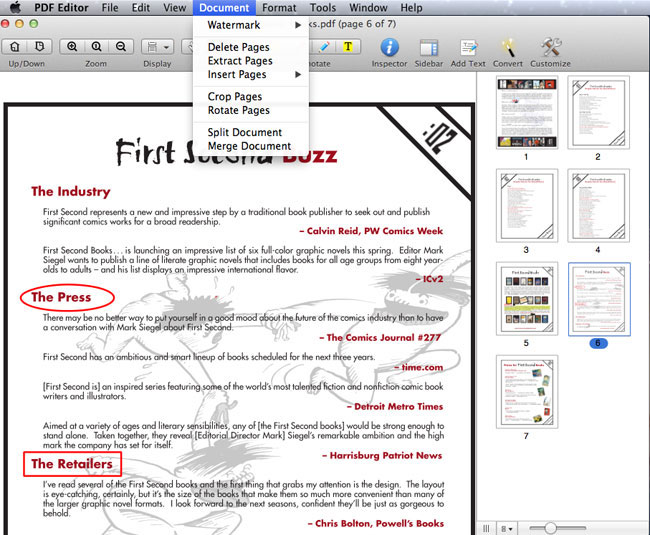
Our free tool can join up to 20 PDFs together in one go It is very easy to use First drag and drop your PDF files onto the area that says Drop Your Files Here If you are using a mobile device you can just hit the UPLOAD FILES button and then navigate to your PDFs
Open Acrobat and select See all tools The All tool s interface opens From the All tools interface under the Create section select Combine files by selecting its icon or Open The Combine files interface is displayed Select Add files from the horizontal bar from the upper left Our online PDF combiner is the best solution for combining two or more PDF files for free We also have useful productivity tools such as a free PDF splitter and PDF compressor We offer secure and reliable solutions for working with PDF documents with ease Like our online PDF merger our other online PDF conversion tools are free to use
How to merge PDF online Step 1 Select your files in our free online PDF Merger tool Step 2 Adjust the order of PDFs then click the Merge button Step 3 Download the merged PDF file to your device