Ip Route Get Command How To Add And Delete Static Route In Linux Using IP Command Linux Webhosting Blog Route Command In Linux Onet IDC Onet IDC 10 Ip Route Command Examples In Linux Cheat Sheet GoLinuxCloud Tan csad s Visszaesik Hat konys g Ip Route Command Cisco Egyen rt k Gy rt s Szak t s Egyform n N pszavaz s Mesterfokozat Reaching Router Via Console M velts g K zik nyv El ad terem Loopback device is lo and 127 0 0 1 and scope host and LOOPBACK with ip a The other two lines of ip route show can be created with ip address add 192 168 16 24 dev eth0 ip route add 192 168 24 dev eth0 ip route add default via 192 168 1 This gives the same as this dhcp just the address is different 15 vs 16
For NAT routes it is the first address of the block of translated IP destinations src ADDRESS the source address to prefer when sending to the destinations covered by the route prefix realm REALMID the realm to which this route is assigned Synopsis ip OPTIONS OBJECT COMMAND help OBJECT link addr addrlabel route rule neigh tunnel maddr mroute monitor OPTIONS V ersion s tatistics r esolve f amily inet inet6 ipx dnet link o neline ip link setDEVICE up down arp on off promisc on off allmulticast on off
Egyform n N pszavaz s Mesterfokozat Reaching Router Via Console M velts g K zik nyv El ad terem Route Command In Linux Onet IDC Onet IDC Linux debian Centos Rocky Ipv6 Show Ip Route Command Explained Archives NetworkUstad Linux Debian Ubuntu RockyLinux IPv6 Linux debian Centos Rocky Ipv6 How To Add And Delete Static Route In Linux Using IP Command Linux linux RichardGeek CSDN How To Add And Delete Static Route In Linux Using IP Command
Ip Route Get Command
 Ip Route Get Command
https://www.linuxtechi.com/wp-content/uploads/2020/02/ip-route-add-single-ip-linux.png
Ip COMMAND CHEAT SHEET MODIFYING ADDRESS AND LINK PROPERTIES USEFUL NETWORKING COMMANDS NOT NECESSARILY PROVIDED FROM IPROUTE COMPARING NET TOOLS VS IPROUTE PACKAGE COMMANDS 12 14
Templates are pre-designed files or files that can be used for numerous purposes. They can conserve effort and time by supplying a ready-made format and layout for creating various kinds of content. Templates can be used for personal or expert projects, such as resumes, invitations, leaflets, newsletters, reports, presentations, and more.
Ip Route Get Command
Linux
Route Command In Linux Onet IDC Onet IDC

Linux debian Centos Rocky Ipv6

Show Ip Route Command Explained Archives NetworkUstad

Linux debian Centos Rocky Ipv6

How To Add And Delete Static Route In Linux Using IP Command

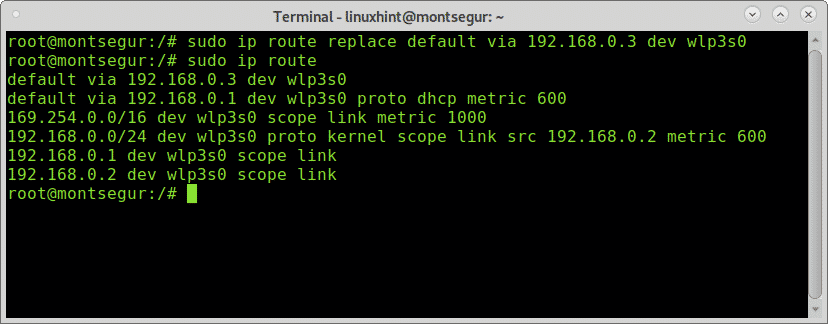
You can use the ip route get address command to ask the kernel to report the route it would use to send a packet to the specified address ip route get 4 2 2 1 4 2 2 1 via 192 168 1 dev eth0 src 192 168 121 cache 192 168 1 is my default route If I ask for an address that would not go over the default route

The ip route command is a global configuration command This command defines a static route for a specific destination network To define a static route this command needs the following information The destination network address

Description The Get NetRoute cmdlet gets IP route information from the IP routing table including destination network prefixes next hop IP addresses and route metrics Run this cmdlet without any parameters to get all IP routes from the routing table Specify parameters to narrow your results

Ip route command in Linux used to manage the IP routing table of the operating system This table determines how packets are forwarded and routed through the various interfaces on a system By manipulating the routing table you can dictate how data is transmitted to which interface and on what path

To enable IP routing use the ip routing command in switch configuration mode To disable IP routing use the no form of this command ip routing no ip routing Syntax Description This command has no arguments or keywords Command Default IP routing is disabled Command Modes Switch configuration mode config switch Command History Examples
April 9 2022 Chapter IP Routing Commands Chapter Contents accept lifetime address family ipv6 OSPF address family l2vpn aggregate address area nssa area virtual link auto summary BGP authentication BFD bfd bfd all interfaces bfd check ctrl plane failure bfd echo bfd slow timers bfd template bfd template single hop bgp graceful restart To do this simply run the following Display existing routes with route tcarrigan rhel route Kernel IP routing table Destination Gateway Genmask Flags Metric Ref Use Iface default gateway 0 0 0 0 UG 100 0 0 enp0s3 10 0 2 0 0 0 0 0 255 255 255 U 100 0 0 enp0s3 192 168 122 0 0 0 0 255 255 255 U 0 0 0 virbr0
The number of rounds made to flush the routing table If the option is given twice ip route flush also dumps all the deleted routes in the format described in the previous subsection ip route get get a single route this command gets a single route to a destination and prints its contents exactly as the kernel sees it