Intune Bitlocker Requirements Encrypt Windows Devices With BitLocker In Intune Microsoft Intune Create An Intune BitLocker Policy For Windows 10 Devices Learn How To Deploy BitLocker Using Intune HTMD Blog Kryptera Windows enheter Med BitLocker I Intune Microsoft Intune Using Intune To Configure Bitlocker How To Configure Bitlocker Using Web Feb 21 2023 nbsp 0183 32 Features Configuration Manager provides the following management capabilities for BitLocker Drive Encryption Client deployment Deploy the BitLocker client to managed Windows devices running Windows 8 1 Windows 10 or Windows 11 Manage BitLocker policies and escrow recovery keys for on premises and internet based clients
Web Apr 26 2021 nbsp 0183 32 As we described in our first post Enabling BitLocker with Microsoft Endpoint Manager Microsoft Intune a best practice for deploying BitLocker settings is to configure a disk encryption policy for endpoint security in Intune Enabling silent encryption Web May 26 2023 nbsp 0183 32 When BitLocker fails to enable on a Windows 10 device using an Intune policy in most cases the hardware or software prerequisites are not in place Examining the BitLocker API log will help you identify which prerequisite is not satisfied The most common issues are TPM is not present WinRE is not enabled UEFI BIOS is not
Using Intune To Configure Bitlocker How To Configure Bitlocker Using Microsoft Intune Is Helping To Enable Unified Endpoint Management Create An Intune BitLocker Policy For Windows 10 Devices Citrix Endpoint Management Integration With Microsoft Endpoint Manager Manage Bitlocker With Intune Mobile Legends Intune BitLocker Windows Microsoft Intune Microsoft Experimenting With ChatGPT For Intune Andrew Taylor Microsoft Intune Update 2023 Blackbelt XP Enable And Configure BitLocker Using Intune A Step by Step Guide
Intune Bitlocker Requirements
 Intune Bitlocker Requirements
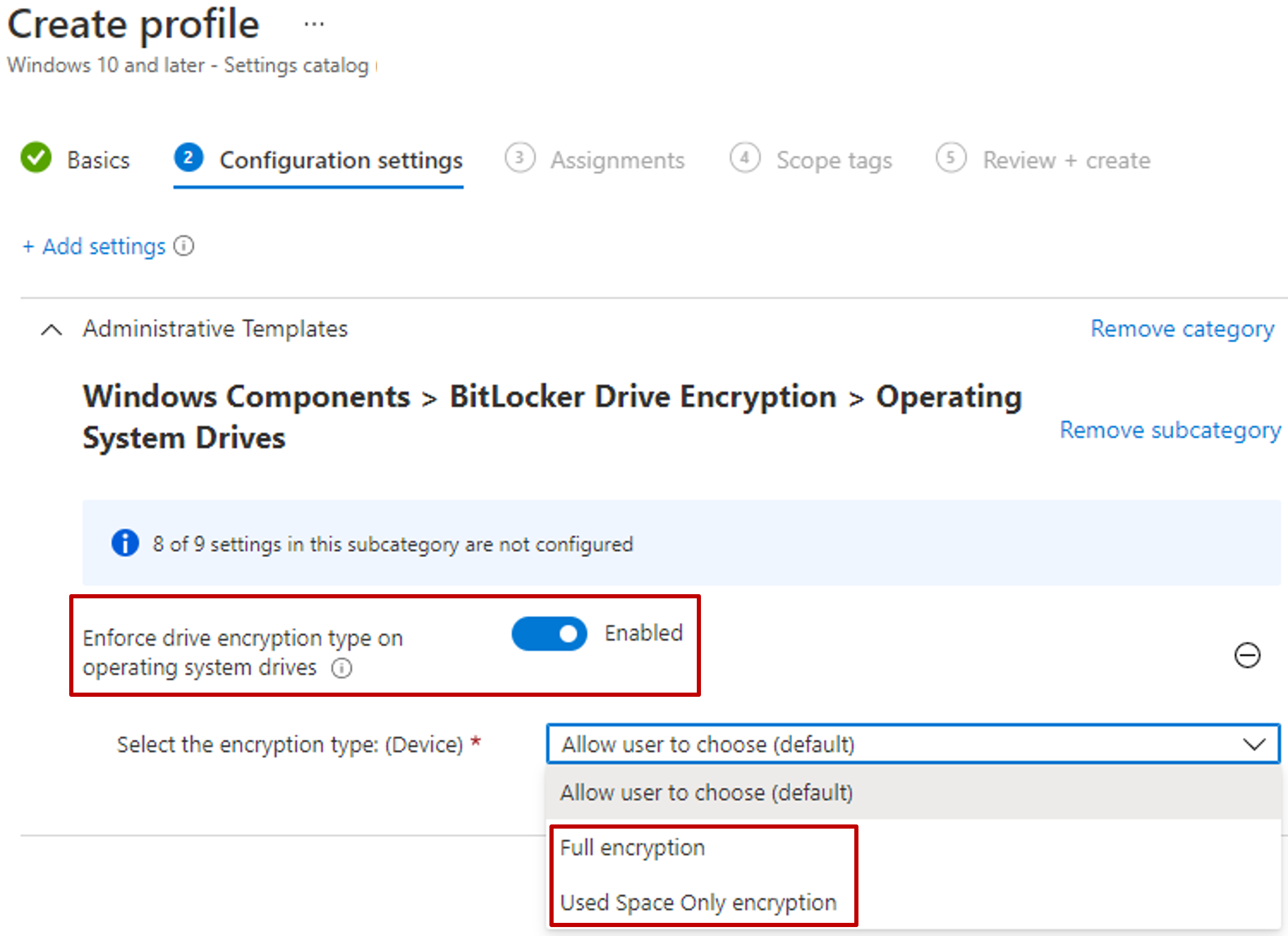
https://learn.microsoft.com/en-us/mem/intune/protect/media/encrypt-devices/docs_bl_settingscatalog_control_encryption.png
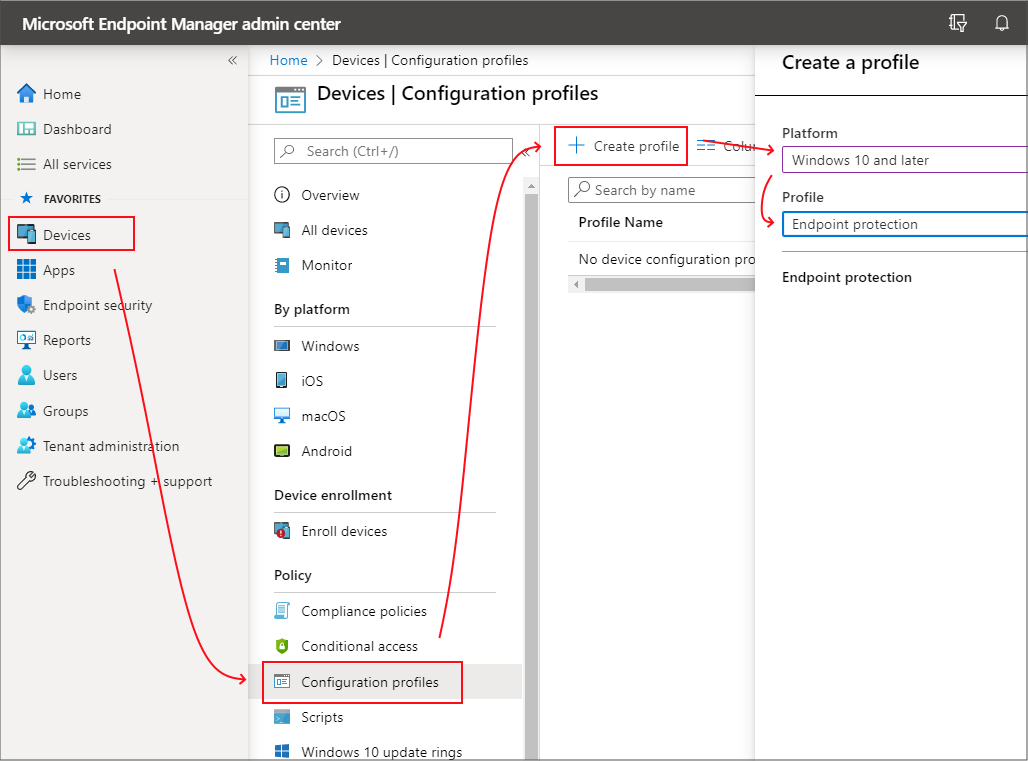
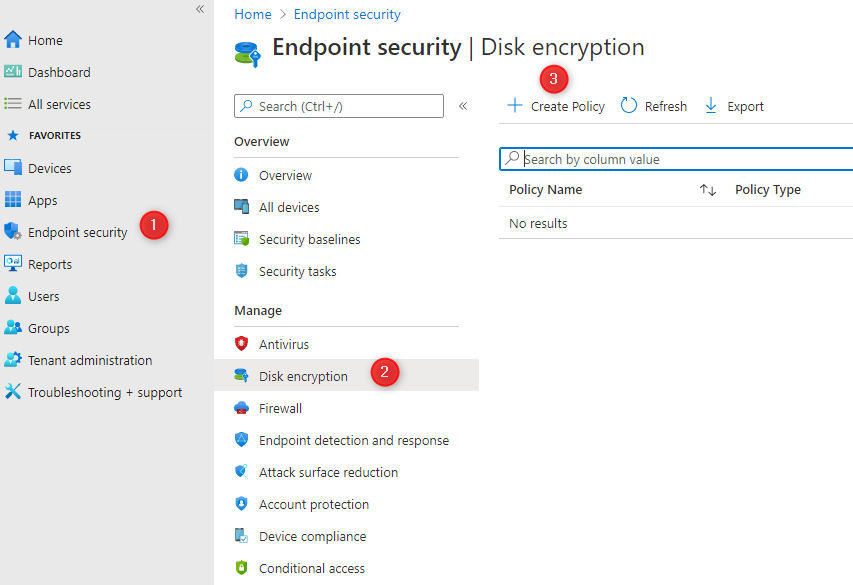
Web Aug 11 2020 nbsp 0183 32 The first step to managing BitLocker using Microsoft Intune is to visit the new Microsoft Endpoint Manager admin center Select Endpoint security gt Disk encryption and then Create policy Enter in the Platform and Profile indicated in the screen capture below and then select Create
Templates are pre-designed files or files that can be utilized for numerous purposes. They can conserve effort and time by providing a ready-made format and design for producing different type of content. Templates can be used for individual or professional projects, such as resumes, invites, leaflets, newsletters, reports, discussions, and more.
Intune Bitlocker Requirements

Intune Training Series No 9 Intune Configure Bitlocker DEMO

Microsoft Intune Is Helping To Enable Unified Endpoint Management
Create An Intune BitLocker Policy For Windows 10 Devices
Citrix Endpoint Management Integration With Microsoft Endpoint Manager
Intune BitLocker Windows Microsoft Intune Microsoft

Experimenting With ChatGPT For Intune Andrew Taylor

Web Feb 19 2021 nbsp 0183 32 Best practices for configuring BitLocker for Intune Use a device with TPM for maximum security Create the BitLocker policy using an Endpoint security policy This workflow is the most recent method of deploying BitLocker settings If you are Sign into the Microsoft Endpoint Manager admin
Web Feb 15 2023 nbsp 0183 32 Enabling Bitlocker using Intune requires the following prerequisites in place You ll need a valid Microsoft Endpoint Manager Intune license The devices must be Azure AD or Hybrid Azure AD joined Devices must not be encrypted with third party disk encryption tools such as McAfee Disk Encryption
Web Feb 20 2023 nbsp 0183 32 Operating System Version Minimum OS version Enter the minimum allowed version in the major minor build revision number format To get the correct value open a command Maximum OS version Enter the maximum allowed version in the major minor build revision number format To get the correct

Web May 25 2022 nbsp 0183 32 Prerequisites Before we jump into configuring let s take a look at the prereqs A valid Microsoft Endpoint Manager Intune license Devices must be Azure AD or Hybrid Azure AD joined Devices must not be encrypted with third party disk encryption like McAfee Disk Encryption or WinMagic You will need to fully decrypt those first

Web Mar 17 2023 nbsp 0183 32 A settings catalog profile All three options are supported and provide the desired configuration options for BitLocker The endpoint protection and endpoint security disk encryption profiles use BitLocker configuration service provider CSP to configure encryption of PCs and devices
[desc-11] [desc-12]
[desc-13]