Install Pycharm On Debian How To Install PyCharm On Debian With Shortcut RaspberryTips How To Install PyCharm On Debian 11 Bullseye LinuxCapable How To Install PyCharm On Debian 12 11 10 LinuxCapable How To Install PyCharm On Debian 10 Kirelos Blog Install Pycharm Community Edition Coolkfil Web I will show you the step by step installation of PyCharm on a Debian 12 Bookworm Prerequisites A server running one of the following operating systems Debian 12 Bookworm
Web Apr 27 2022 nbsp 0183 32 Last Updated on April 27 2022 by Heyan Maurya Here is the guide to learning the simple steps for the installation of PyCharm on Debian 11 Bullseye Linux using the command terminal PyCharm is a Python development environment with code completion code analysis refactorings and debuggers Web Dec 20 2020 nbsp 0183 32 This tutorial will help you to Install PyCharm on Debian 10 Linux system Prerequisites A running Debian 10 system with Desktop Sudo privileged account access You must have Python installed on your system Install PyCharm on Debian 10 The PyCharm community and professional editions are available as snap package
Install Pycharm Community Edition Coolkfil JetBrains PyCharm Debian 8 7 0 Disponibile Al Download OCULUS IT Pycharm Linux Dynamicslasopa Memcached Installation And Configuration With PHP On Debian Server How To Install PyCharm On Ubuntu 18 04 Linuxize Install PHP 8 3 8 2 8 1 8 0 7 4 On Debian 12 11 Or 10 LinuxCapable How To Install PyCharm Free Community On Ubuntu 16 04 YouTube 2 Ways To Install PyCharm Python IDE On Debian 11 Bullseye Linux
Install Pycharm On Debian
 Install Pycharm On Debian
https://raspberrytips.com/wp-content/uploads/2023/03/install-pycharm-debian.jpg
Web Download Download the latest version of PyCharm for Windows macOS or Linux
Templates are pre-designed files or files that can be utilized for different purposes. They can conserve effort and time by providing a ready-made format and design for creating different type of content. Templates can be used for individual or expert jobs, such as resumes, invites, leaflets, newsletters, reports, discussions, and more.
Install Pycharm On Debian
How To Install PyCharm On Ubuntu 18 04 Linuxize
JetBrains PyCharm

Debian 8 7 0 Disponibile Al Download OCULUS IT
Pycharm Linux Dynamicslasopa
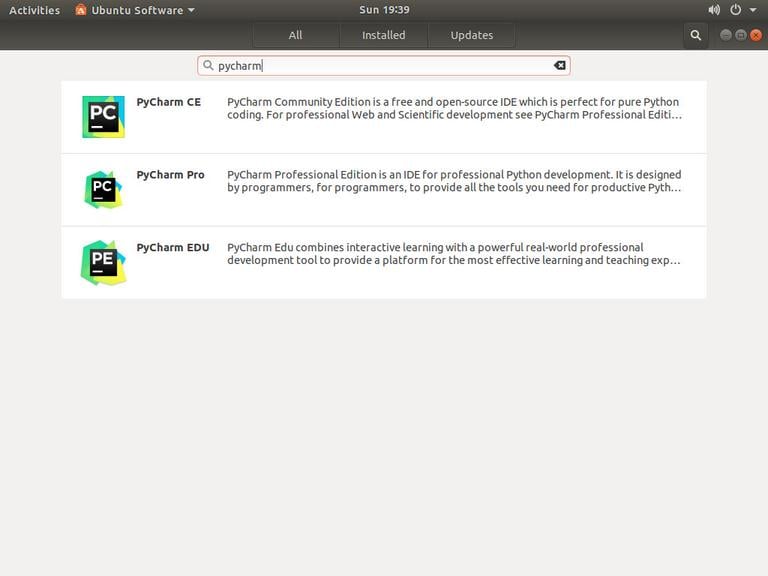
How To Install PyCharm On Ubuntu 18 04 Linuxize

Install PHP 8 3 8 2 8 1 8 0 7 4 On Debian 12 11 Or 10 LinuxCapable

Web Jan 11 2024 nbsp 0183 32 Latest 64 bit version of Windows macOS or Linux for example Debian Ubuntu or RHEL You do not need to install Java to run PyCharm because JetBrains Runtime is bundled with the IDE based on JRE 17 PyCharm supports the following versions of Python Python 2 version 2 7

Web Aug 3 2022 nbsp 0183 32 Step 1 Download Tarball Go to the Pycharm Download page and download the package of your choice In this tutorial I will be installing the Community Free package Step 2 Extract the Tarball After you have downloaded the tar package go ahead and unpack it using the tar command tar xvzf path to pycharm tarball Flags

Web Sep 21 2023 nbsp 0183 32 There is two way to install the PyCharm IDE on Debian In this section we will use flatpak to install PyCharm IDE First install the Flatpak using the following command apt get install flatpak y Next run the following command to enable the flatpak for Debian flatpak remote add if not exists flathub https flathub repo flathub

Web Sep 29 2023 nbsp 0183 32 How to install PyCharm on Debian September 29 2023 by Vitux Staff PyCharm is a free open source and fully featured IDE for Python development It is available in free community edition and professional edition It is also used for other programming languages like HTML CSS Javascript SQL Typescript and many more

Web Feb 2 2022 nbsp 0183 32 In this guide we will focus on the installation of Pycharm on Debian 11 Option 1 Install Pycharm using snap One of the easiest ways of installing Pycharm is using Snap Snap is a software packaging and deployment tool developed by Canonical the parent Company of Ubuntu
Web Go to the Downloads folder probably home USER Downloads Find the PyCharm archive and right click on it Choose Extract here and wait a few seconds A new folder containing all the files will be created If you prefer the command line you can also start a terminal and run tar zxvf pycharm community A B C tar gz Web Step 1 Before we install any software it s important to make sure your system is up to date by running the following apt commands in the terminal sudo apt update sudo apt upgrade Step 2 Installing Snap Package Manager Run the following command below to install Snap package manager to your Ubuntu system
Web First go to the download section of the tool Download PyCharm from the website There you will see the Professional and Community versions Click on the community version and the download will start After that create a folder called pycharm and extract the file into it Then move it to the opt folder