Install Numpy In Venv Vscode Install NumPy With VSCode Windows YouTube Alternatives And Detailed Information Of Postgresql dotnet core GitPlanet NumPy A Quick Introduction For Python Beginners Chore deps Update Dependency Playwright To 1 28 0 Bytemeta EasyCodeAI chatgpt gpt4 gpt3 vscode Aigc aigc pip install conda install anaconda prompt pip install conda install 1 098
Select Install for no charge items or the item s price Tips To check that an app is reliable find out what other people say about it Under the app s title check the star ratings and the number Install an extension Important You can t add extensions when you browse in Incognito mode or as a guest Open the Chrome Web Store Find and select the extension you want Select Add
EasyCodeAI chatgpt gpt4 gpt3 vscode Aigc aigc VsCode Devcontainer How To Install Numpy In VS Code CopyAssignment Visual Studio Code How To Use Numpy In VScode PhpOut NumPy Python Skillbox Media VSCode Build With Multiple Commands M ty s Budav ri Hola Visual Studio Code Adi s Vim Main vscode cdn Urlscan io How To Setup Python Environment In Vscode Company Salaries 2023
Install Numpy In Venv Vscode
 Install Numpy In Venv Vscode
https://i.ytimg.com/vi/1ivFkpOuPw4/maxresdefault.jpg
Tip If you use a work or school account you might not be able to use Google Drive for desktop or your organization might have to install it for you If you have questions ask your administrator
Pre-crafted templates offer a time-saving option for creating a diverse range of documents and files. These pre-designed formats and layouts can be made use of for numerous personal and expert jobs, consisting of resumes, invites, flyers, newsletters, reports, discussions, and more, streamlining the content production procedure.
Install Numpy In Venv Vscode

VsCode Remote SSH Linux HackMD

VsCode Devcontainer
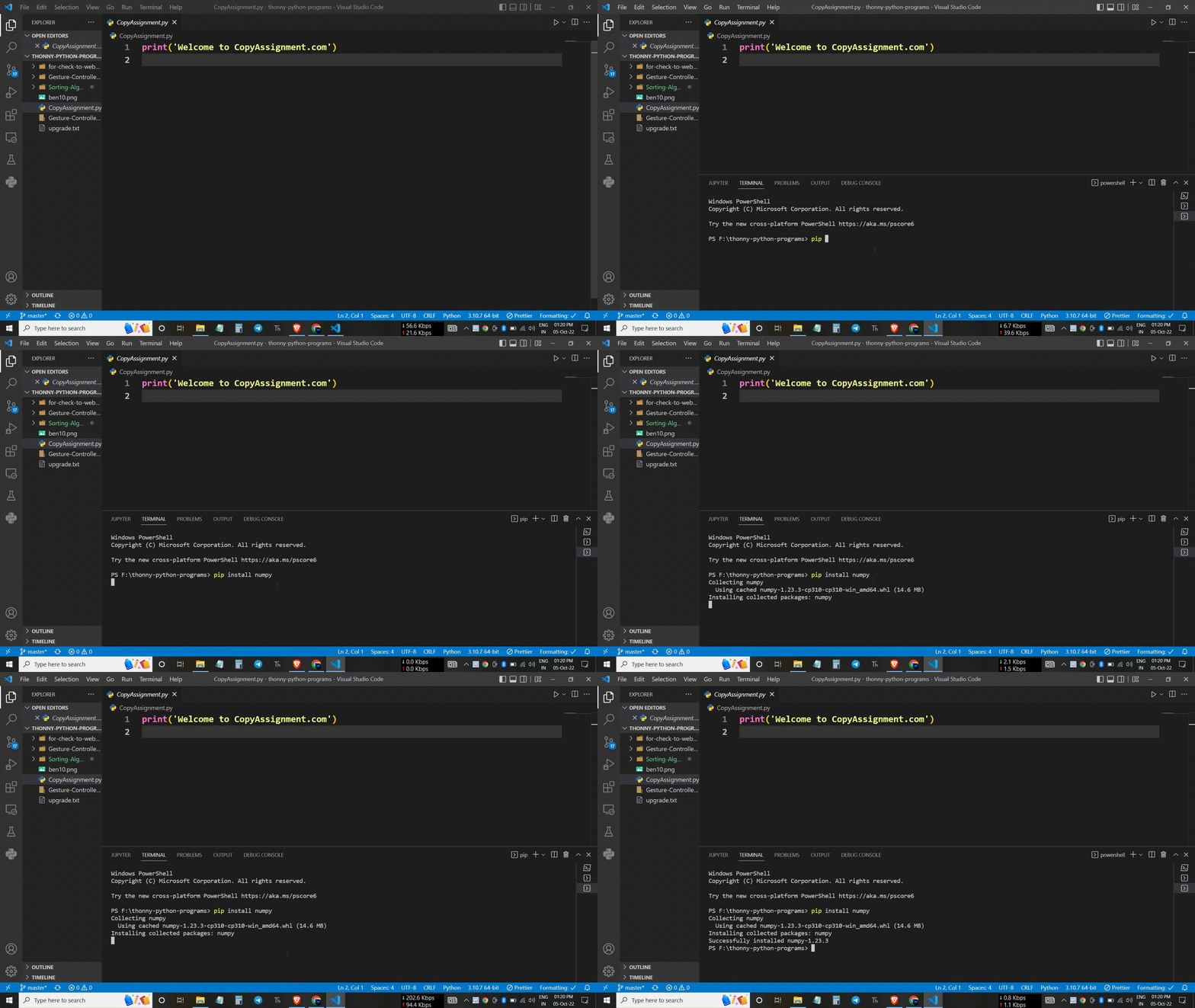
How To Install Numpy In VS Code CopyAssignment

Visual Studio Code How To Use Numpy In VScode PhpOut

VSCode Build With Multiple Commands M ty s Budav ri

Hola Visual Studio Code Adi s Vim
When you install Drive for desktop on your computer it creates a drive in My Computer or a location in Finder named Google Drive All of your Drive files appear here

You can download and install the Chrome web browser at no charge and use it to browse the web

Download the installation file again To install Chrome again use the new file If the installation still isn t working use an offline installer Computers with multiple user accounts Computers

To install or upgrade to the latest version of Google Earth Pro download the application System requirements In order for Google Earth Pro to run on your computer you must have all

Official Google Chrome Help Center where you can find tips and tutorials on using Google Chrome and other answers to frequently asked questions
[desc-11] [desc-12]
[desc-13]