Install Nginx Red Hat 9 Secure Strengthen And Scale Modern Workloads High Speed App Delivery Nginx Nedir Nginx Nas l Kurulur Centos 8 Ahmet Bolu Performance Testing NGINX Ingress Controller And Red Hat OpenShift The Value Of Red Hat NGINX NGINX How To Uninstall NGINX On RHEL Based OS CentOS Stream 9 FCGID You can download and install the Chrome web browser at no charge and use it to browse the web
Tip If you try all of these troubleshooting steps and still can t install Google Play Games Beta on your PC submit your feedback Run the Google Play Games installer I uninstalled Chrome using Revo Uninstaller to make sure it was completely removed I re downloaded Chrome amp tried all the other suggestions I found
How To Uninstall NGINX On RHEL Based OS CentOS Stream 9 FCGID Using NGINX Ingress Controller On Red Hat OpenShift How To Deploy ONLYOFFICE Docs Server On RHEL CentOS Red hat 9 Linux Distros Using NGINX Ingress Controller On Red Hat OpenShift Open Source Red Hat Nginx MongoDB Eric D Schabell Red Hat Summit 2018 Hybrid Mulit cloud Optimize IT Nginx 1 4 On Red Hat Enterprise Linux 7 Red Hat Developer Red Hat Enterprise Linux 8 2 Adds Evolved Container Tools To Help Fuel
Install Nginx Red Hat 9
 Install Nginx Red Hat 9
https://i.ytimg.com/vi/VaXigrz0GRI/maxresdefault.jpg
You can download and install the Chrome web browser at no charge and use it to browse the web
Templates are pre-designed files or files that can be utilized for different purposes. They can conserve time and effort by supplying a ready-made format and design for developing various kinds of content. Templates can be utilized for individual or professional projects, such as resumes, invitations, leaflets, newsletters, reports, discussions, and more.
Install Nginx Red Hat 9
How To Install And Configure Nginx On CentOS Red Hat 7 Tutorial

Using NGINX Ingress Controller On Red Hat OpenShift
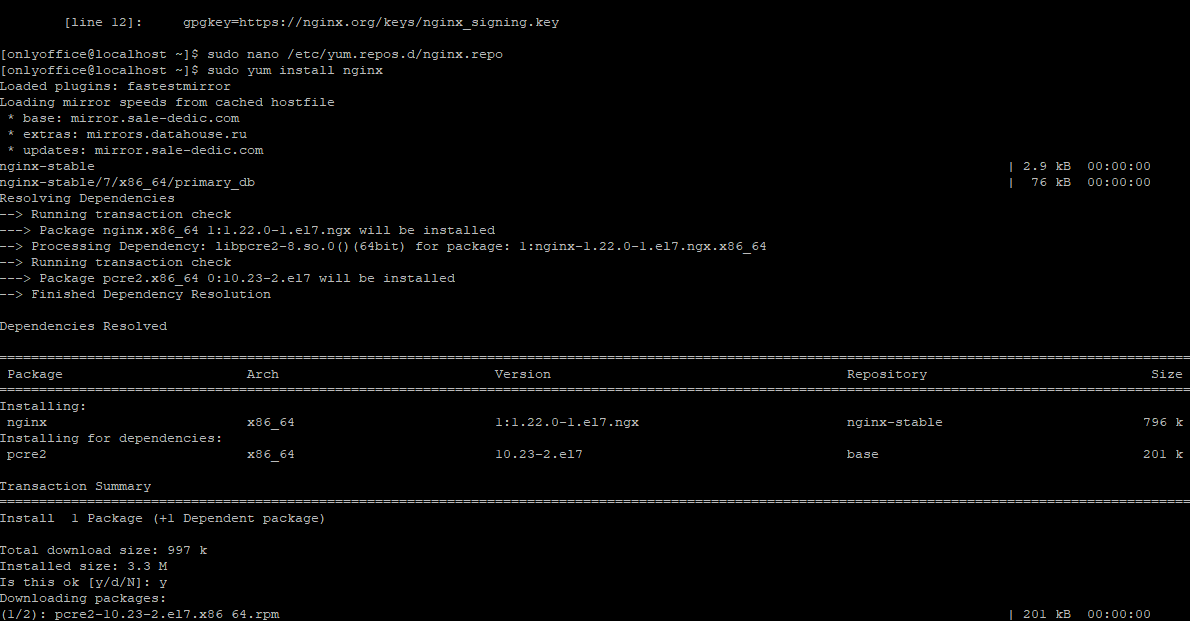
How To Deploy ONLYOFFICE Docs Server On RHEL CentOS

Red hat 9 Linux Distros

Open Source Red Hat Nginx MongoDB

Eric D Schabell Red Hat Summit 2018 Hybrid Mulit cloud Optimize IT

How to install Chrome Important Before you download you can check if Chrome supports your operating system and other system requirements
On your iPhone or iPad open App Store In the search bar enter Chrome Tap Get To install follow the on screen instructions If prompted enter your Apple ID password To start

Official Google Chrome Help Center where you can find tips and tutorials on using Google Chrome and other answers to frequently asked questions

Select Install for no charge items or the item s price Tips To check that an app is reliable find out what other people say about it Under the app s title check the star ratings and the number

Como instalar o Chrome Importante antes de baixar confira se o Chrome 233 compat 237 vel com seu sistema operacional e outros requisitos do sistema
[desc-11] [desc-12]
[desc-13]