Install Mysql Server Windows 10 64 Bit Installing MySQL On Windows 8 Install MySQL Server 8 0 27 zip Archive On Windows 10 Javacodepoint How To Install MySQL Server On Windows 10 Tutorial And Full Version How To Install MySQL Server Application On Windows 10 11 Easy How To Install MySQL In Windows 10 MacOS Ubuntu Scaler Topics 1 Having a MySQL installer is the first step ahead of all the others Open an Internet browser on your desktop and head to mysql Right there click on the Downloads option You should read carefully the descriptions explaining the differences between several MySQL editions 2 We re about to install the MySQL Community Edition version
Click the Next button to continue Select Windows service details such as Windows Service Name and account type Tap Next button to continue After this MySQL Installer will configure MySQL database server Wait until it is done and click the Next button to continue MySQL Installer installs sample databases and sample models Start MySQL Server on Windows If you need to start the MySQL Server on Windows for the first time enter the following command in the Windows Command Prompt C Program Files MySQL MySQL Server 8 0 bin mysqld console The path in this command is the default installation folder
How To Install MySQL In Windows 10 MacOS Ubuntu Scaler Topics How To Install MySQL In Windows 10 Step By Step Tutorials MobyGeek How To Install MySQL In Windows 10 YouTube Git Bash Windows 10 64 Bit Download Operfmuseum How To Install MySQL Database Server 8 0 19 On Windows 10 ProIsrael Mysql Server Download Windows 10 64 Bit How To Install Mysql Server On Windows Server 2019 Tutorial Www vrogue co Como Instalar MySQL En Windows 10 Paso A Paso Install MySQL Server On Linux TestingDocs
Install Mysql Server Windows 10 64 Bit
 Install Mysql Server Windows 10 64 Bit
https://www.lifewire.com/thmb/dSveZyWrKoHQMLQEGdwlRS3VAwE=/1582x1182/filters:no_upscale():max_bytes(150000):strip_icc()/installer-56a227b85f9b58b7d0c748db.jpg
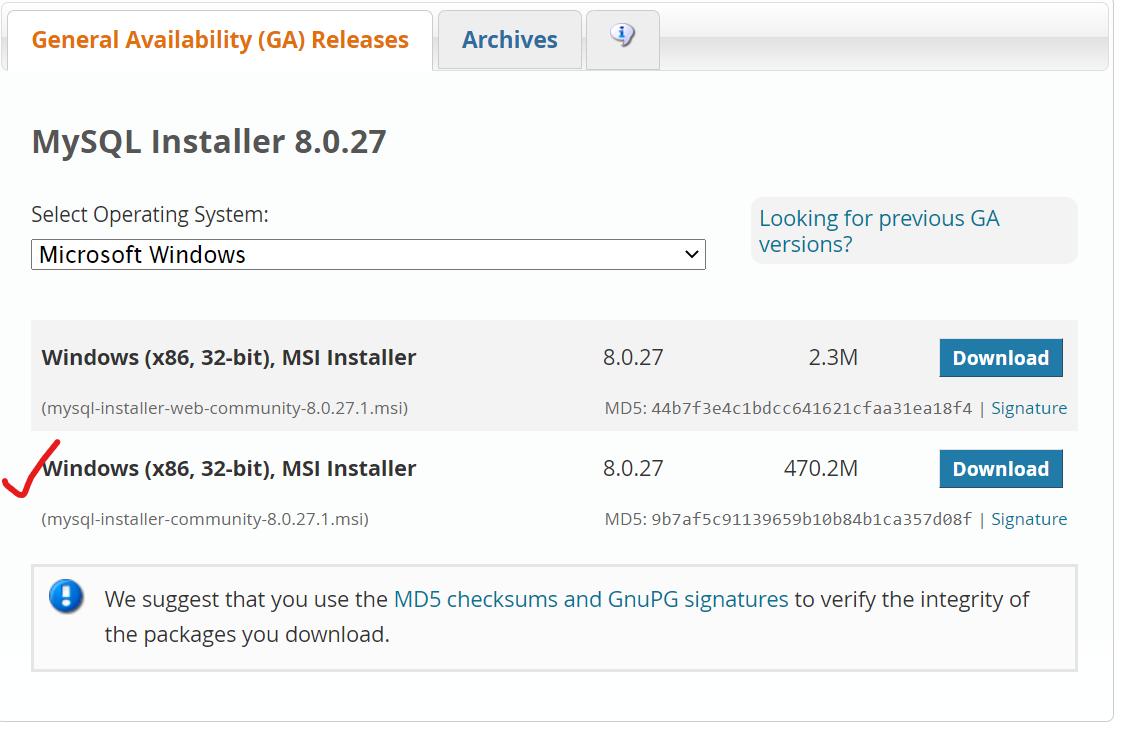
First of all you need to download the installer Click here choose the version compatible with your operating system 32 bit or 64 bit and hit Download Notice that you can also choose the web installer or offline installer The last one is much heavier while the first will be faster to download
Templates are pre-designed documents or files that can be used for various purposes. They can conserve time and effort by offering a ready-made format and layout for creating different kinds of material. Templates can be used for individual or professional projects, such as resumes, invitations, flyers, newsletters, reports, discussions, and more.
Install Mysql Server Windows 10 64 Bit

How To Download MySQL In Windows 10 Mysql Installation On Windows 10
How To Install MySQL In Windows 10 Step By Step Tutorials MobyGeek
How To Install MySQL In Windows 10 YouTube
Git Bash Windows 10 64 Bit Download Operfmuseum

ProIsrael Mysql Server Download Windows 10 64 Bit

How To Install Mysql Server On Windows Server 2019 Tutorial Www vrogue co

Archives MySQL Installer 8 0 35 Note MySQL 8 0 is the final series with MySQL Installer As of MySQL 8 1 use a MySQL product s MSI or Zip archive for installation MySQL Server 8 1 and higher also bundle MySQL Configurator a tool that helps configure MySQL Server Select Version Select Operating System

MySQL Download MySQL Community Server MySQL Community Server 8 2 0 Innovation Select Version Select Operating System Select OS Version We suggest that you use the to verify the integrity of the packages you download

The simplest and recommended method is to download MySQL Installer for Windows and let it install and configure a specific version of MySQL Server as follows Download MySQL Installer from https dev mysql downloads installer and execute it Note
Download Community Edition Install MySQL on Windows 10 Starting and Stopping MySQL MySQL is the database that holds important information like user credentials website content or options like size and color for your favorite products

Review the list and click on Execute The installer downloads all the products software After that it installs all the products Wait for a few mins Once the installation process completes we are ready to configure the MySQL database server and other components Click on Next
MySQL NDB Cluster is a real time open source transactional database designed for fast always on access to data under high throughput conditions MySQL NDB Cluster MySQL NDB Cluster Manager Plus everything in MySQL Enterprise Edition Learn More Customer Download Select Patches Updates Tab Product Search Trial Download MySQL Install MySQL Server on Windows To install the MySQL server on a Windows computer visit the MySQL Community Downloads page In the Select Operating System dropdown menu choose Microsoft Windows as shown in the following image Next to Windows x86 32 64 bit MySQL Installer MSI select Go to Download Page
It will take a few minutes to completely install the list of the packages Once all are installed we are ready to go to the next step So click on next 6 You will be directed to the Product configuration screen which shows a list of products that need to be configured Click on next to start with MySQL Server