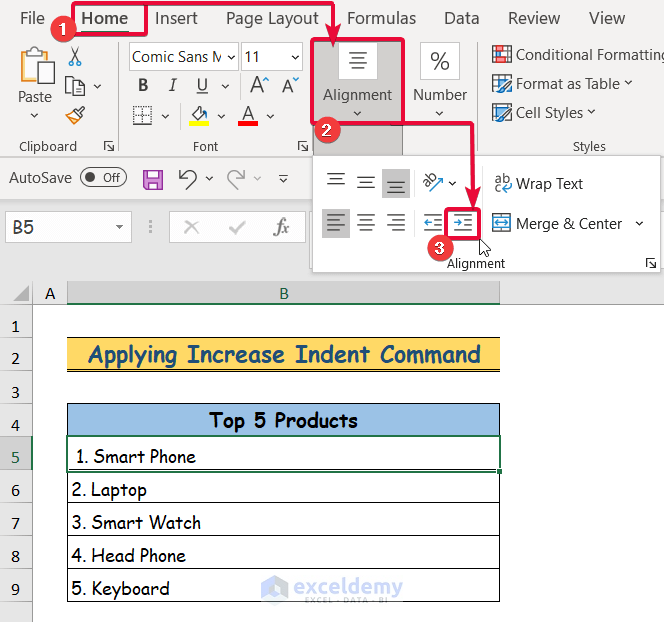
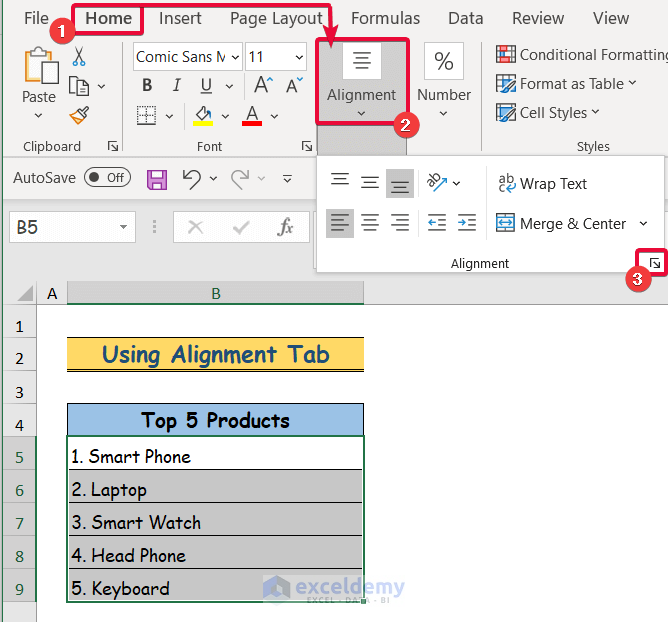
Insert Tab Inside Excel Cell How To Insert Tab In Excel Cell 4 Easy Ways ExcelDemy How To Tab Within A Cell Earn Excel Microsoft Invites Microsoft 365 Insider Members To Test Excel Cell How To Tab Within A Cell In Excel SpreadCheaters How To Insert Image In Excel Cell A Comprehensive Guide WEB To insert a tab in an Excel cell you can utilize the Alignment tab which allows for text indentation at various levels Follow these steps Select the cells in your dataset such as the range C5 C9 Go to the Home tab in the ribbon
WEB Apr 30 2024 nbsp 0183 32 Steps to Create Tabs Within Tabs in Excel In this tutorial we will create tabs within tabs to show detailed statistics of three football clubs The dataset contains data about the English Premier League in Column B to Column G Bundesliga in Column I to Column N and Serie A in Column P to Column U WEB Mar 27 2023 nbsp 0183 32 Use the CHAR function to insert a tab character The formula CHAR 9 represents a tab character Combine text with the CHAR function to align parts of your cell content For example A1 amp CHAR 9 amp B1 will insert a tab between the contents of
How To Insert Image In Excel Cell A Comprehensive Guide How To Insert Tab In Excel Cell 4 Easy Ways ExcelDemy How To Insert Image In Excel Cell As Attachment 4 Examples How To Add New Line In Excel Cell Using Vba Printable Templates Insert Picture Into An Excel Cell YouTube Insert Image Microsoft Excel Cell Engineering Names Tips Picture Microsoft Excel How To Insert An Image Into A Cell Insert Cell In Excel keyboard Shortcut Microsoft Excel Has Unveiled An Absolutely Mind blowing New Feature
Insert Tab Inside Excel Cell
 Insert Tab Inside Excel Cell
https://www.exceldemy.com/wp-content/uploads/2022/08/How-to-Tab-in-Excel-Cell-4.png
WEB In this tutorial we will walk through the step by step process of adding tabs in Excel cells making it easier for you to organize and manage your data effectively Key Takeaways Adding tabs in Excel cells is crucial for better organization and
Pre-crafted templates use a time-saving service for developing a diverse variety of files and files. These pre-designed formats and designs can be utilized for different personal and professional jobs, consisting of resumes, invitations, flyers, newsletters, reports, presentations, and more, streamlining the material production process.
Insert Tab Inside Excel Cell
How To Insert Tab In Excel Cell 4 Easy Ways ExcelDemy

How To Insert Tab In Excel Cell 4 Easy Ways ExcelDemy

How To Insert Image In Excel Cell As Attachment 4 Examples
How To Add New Line In Excel Cell Using Vba Printable Templates

Insert Image Microsoft Excel Cell Engineering Names Tips Picture
Microsoft Excel How To Insert An Image Into A Cell

WEB Jun 10 2022 nbsp 0183 32 Learn how to achieve a tabbed appearance in Excel cells with these four workarounds Although Excel does not allow tabs you can still improve readability

WEB To tab text inside a table cell Click or tap in front of the text or numbers you want to indent and then press CTRL TAB

WEB In this tutorial we will cover the step by step process of inserting tabs in Excel cells as well as provide tips for using this feature effectively Key Takeaways Inserting tabs in Excel cells can improve the clarity and readability of your data Tabs can be used to organize and format data in spreadsheets making it easier to navigate

WEB To tab within a cell in Excel simply press the quot Tab quot key on your keyboard When you press the quot Tab quot key the cursor will move to the next cell to the right just like it would if you were to press the right arrow key
WEB Aug 31 2011 nbsp 0183 32 Hello I would like to find a way to concatenate two tab characters to the beginning of a string in a cell Example A4 quot Alpha quot A5 quot Zeta quot A6 has A4 amp quot quot amp A5 Which displays as Alpha Zeta I would like to see TABTABAlpha Zeta I then copy that cell and paste into another document
WEB Learn the quick steps to insert a tab character within an Excel cell to organize your data efficiently Perfect for enhancing spreadsheet readability WEB Nov 21 2017 nbsp 0183 32 Use Ctrl Tab I need to use the tab key within a cell to tab information text I cannot get the tab key to work as a tab key no matter which other key i use with it e g Shift Tab Ctrl Tab FN Tab Alt Tab
WEB Mar 19 2012 nbsp 0183 32 The bottom line is Currently there appears to be no method to insert a tab in a cell This is a pity as there is a genuine need for this A workaround is to insert a character that isn t expected in the cell and then use a