Input Tag File Size Limit Transfer Large Files For FREE No File Size Limit YouTube Restrict Upload File Size In PHP Very Simple Example Larger File Size Upload Limits How To Compress A PDF And Reduce Its File Size Manually How To Increase The Maximum Upload File Size In WordPress WPZOOM Developers can customize file input fields in a number of ways such as setting file type restrictions e g only allowing photos or videos or setting a maximum file size limit to prevent users from uploading excessively large files that could slow down the site In addition many developers use JavaScript or other programming languages to
The input tag specifies an input field where the user can enter data Specifies a filter for what file types the user can pick from the file input dialog box only for type file alt Specifies the maximum value for an input element maxlength number Specifies the maximum number of characters allowed in an input element min Do you want to learn how to restrict the size of a file upload using JavaScript In this tutorial you will find out how to use the HTML file input element and the FileReader API to check and limit the file size before uploading This is a useful skill for developing websites that handle user generated content and avoid disk space issues Follow the step by step guide and see the source code
How To Increase The Maximum Upload File Size In WordPress WPZOOM How To Set A Maximum Character Limit For An Input Or Textarea Tag In Limit Upload File Size In CRM Form HTML Input Types CodeBridePlus Removing The File Size Limit On All in One WP Migration Plugin YouTube Calculating Maximum File Size Limit In JavaScript DEV Community Convertio File Converter Review TechRadar Input Type Values In HTML All Values Of type Attribute Of Input Tag File Upload Indicator For Original Course View 3900 46 Blackboard
Input Tag File Size Limit
 Input Tag File Size Limit
https://i.ytimg.com/vi/xz63JgjCw8w/maxresdefault.jpg
Limiting the file format in HTML requires only input type file tag and specifying the file format in the accept attribute This attribute provides a way to filter the files of types that are of interest Example 1 In this example we will allow only pdf and mp3 files by using the HTML input accept attribute
Templates are pre-designed documents or files that can be utilized for different functions. They can save effort and time by supplying a ready-made format and layout for developing various kinds of material. Templates can be utilized for personal or professional projects, such as resumes, invitations, flyers, newsletters, reports, discussions, and more.
Input Tag File Size Limit

Retrieve My File SketchUp Free SketchUp Community
How To Set A Maximum Character Limit For An Input Or Textarea Tag In
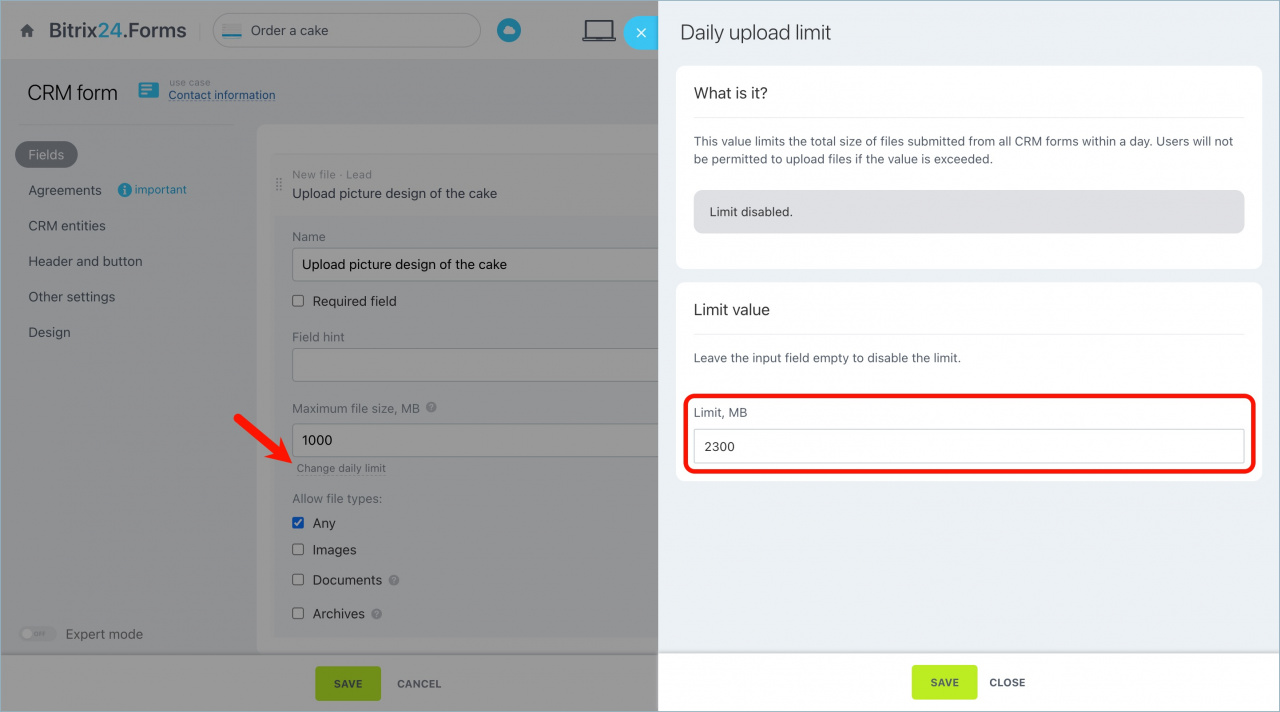
Limit Upload File Size In CRM Form

HTML Input Types CodeBridePlus

Calculating Maximum File Size Limit In JavaScript DEV Community

Convertio File Converter Review TechRadar

Teams Q A for work Connect and share knowledge within a single location that is structured and easy to search Learn more about Teams

The accept attribute takes a string containing one or more of these unique file type specifiers as its value separated by commas For example a file picker that needs content that can be presented as an image including both standard image formats and PDF files might look like this html input type file accept image pdf

We added a change event listener to the file input element The maximum allowed file size in the example is 2MB 1 Megabyte is equal to 1024 Kilobytes and the size property of the file returns the file size in Kilobytes If the size of the selected file is greater than 2 Megabytes we display a message to the user to upload a smaller file

Type file multiple max 5 don t allow more then 5 image for a slideshow type file multiple max file size 1024 type file multiple total max size 1024 must use bytes not KB KiB or any other measurement unit 1024 vs 1000 is confusing as it already is should not have to use decimals if you want really small size limits

Definition and Usage The input type file defines a file select field and a Browse button for file uploads To define a file select field that allows multiple files to be selected add the multiple attribute Tip Always add the label tag for best accessibility practices
The value of the id attribute on the form with which to associate the element type file Specifies that its input element represents a list of file items accept list of MIME types Provides the UA with a hint of what file types the server is able to accept A set of comma separated strings each of which is a valid MIME Definition and Usage The size attribute specifies the visible width in characters of an input element Note The size attribute works with the following input types text search tel url email and password Tip To specify the maximum number of characters allowed in the input element use the maxlength attribute
The max attribute defines the maximum value that is acceptable and valid for the input containing the attribute If the value of the element is greater than this the element fails validation This value must be greater than or equal to the value of the min attribute If the max attribute is present but is not specified or is invalid no max value is applied