Importing Data From Word To Excel Transfer Word Table Into Excel Mac Os Clash How To Import Data From Word To Excel 3 Easy Methods Power Automate Desktop Transfer Data From Word Chanmingman s Blog Industrie Transfer Oficial How To Input Word Table To Excel Foarfece Mai Mare Caligraf How To Copy From Word To Excel Into Multiple Cells 3 Ways ExcelDemy Web Apr 11 2023 nbsp 0183 32 There are a few easy methods you can try to switch from Word to Excel whether manually copying the data or converting the file type If you want to know how to convert a Word file to Excel try the
Web May 7 2023 nbsp 0183 32 Method 1 Converting a List Download Article 1 Understand how the document will be converted When you import a document into Excel certain characters will be Web You can import data from a text file into an existing worksheet On the Data tab in the Get amp Transform Data group click From Text CSV In the Import Data dialog box locate and
How To Copy From Word To Excel Into Multiple Cells 3 Ways ExcelDemy How To Import Data From Word To Excel 3 Easy Methods How To Import Data From Word To Excel 3 Easy Methods Solved Transfer Data From Word To Excel Using PAD Power Platform Community Solved Transfer Data From Word To Excel Using PAD Power Platform Community How To Import Data From Word To Excel 3 Easy Methods Extract Data From Word To Excel Using Vba But Having Problem With Vertically Merge Cell Stack How To Import Data From Word To Excel 3 Easy Methods How To Import Data From Word To Excel 3 Easy Methods
Importing Data From Word To Excel
 Importing Data From Word To Excel
https://www.repairmsexcel.com/blog/wp-content/uploads/2018/03/doc-convert-word-to-excel-3.png
Web Although you can t export to Excel directly from a text file or Word document you can use the Text Import Wizard in Excel to import data from a text file into a worksheet The
Templates are pre-designed documents or files that can be utilized for numerous purposes. They can conserve effort and time by supplying a ready-made format and design for creating various kinds of material. Templates can be utilized for individual or professional jobs, such as resumes, invites, flyers, newsletters, reports, presentations, and more.
Importing Data From Word To Excel

Solved Transfer Data From Word To Excel Using PAD Power Platform Community

How To Import Data From Word To Excel 3 Easy Methods

How To Import Data From Word To Excel 3 Easy Methods

Solved Transfer Data From Word To Excel Using PAD Power Platform Community

How To Import Data From Word To Excel 3 Easy Methods

Extract Data From Word To Excel Using Vba But Having Problem With Vertically Merge Cell Stack

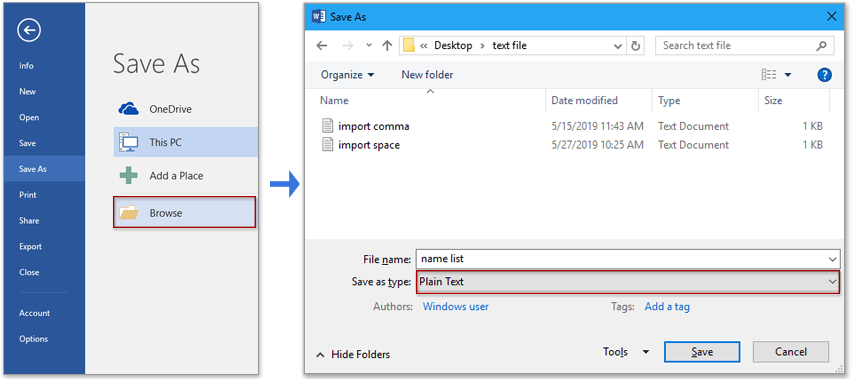
Web Apr 30 2020 nbsp 0183 32 Select the version of Word and Excel you re using and follow the steps to make a plain text version of your Word document and import it in Excel Note You must use the Microsoft Word and Microsoft Excel

Web When you copy data from a Word table into an Excel worksheet the data in each Word table cell is pasted in an individual cell on the worksheet Important After pasting the

Web Jul 27 2018 nbsp 0183 32 Go to Data Import External Data Import Data In Excel 2007 click the Data tab click Get External Data and then select From Text Click the text file you want

Web Mar 10 2022 nbsp 0183 32 Method 1 Import Word Document as an embedded object into Excel This is useful to create a central access point to various Word documents By embedding the

Web Aug 20 2021 nbsp 0183 32 Microsoft Word doesn t have an option to directly save form data as an Excel worksheet However by going through just a few extra steps it s very easy to export data from a Word form into Excel
Web Jul 17 2021 nbsp 0183 32 How To Import Data from MS Word to Excel Here are some easy tricks to import word document into Excel 1 Single Cell Import 2 Import Data Cell by Cell 3 Web May 14 2021 nbsp 0183 32 Import Word Document into Excel Convert Transfer Data in Word into Excel Worksheet YouTube Download the featured Word documents
Web On the File menu click Import In the Import dialog box click the option for the type of file that you want to import and then click Import In the Choose a File dialog box locate