Image Height And Width Resize Css How To Resize An Image In HTML How To Change Photo Size For Upload Smith Camem1997 Resize Web Page Elements With CSS3 Articles DMXzone COM Position Of Div Changing After Browser Resize CSS Tricks CSS Tricks How To Resize Image Html Css IMAGECROT Option 1 Resize with the image width attribute When you d like to fit images in relation to its parent container you can use the CSS width attribute to resize them Here s how our image looks without any sizing or fit specifications To set this image to a fixed width of 500 pixels use this CSS code
In CSS select the tag and set the height and width to 100 Use the contain value in the object fit option Then select the cat class and give the height and width of 300px to the container Here we inserted an image of a larger dimension than the size of the container The image is 600px while the container is only 300px CSS Image Resizing This technique involves using the width and height CSS properties to adjust the dimensions of an image You can either set a fixed value for both properties or use one value and let the other adjust automatically
How To Resize Image Html Css IMAGECROT Html Div Style Height Izuka jp Img Style Html Maemuki ekiden jp How To Resize The Image Change Image Height And Width YouTube How To Change Background Image Size In Css The Meta Pictures CSS 100 Width Background Image Auto Height HTML Ticks How To Scale Image Proportionally Css Code Example How To Make Sure All Image Size Width And Height Are The Same Html Css Css Background Image Size To Fit Screen Mobile Making A Background
Image Height And Width Resize Css
 Image Height And Width Resize Css
https://imagekit.io/blog/content/images/2020/12/image-resizing-html.jpg
Similar to resizing with standard images absolute resizing changes the background dimensions to match the height and width you specify Keep in mind that manually setting values also changes the aspect ratio To resize backgrounds specify the width first and then the height Omitting the height defaults it to auto For example the three
Templates are pre-designed files or files that can be utilized for numerous purposes. They can conserve time and effort by providing a ready-made format and design for producing various type of material. Templates can be used for individual or professional projects, such as resumes, invites, leaflets, newsletters, reports, presentations, and more.
Image Height And Width Resize Css

Css How To Resize Grid view Column Width Stack Overflow
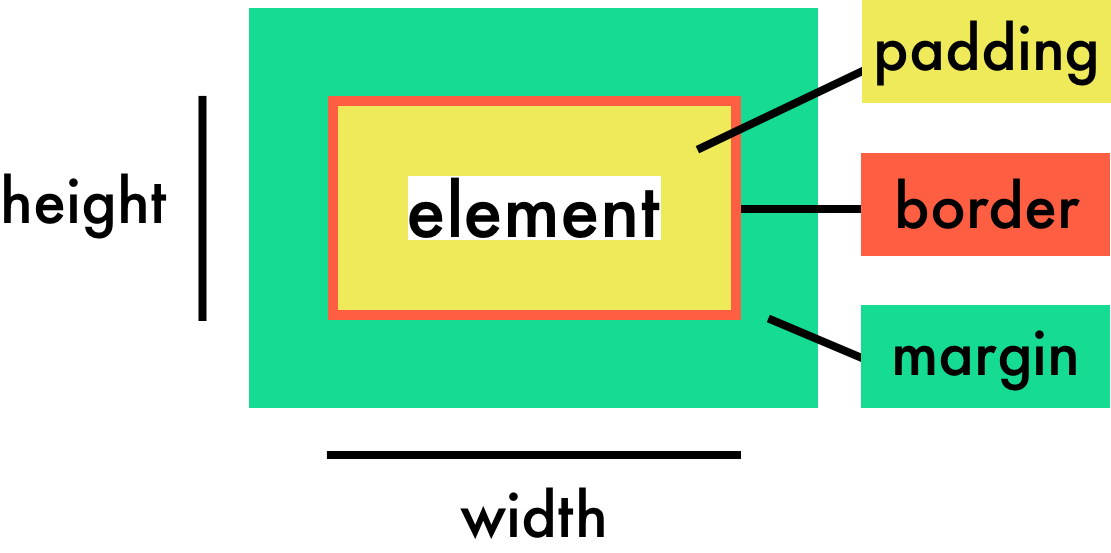
Html Div Style Height Izuka jp

Img Style Html Maemuki ekiden jp
How To Resize The Image Change Image Height And Width YouTube
CSS 100 Width Background Image Auto Height HTML Ticks

How To Scale Image Proportionally Css Code Example
Use the border property to create thumbnail images Thumbnail Image Example img border 1px solid ddd border radius 4px padding 5px width 150px img src paris jpg alt Paris Try it Yourself Thumbnail Image as Link Example img border 1px solid ddd border radius 4px padding 5px width 150px img hover

The background size CSS property lets you resize the background image of an element overriding the default behavior of tiling the image at its full size by specifying the width and or height of the image By doing so you can scale the image upward or downward as desired Tiling a large image
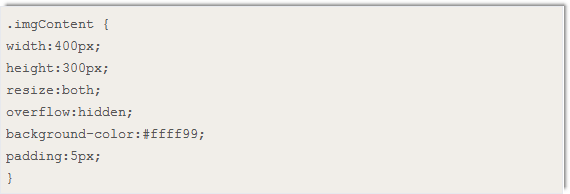
How to resize a responsive image using CSS Method 1 Resizing a responsive image using the max width and max height property It is really not convenient when the size of the image exceeds the size of the parent container the max width and max height attribute limits the size of the image to not go more than the desired property The previous method was not much efficient as you would not get

Resize images with the HTML width and height attributes Apply the width and height attributes for your img tag to define the width and height of the image See an example below Example of resizing an image proportionally with the width and height attributes

Background Images Background images can also respond to resizing and scaling 1 If the background size property is set to contain the background image will scale and try to fit the content area However the image will keep its aspect ratio the proportional relationship between the image s width and height 2
Using the height and width CSS property is the simplest solution to maintain the aspect ratio of an image An example code is mySelector width 100 height auto Setting the width to 100 suggests that the image will take up all the horizontal space While height auto helps the height to change proportionally and maintain the aspect ratio Method 3 Using an Auto Value for Width and Max Height Property In this method we set the value of width to be auto while setting the maximum height Method 4 Resizing with Background Size Property If we want to change the size of background images we use the background size properties
The max width property in CSS is used to create resize image property The resize property will not work if width and height of image defined in the HTML Syntax img max width 100 height auto Width can also be used instead of max width if desired