How To View Table Structure In Sql Workbench Knowledge Sharing Table Structure In Sql Server Riset Hubert Hudson Conjuga Idee Get Table Structure In Sql R sete Frecven How To View Table In SQL Server DatabaseFAQs Hubert Hudson Conjuga Idee Get Table Structure In Sql R sete Frecven Describe Table Structure In Sql Server How to view table structure in SQL September 11 2019 To show the table structure with all its column s attributes name datatype primary key default value etc In SQL Server use sp help function sp help objname table name In MySQL and Oracle you can use DESCRIBE DESCRIBE table name Or DESC table name
Step 1 Creating the Database For the purpose of demonstration we will be creating a Participant table in a database called GeeksForGeeksDatabase Query CREATE DATABASE GeeksForGeeksDatabase Step 2 Using the Database Use the below SQL statement to switch the database context to GeeksForGeeksDatabase Query USE GeeksForGeeksDatabase 9 1 1 4 The Physical Schemas Panel 9 1 1 4 1 The Schema Objects Panel The Physical Schemas panel of the MySQL Model page shows the active schemas and the objects that they contain Expand and contract the Physical Schemas panel by clicking the arrow for the panel MySQL Workbench provides the details of each physical schema in a separate tab
Describe Table Structure In Sql Server Hubert Hudson Conjuga Idee Get Table Structure In Sql R sete Frecven CREATE TABLE Defining A New Table Structure In SQL DEV3LOPCOM LLC Oracle Show Table Structure Brokeasshome Hubert Hudson Conjuga Idee Get Table Structure In Sql R sete Frecven Describe Table Structure In Sql Server How To View Table Structure In SQL Server Management Studio Hubert Hudson Conjuga Idee Get Table Structure In Sql R sete Frecven How To View SQL Table Structure In Oracle SQL Developer sql server
How To View Table Structure In Sql Workbench
 How To View Table Structure In Sql Workbench
https://i.stack.imgur.com/nTQDQ.png
How to view table structure sql query Ask Question Asked 4 years 7 months ago Modified 4 years 7 months ago Viewed 945 times 1 I want to make a new table like as an existing table in MySQL database with some column name changes So is there any way to see the SQL dump of the existing table without importing mysql sql phpmyadmin Share Follow
Pre-crafted templates offer a time-saving service for developing a varied variety of files and files. These pre-designed formats and layouts can be made use of for numerous individual and expert jobs, consisting of resumes, invites, flyers, newsletters, reports, discussions, and more, enhancing the material creation procedure.
How To View Table Structure In Sql Workbench
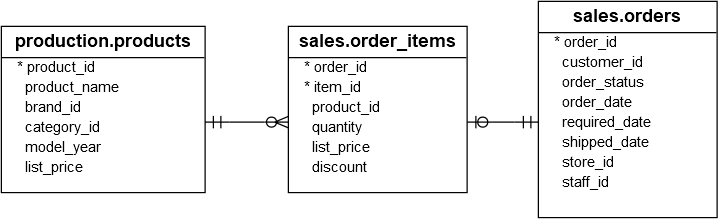
Item Council Pollinator View Table Marquee Discretion Annual
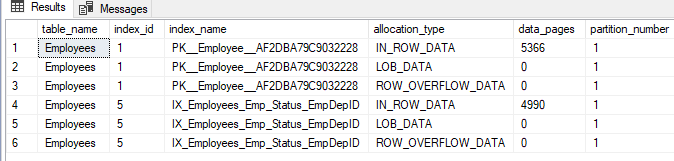
Hubert Hudson Conjuga Idee Get Table Structure In Sql R sete Frecven

CREATE TABLE Defining A New Table Structure In SQL DEV3LOPCOM LLC
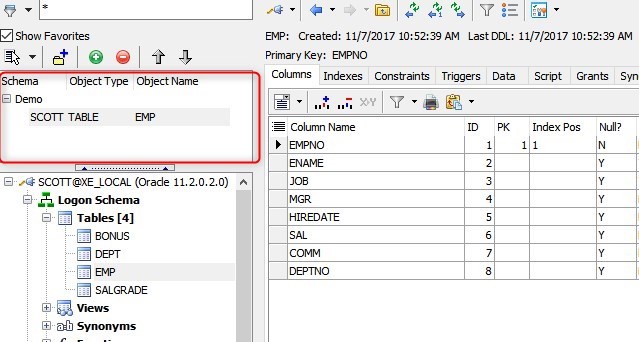
Oracle Show Table Structure Brokeasshome

Describe Table Structure In Sql Server

How To View Table Structure In SQL Server Management Studio

1 1 1 Add a comment 2 Answers Sorted by 1 You can get the DDL via the context menu for an object So right click on e g your table and let it send the DDL to your current editor or to the clipboard Share Improve this answer Follow answered Jan 21 2017 at 7 43 Mike Lischke 1 543 9 11 Its little weird

Table Inspector You can use the Table Inspector to view table information which is similar to the Schema Inspector The Table Inspector includes an easy to use interface for analyzing and creating indexes for your tables To open right click a table in the object browser of the Navigator pane and choose Table Inspector from the context menu

Syntax Of The Command The basic syntax for the MySQL Show Tables command is straightforward SHOW TABLES This command will list all tables in the currently selected database To specify a particular database use SHOW TABLES FROM database name Using The Command With Filtering You can also incorporate filtering to find specific tables
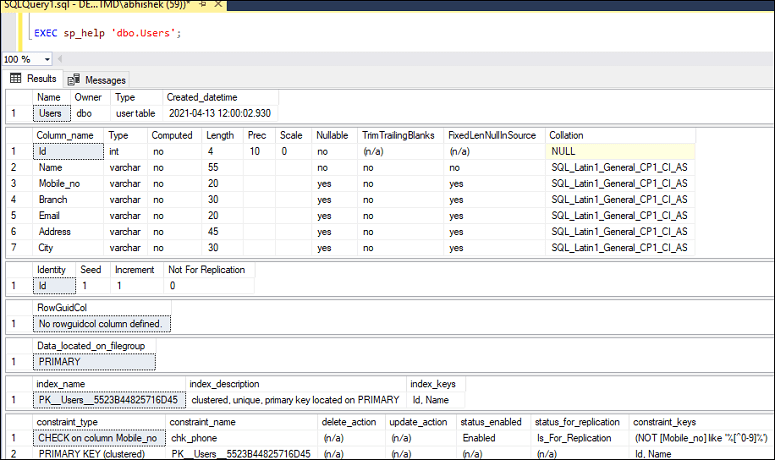
How can I show the table structure in SQL Server query Stack Overflow How can I show the table structure in SQL Server query Asked 10 years 4 months ago Modified 1 year 5 months ago Viewed 647k times 97 SELECT DateTime Skill Name TimeZone ID User Employee Leader FROM t Agent Skill Group Half Hour AS t
From the home screen right click on a MySQL connection choose Edit Connection and set the desired default schema on the Default Schema box Note The selected schema is displayed as bold in the schema navigator Filter to This Schema Enables you to target specific schemas in the list
Steps to view the table Open the Home Window Launching the MySQL Workbench is the first step This is referred to as the Home Window Open New Connection Wizard The following step is to construct your MySQL Server Connection which includes information about the target database server and instructions for connecting to it 7 Answers Sorted by 45 To get an individual table s creation script just right click on the table name and click Copy to Clipboard Create Statement To enable the File Forward Engineering SQL CREATE Script option and to get the creation script for your entire database Database Reverse Engineer Ctrl R
Step 1 Go view our video on YouTube EF Core Bulk Insert Step 2 And Like the video BONUS You can also share it Example If you want to see the schema information of your table you can use one of the following