How To Use Winrm What Is The Windows PowerShell Command Used To Enable Server Manager Remote Management Windows Remote Management WinRM Guide Architecture Use What Is Ansible Working And Advantages Scope And Career Gambaran Default WinRm Ports And How To Change Them Screenshot Showing Thumbprint Information In The Certificate WinRM is a management protocol used by Windows to remotely communicate with another server It is a SOAP based protocol that communicates over HTTP HTTPS and is included in all recent Windows operating systems Since Windows Server 2012 WinRM has been enabled by default but in most cases extra configuration is required to use WinRM with Ansible
The following list includes topics that describe how to use WinRM scripting Detecting Whether a Remote Computer Supports WS Management Protocol Obtaining Data from the Local Computer Obtaining Data from a Remote Computer Enumerating or Listing All the Instances of a Resource Querying for Specific Instances of a Resource Use the winrm command to locate listeners and the addresses by typing the following command at a command prompt n winrm enumerate winrm config listener n To check the state of configuration settings type the following command n winrm get winrm config n Quick default configuration n
Screenshot Showing Thumbprint Information In The Certificate How To Enable WinRM On Windows Servers Clients Support InfraSight Labs How To Install And Use Evil WinRM In Kali Linux Ethicalhackingguru How To Use Python WinRM On Linux To Query Windows Hosts Blog Techniczny Piotr Najberek PowerShell The WinRM Service Could Not Use The Following How To Determine Windows PowerShell Version And To See If WinRM Is Running Via Test WSMan Infrastructure Automation With Chef Ansible Docker Visual Studio Geeks How To Configure WinRM For HTTPS Manually Setup WinRM For Ansible With Certificate Authentication In 8 Easy Steps YouTube
How To Use Winrm
 How To Use Winrm
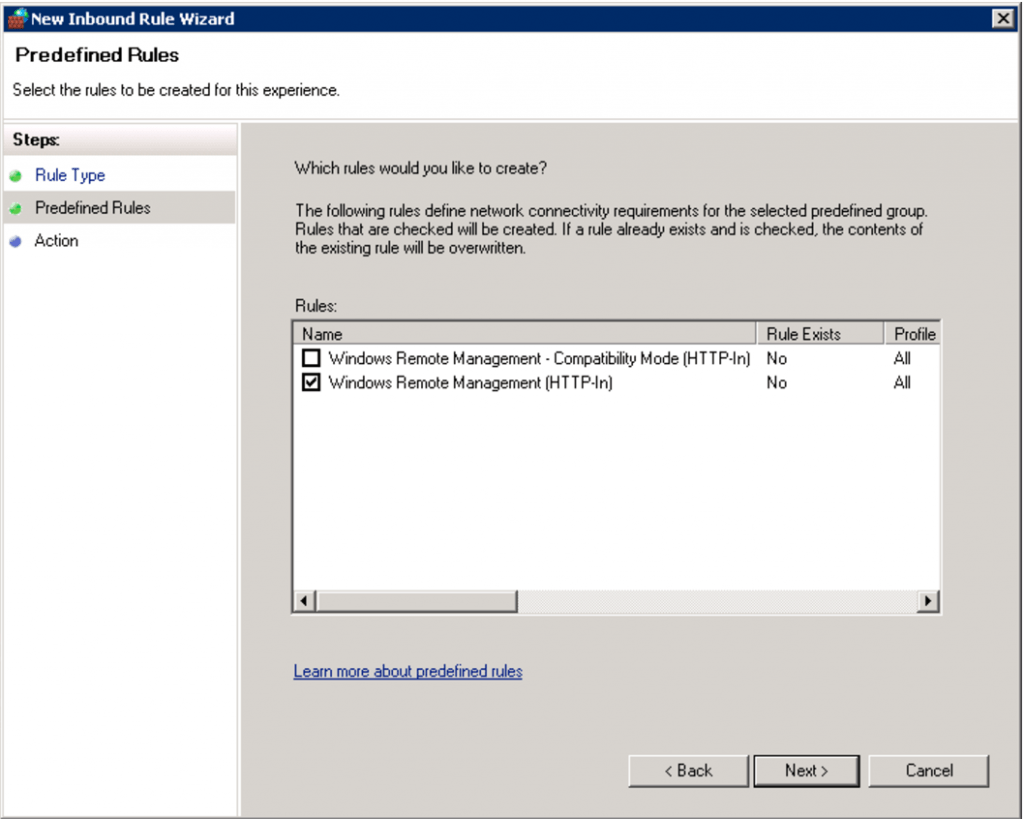
https://support-cdn.infrasightlabs.com/wp-content/uploads/2018/01/open-winrm-ports-in-the-firewall-3.png
PowerShell Remoting uses WinRM for communication between computers WinRM runs as a service under the Network Service account and spawns isolated processes running as user accounts to host PowerShell instances An instance of PowerShell running as one user has no access to a process running an instance of PowerShell as another user
Templates are pre-designed files or files that can be used for numerous functions. They can conserve effort and time by supplying a ready-made format and layout for developing different sort of material. Templates can be utilized for personal or professional projects, such as resumes, invitations, flyers, newsletters, reports, discussions, and more.
How To Use Winrm

Ansible Manage Windows Programmer Sought

How To Enable WinRM On Windows Servers Clients Support InfraSight Labs

How To Install And Use Evil WinRM In Kali Linux Ethicalhackingguru

How To Use Python WinRM On Linux To Query Windows Hosts

How To Determine Windows PowerShell Version And To See If WinRM Is Running Via Test WSMan

Infrastructure Automation With Chef Ansible Docker

Windows Remote Management WinRM is the Microsoft implementation of Web Services Management WS Management protocol that provides a common way for systems hardware and operating systems from different vendors to interact to access and exchange management information across an IT infrastructure

Tutorial Powershell Remote commands using WinRM Step by step Learn how to use Powershell to execute remote commands on a computer running Windows in 5 minutes or less
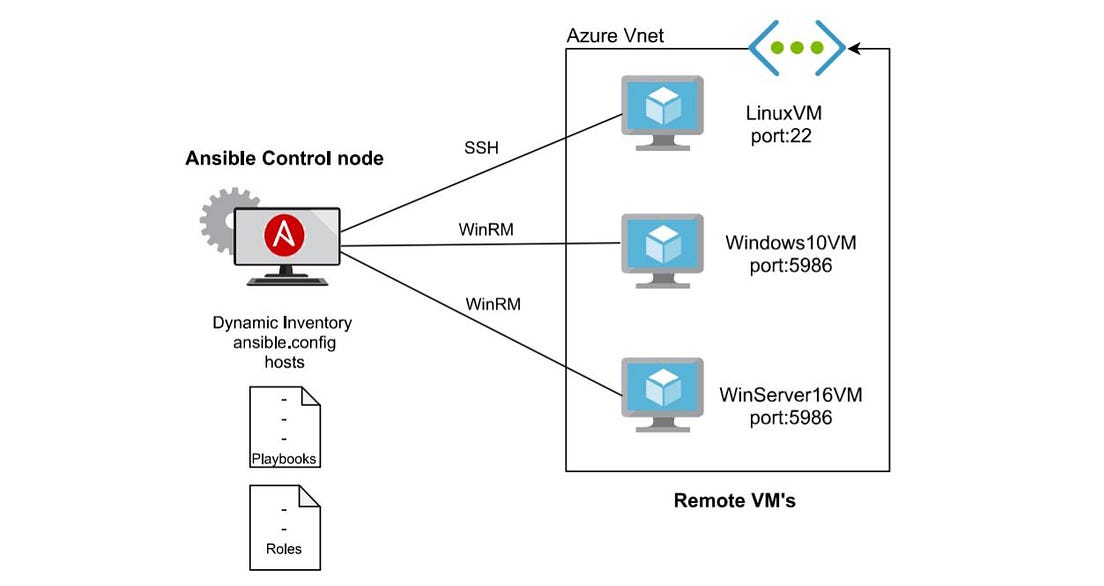
Windows Remote Management WinRM is the Microsoft implementation of the WS Management protocol which is a standard Simple Object Access Protocol SOAP based firewall friendly protocol that allows interoperation between hardware and operating systems from different vendors
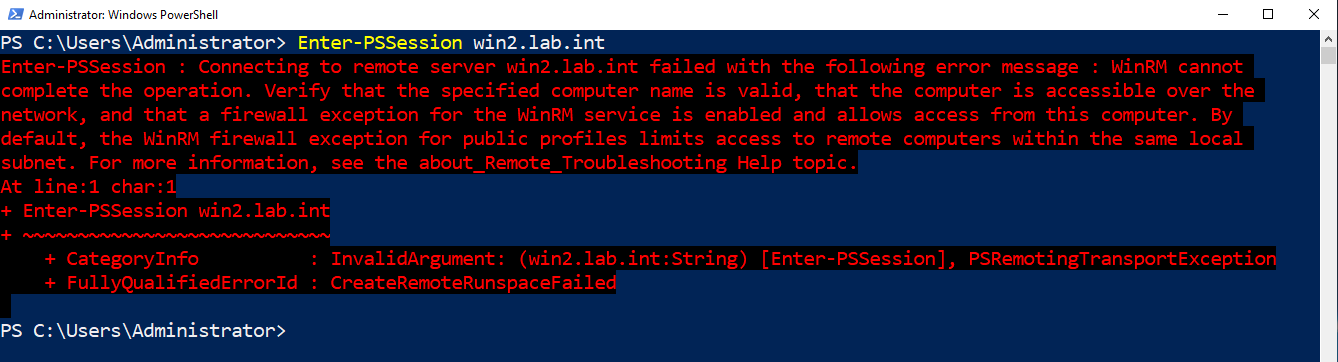
First to make WinRM work on the server we need the Windows Firewall to be enabled Once that is done open a command prompt and run the following command winrm quickconfig This command performs configuration actions to enable this machine for remote management which includes Starts the WinRM service Set the WinRM service type to auto start
02 07 2022 3 contributors Feedback In this article Summary More information This article provides a solution to configuring WINRM for HTTPS Applies to Windows 10 all editions Original KB number 2019527 Summary By default WinRM uses Kerberos for authentication so Windows never sends the password to the system requesting validation
To begin type y and hit enter After starting the service you ll be prompted to enable the WinRM firewall exception Type y and hit enter to continue Once the process finishes it ll inform you that the firewall exception has been added and WinRM should be enabled Windows Remote Management WinRM Windows Remote Management is Microsoft s implementation of WS Management in Windows which allows systems to access or exchange management information across a common network Utilizing scripting objects or the built in command line tool WinRM can be used with any remote computers that may have baseboard
Open the Group Policy Management Console gpmc msc select an Active Directory container Organizational Unit with the computers you want to enable WinRM on and create a new GPO corpEnableWinRM Open the policy to edit it Go to Computer Configuration Policies Windows Settings Security Settings System Services