How To Use Python Inside Excel How To Insert A Python Cell Into Your Excel Worksheet three Ways A First Look At Python In Excel Modelx GitHub Microsoft python in excel Python In Microsoft Excel How To Use Python For Loop A Guide With Code Examples Techlitistic Fill A Random Shape In An Image Using Python OpenCV PYCAD If you change or reset your password you ll be signed out everywhere except Devices you use to verify that it s you when you sign in Some devices with third party apps that you ve given
When your account reaches its storage limit you won t be able to upload or create files in Drive send or receive emails in Gmail or back up photos or videos to Google Photos If you re over You can easily work with your files with Google Drive for desktop You can also Keep local files safe Your computer files are securely stored in the cloud Keep files up to date across
Fill A Random Shape In An Image Using Python OpenCV PYCAD How To Use Python In Excel Step by step Guide YouTube How To Use PYTHON IN EXCEL For COMPLETE Beginners Beginner Tutorial What Is A Moving Average And How Do You Calculate It In Python Python Programming The Complete Crash Course For Beginners To Python Comes To Microsoft Excel Reviews App How To Create A Waterfall Chart In Python Using Plotly Excel Coding Python Space On Twitter GIVEAWAY ALERT 5 FREE E books Of Python How To Modify Excel Xlsx Files With Python And Openpyxl Library Artofit
How To Use Python Inside Excel
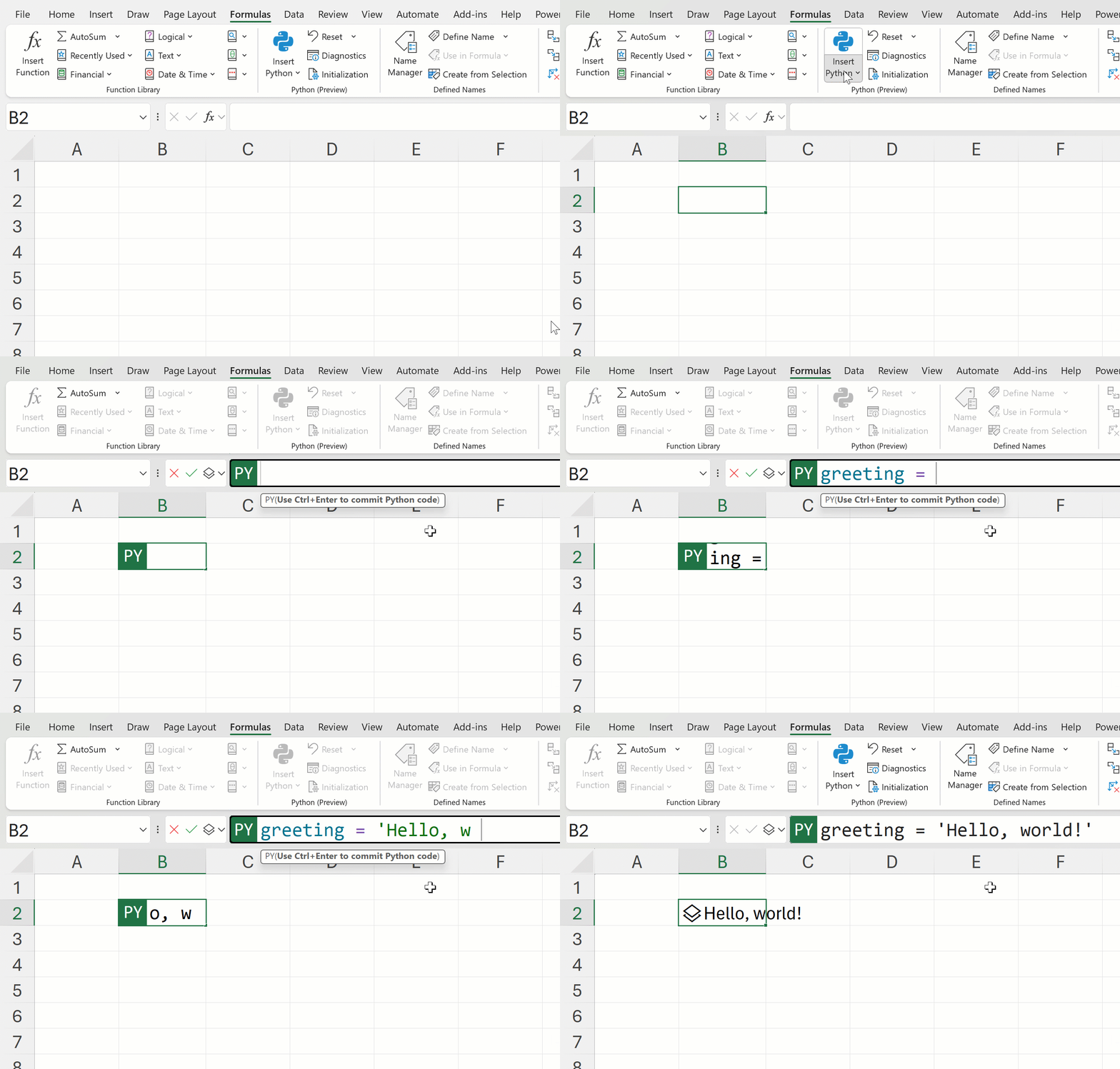 How To Use Python Inside Excel
https://stringfestanalytics.com/wp-content/uploads/2023/11/insert-python-formula-bar.gif
Cookies save browsing information to make your online experience easier Discover how to turn cookies on or off while using the Google Chrome browser
Templates are pre-designed documents or files that can be used for numerous purposes. They can save effort and time by supplying a ready-made format and layout for developing various kinds of material. Templates can be utilized for personal or professional jobs, such as resumes, invites, leaflets, newsletters, reports, discussions, and more.
How To Use Python Inside Excel

How To Use Python With Google Sheets Easy Guide YouTube

How To Use Python In Excel Step by step Guide YouTube

How To Use PYTHON IN EXCEL For COMPLETE Beginners Beginner Tutorial

What Is A Moving Average And How Do You Calculate It In Python
Python Comes To Microsoft Excel Reviews App

How To Create A Waterfall Chart In Python Using Plotly Excel Coding
Sign in to Gmail Tip If you sign in to a public computer make sure to sign out before you leave the computer Learn how to sign in on a device that s not yours

To find your username follow these steps You need to know A phone number or the recovery email address for the account The full name on your account Follow the instructions to

Important Before you set up a new Gmail account make sure to sign out of your current Gmail account Learn how to sign out of Gmail From your device go to the Google Account sign in

Important When you create a Google Account for your business you can turn business personalization on A business account also makes it easier to set up Google Business Profile

On your computer open Chrome At the top right click More Delete browsing data Choose a time range like Last hour or All time Select the types of information you want to remove Click
[desc-11] [desc-12]
[desc-13]