How To Upgrade Typescript In Visual Studio Code How To Use TypeScript In React Ionic Blog Comprendre Typescript En 5 Minutes Je Suis Un Dev CoderJony How To Check TypeScript Version Installed In Visual Studio How To Add TypeScript To A JavaScript Project How To Type With TypeScript How To Type Javascript Free Online Courses You might be able to check the version of TypeScript by using this command npm view typescript version on the command line summea Mar 8 2013 at 19 23 Add a comment 12 Answers Sorted by 80 I had the same problem below procedure worked for me Update NPM npm install npm latest g Update typescript npm g upgrade typescript or
To add the file right click the project node and choose Add New Item Choose the TypeScript JSON Configuration File and then click Add If you don t see all the item templates choose Show All Templates and then choose the item template Visual Studio adds the tsconfig json file to the project root You can use this file to configure Update Visual Studio 2019 TypeScript version Ask Question Asked 3 years 7 months ago Modified 3 years 7 months ago Viewed 124 times 1 Even though Visual Studio Installer says I have v3 7 installed In the editor it says I still have the 1 8 Do you know what the problem is and how I can change the version in use
How To Type With TypeScript How To Type Javascript Free Online Courses Working With TypeScript In Visual Studio Code Scotch io Why You Should Use TypeScript TypeScript Vs JavaScript Understand The Differences InfoWorld 4 Tips On How To Refactor Code In Visual Studio Code In 2021 Coding VS Code Enable Javascript Intellisense In Typescript Project Stack Visual Studio Code Treasures A List Of Visual Studio Code Extensions Update Visual Studio 2019 TypeScript Version Stack Overflow Declare Missing Helper Function TypeScript In Visual Studio Code By
How To Upgrade Typescript In Visual Studio Code
 How To Upgrade Typescript In Visual Studio Code
https://ionic.io/blog/wp-content/uploads/2019/02/typescript-in-react.png
You will need to install the TypeScript compiler either globally or in your workspace to transpile TypeScript source code to JavaScript tsc HelloWorld ts The easiest way to install TypeScript is through npm the Node js Package Manager If you have npm installed you can install TypeScript globally on your computer by
Templates are pre-designed documents or files that can be used for numerous functions. They can save time and effort by providing a ready-made format and layout for developing various sort of material. Templates can be used for personal or expert projects, such as resumes, invites, leaflets, newsletters, reports, discussions, and more.
How To Upgrade Typescript In Visual Studio Code
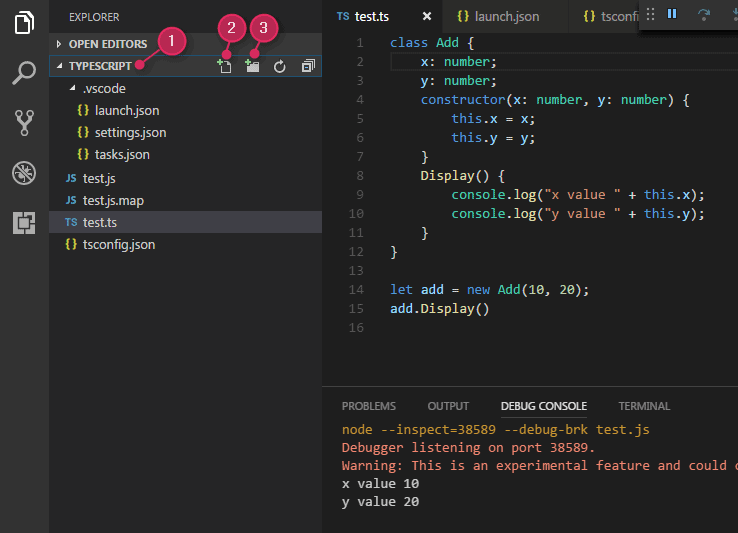
Configure And Run Typescript In Visual Studio Code updated Qavalidation

Working With TypeScript In Visual Studio Code Scotch io
Why You Should Use TypeScript
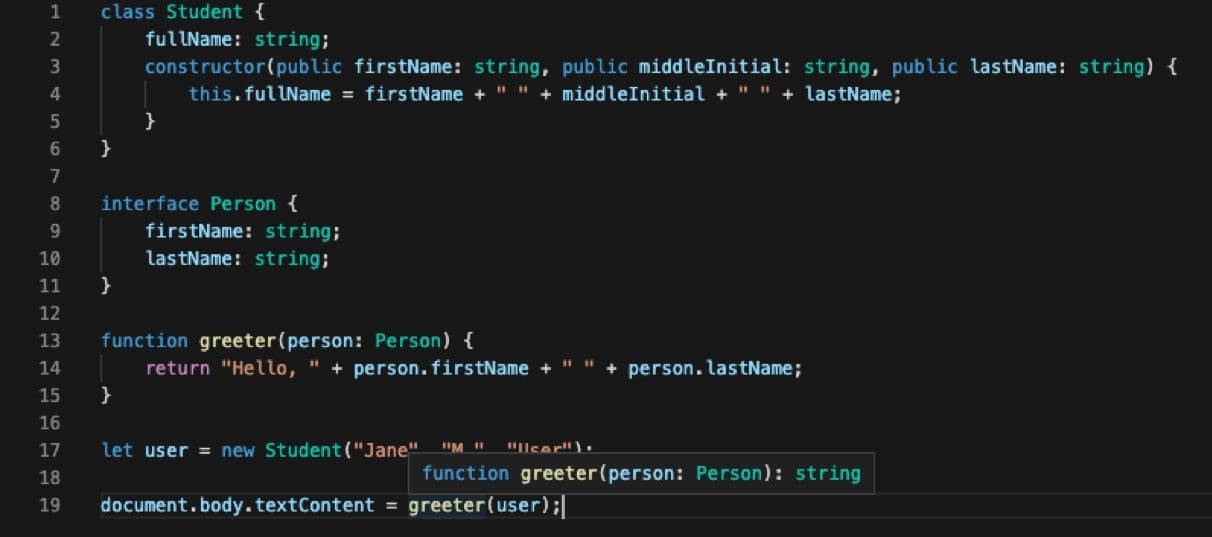
TypeScript Vs JavaScript Understand The Differences InfoWorld

VS Code Enable Javascript Intellisense In Typescript Project Stack
Visual Studio Code Treasures A List Of Visual Studio Code Extensions

The easiest way to install TypeScript is through npm the Node js Package Manager If you have npm installed you can install TypeScript globally g on your computer by npm install g typescript You can test your install by checking the version tsc version
Open Visual Studio Code GUI open the Files Menu then Preferences Menu and User Settings Add this setting to the user settings typescript tsdk C Users userName AppData Roaming npm node modules typescript lib This is for windows
To do this follow these steps Open a new or existing TypeScript project in Visual Studio Code Open the integrated terminal Run the following command to check the updated TypeScript version Check TypeScript version tsc version If the displayed version matches the latest TypeScript version the update was successful Conclusion

You can check in tsconfig json and start getting benefits from TypeScript s checking in the editor without changing anything else Of course there are a huge number of errors hardly any of which are due to real bugs So the next step is to start getting rid of incorrect errors and improving TypeScript s knowledge of the code Here s the

The JavaScript experience in Visual Studio 2022 is powered by the same engine that provides TypeScript support This engine gives you better feature support richness and integration immediately out of the box The option to restore to the legacy JavaScript language service is no longer available Users have the new JavaScript language service
Visual Studio Code has great editing support for TypeScript This article goes into depth on the editing and programming language features that come built in to VS Code If you d like to know more about general editing features in VS Code such as keyboard shortcuts multi cursors search and find and replace you can read Basic Editing In Visual Studio 2017 TypeScript updates are applied slightly differently than in Visual Studio 2015 however you can now have multiple TypeScript versions installed and choose specific versions for each of your projects In this document we will walk through how to manage your TypeScript version in Visual Studio 2017 Pre reqs
Linting JavaScript Compile TypeScript code using tsc Compile TypeScript code using NuGet Manage npm packages Debug your code Develop code without projects or solutions Write and run unit tests Explore documentation to help you use Visual Studio to create JavaScript and TypeScript applications including overviews tutorials and quickstarts