How To Set Java Classpath Using Command Prompt How To Set Java Classpath In Windows 10 11 YouTube How To Compile And Run Java Program From Command Prompt YouTube Cara Setting PATH Dan CLASSPATH Java Di CMD KaAzima How To Set Multiple Classpath In Java In Windows GeeksforGeeks La Forma M s Sencilla De Planificar Classpath Para Java En Windows IT Web Feb 23 2023 nbsp 0183 32 2 Setting CLASSPATH from Command Line Use classpath argument to set classpath from command prompt console Use the following command to set the classpath for different requirements Let s say we have a folder named dependency where JAR files and other classes are placed 2 1 Add a Single Jar in CLASSPATH
Web setCLASSPATH classpath1 classpath2 sdkTool A command line tool such as java javac javadoc or apt For a listing see JDK Tools and Utilities athttp docs oracle javase 8 docs technotes tools index html classpath1 classpath2 Class paths to the JAR zip or class files Web Sep 17 2011 nbsp 0183 32 just append the full path to the Bin folder under your Java installation path You can copy it using Windows Explorer to avoid typing it manually click OK to close the dialogs To verify open the command window aka console window for example WindowsKey R cmd exe and run javac version
La Forma M s Sencilla De Planificar Classpath Para Java En Windows IT How To Set Multiple Jar Files In Java Classpath In Command Line Becbe Usage Of Javac Command With d Option And Java Command With classpath Java Command Line Set Classpath Jar Kubbeih Java Javax How To Set Path Classpath In Windows 8 For Environmental How To Set Path And Classpath In Java Java How To Set Classpath In Windows How To Set Java Environment Variables RoundTheTech Different Ways To Set Java Classpath Environment Variables In Windows
How To Set Java Classpath Using Command Prompt
 How To Set Java Classpath Using Command Prompt
https://i.ytimg.com/vi/ftyEsnxVLY4/maxresdefault.jpg
Web To set the classpath temporarily from DOS prompt use the command set CLASSPATH set CLASSPATH C Program Files Java jdk1 7 0 79 lib The classpath variable set in this way is not persistent The classpath will be available only in the current DOS window It will not be available in any other window or application opened in new command prompts
Pre-crafted templates provide a time-saving option for producing a diverse series of files and files. These pre-designed formats and designs can be utilized for different individual and expert jobs, consisting of resumes, invitations, leaflets, newsletters, reports, presentations, and more, simplifying the content production procedure.
How To Set Java Classpath Using Command Prompt
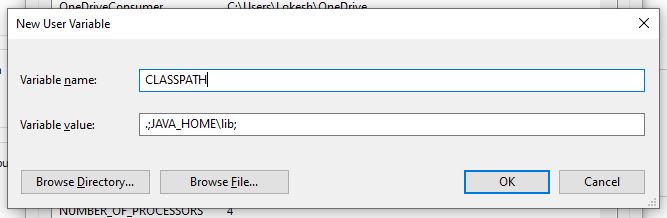
Java How To Set Classpath In Windows

How To Set Multiple Jar Files In Java Classpath In Command Line Becbe

Usage Of Javac Command With d Option And Java Command With classpath
Java Command Line Set Classpath Jar Kubbeih
How To Set Path And Classpath In Java

Java How To Set Classpath In Windows

Web Mar 4 2014 nbsp 0183 32 Open a new command prompt and type again the new classpath for eg set classpath classpath d java example jar Once your open a new command window it would have the default classpath and your previous trials in another window would go away as you expected

Web May 14 2022 nbsp 0183 32 In programming context you can execute SET command SET classpath c java or Right click on your computer gt properties gt advanced gt environment variables In a batch file you can use SET classpath c java java c myapplication class

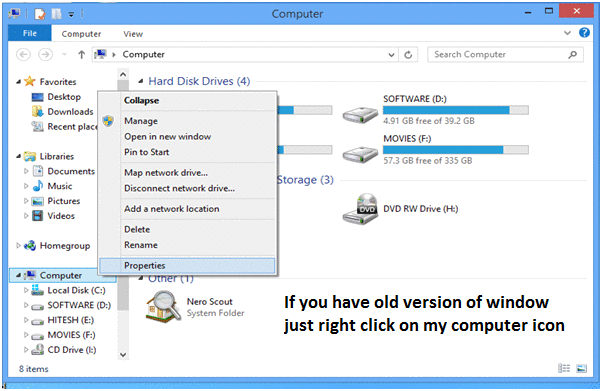
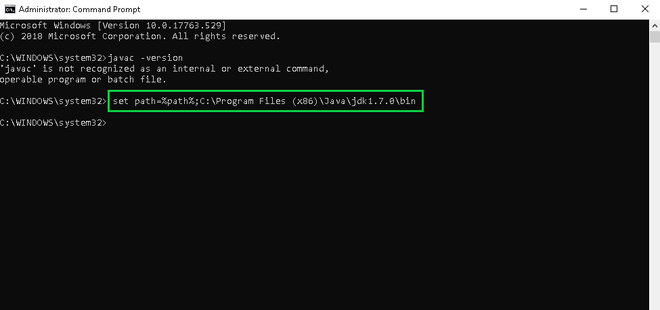
Web Nov 20 2020 nbsp 0183 32 GeekForGeeks Set the CLASSPATH in JAVA in Windows Command Prompt set PATH C Program Files Java JDK1 6 20 bin Note Semi colon is used as a separator and dot is the default value of CLASSPATH in the above command GUI 1 Select Start 2 Go to the Control Panel 3 Select System and Security 4 Select Advanced
Web Jun 15 2015 nbsp 0183 32 You have add the JAR to the CLASSPATH not the folder which contains this JAR So the cp argument should something be like this C Users ANNA Downloads SimplifiedConnectionProvider jar C Users ANNA Downloads Windows64 Libjitsi the name of the JAR jar
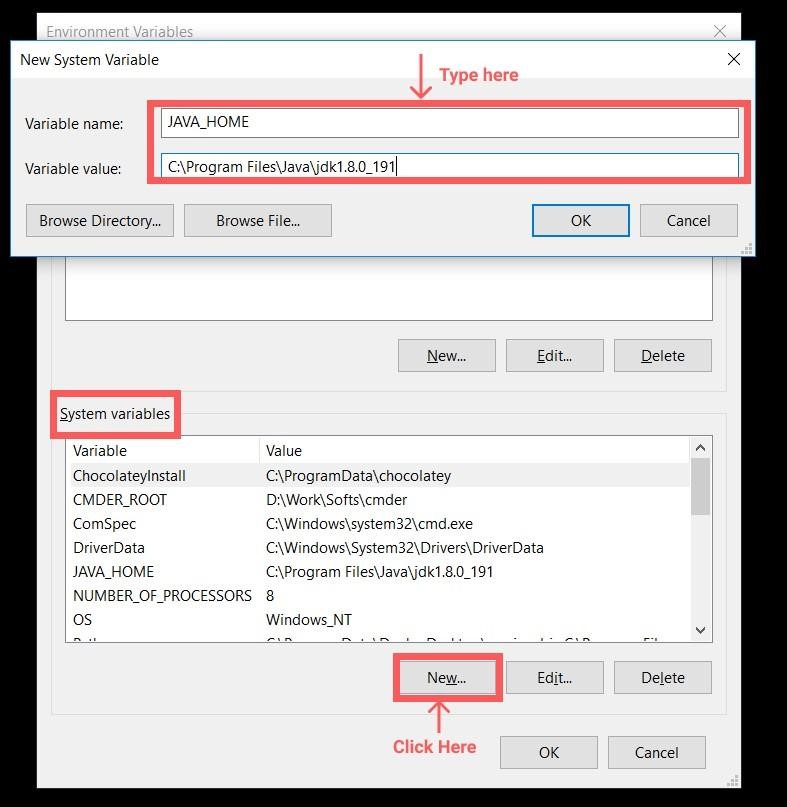
Web set classpath classpath D TECHNICAL JAVA WORLD JDBC mysql connector java 5 1 18 bin jar D TECHNICAL JAVA WORLD JDBC is the location of mysql connector To set this path go to Advanced System Settings gt Environment variables gt User variables gt CLASSPATH gt Edit then type set classpath classpath D TECHNICAL JAVA
Web Microsoft Windows uses a semicolon while UNIX and Linux use a colon For example to set the class path on Linux or UNIX to the locations opt some path classlib jar opt some path otherclasslib jar and the current directory denoted by a single dot you should set the class path to this opt some path classlib jar opt some path Web Jul 13 2012 nbsp 0183 32 Importing has nothing to do with loading classes or setting CLASSPATH Try this java cp lib Generator Using the dot as the first entry in the CLASSPATH assumes that the Generator class file exists in the directory from which you re running java and lib is one level up from that directory Adjust as needed if both of these are not
Web There are two ways to ways to set CLASSPATH through Command Prompt or by setting Environment Variable Let s see how to set CLASSPATH of MySQL database Step 1 Click on the Windows button and choose Control Panel Select System Step 2 Click on Advanced System Settings Step 3 A dialog box will open Click on Environment Variables