How To Set Button Size In Html Radio Button Size HTML CSS The FreeCodeCamp Forum How To Change Button Size In CSS TheSassWay How To Change Button Size In CSS TheSassWay Easy Button Sizes Guide With Free Printable Chart How To Specify Button Size In HTML YouTube The button HTML element is an interactive element activated by a user with a mouse keyboard finger voice command or other assistive technology Once activated it then performs an action such as submitting a form or opening a dialog By default HTML buttons are presented in a style resembling the platform the user agent runs on but you can change buttons appearance with CSS
Learn how to use the input type button element in HTML to create simple push buttons that can trigger custom functionality on your webpage This element is different from the button element which can also be used as a submit button for forms Find out the syntax attributes and examples of input type button on MDN Web Docs How to style button tag Common properties to alter the visual weight emphasis size of text in button tag CSS font style property sets the style of the font normal italic oblique initial inherit CSS font family property specifies a prioritized list of one or more font family names and or generic family names for the selected element CSS font size property sets the size of the
How To Specify Button Size In HTML YouTube How To Change The Button Color In HTML Wiki HTML How To Make An Indestructible Button Quick Android Tutorial How To Set Height And Width In Percentage Of A Button Download Templates For Your Custom Button Designs Seatthole Custom UX UI Tips A Guide To Creating Buttons Make It Clear Easy Button Sizes Guide With Free Printable Chart Printable Button Size Chart How To Measure Buttons The Creative Curator Button Sizes Pinback Button Sizes Busy Beaver Button Co
How To Set Button Size In Html
 How To Set Button Size In Html
https://global.discourse-cdn.com/freecodecamp/optimized/3X/b/d/bdc90c2637b373197099c3b5eb053ec94028abdf_2_1024x708.png
Font Size The font size attribute helps with the size the size can be altered making it look bigger or smaller button font size 35px Always use CSS classes or IDs to target certain buttons and apply styles since this is considered best practice
Pre-crafted templates offer a time-saving option for creating a diverse series of documents and files. These pre-designed formats and designs can be used for numerous individual and expert tasks, consisting of resumes, invitations, flyers, newsletters, reports, presentations, and more, improving the content creation procedure.
How To Set Button Size In Html
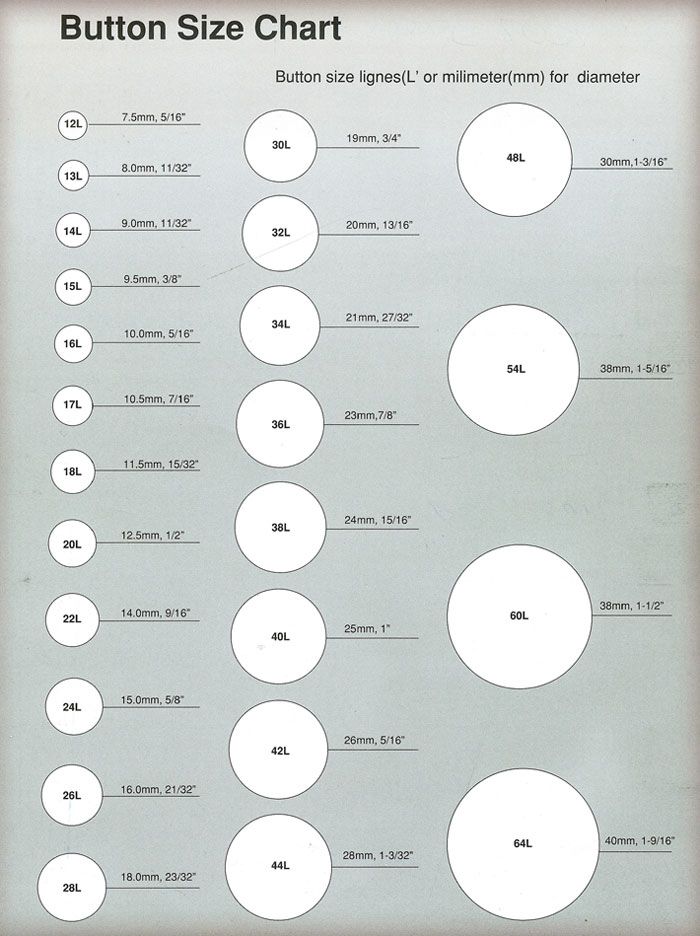
Button Size Chart Vintage Buttons Crafts Size Chart Buttons

How To Change The Button Color In HTML Wiki HTML

How To Make An Indestructible Button Quick
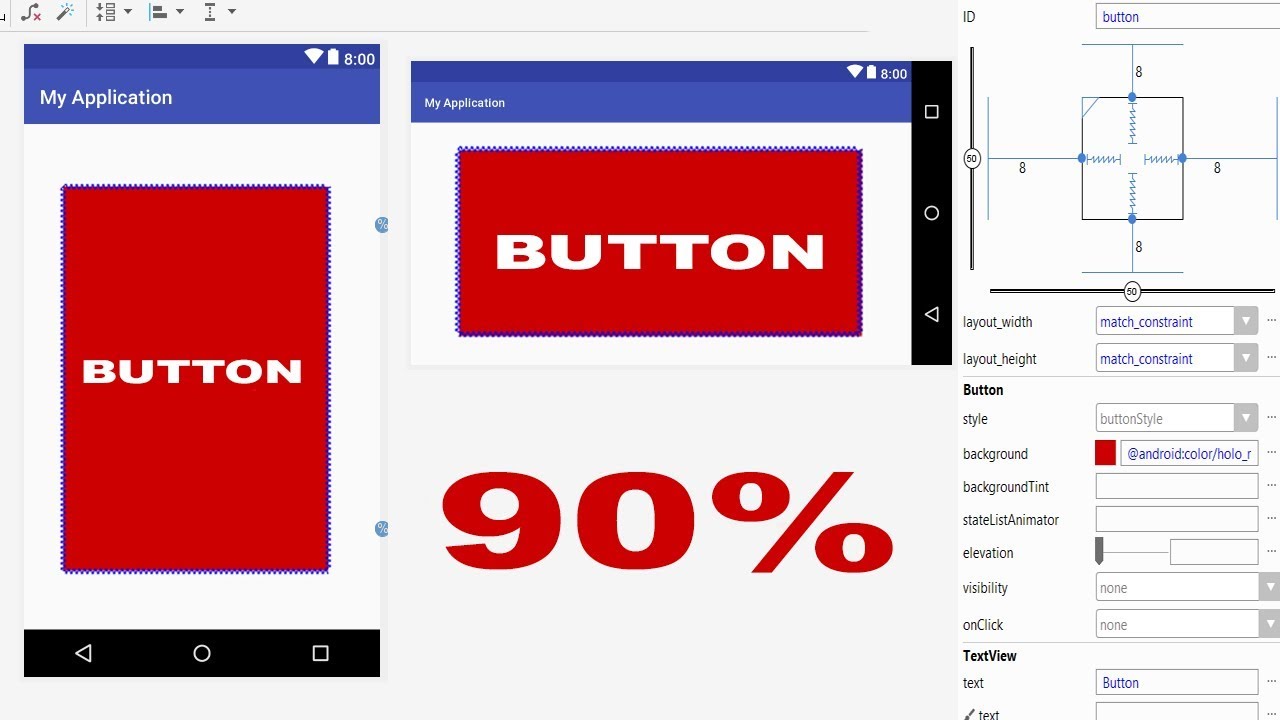
Android Tutorial How To Set Height And Width In Percentage Of A Button

UX UI Tips A Guide To Creating Buttons Make It Clear
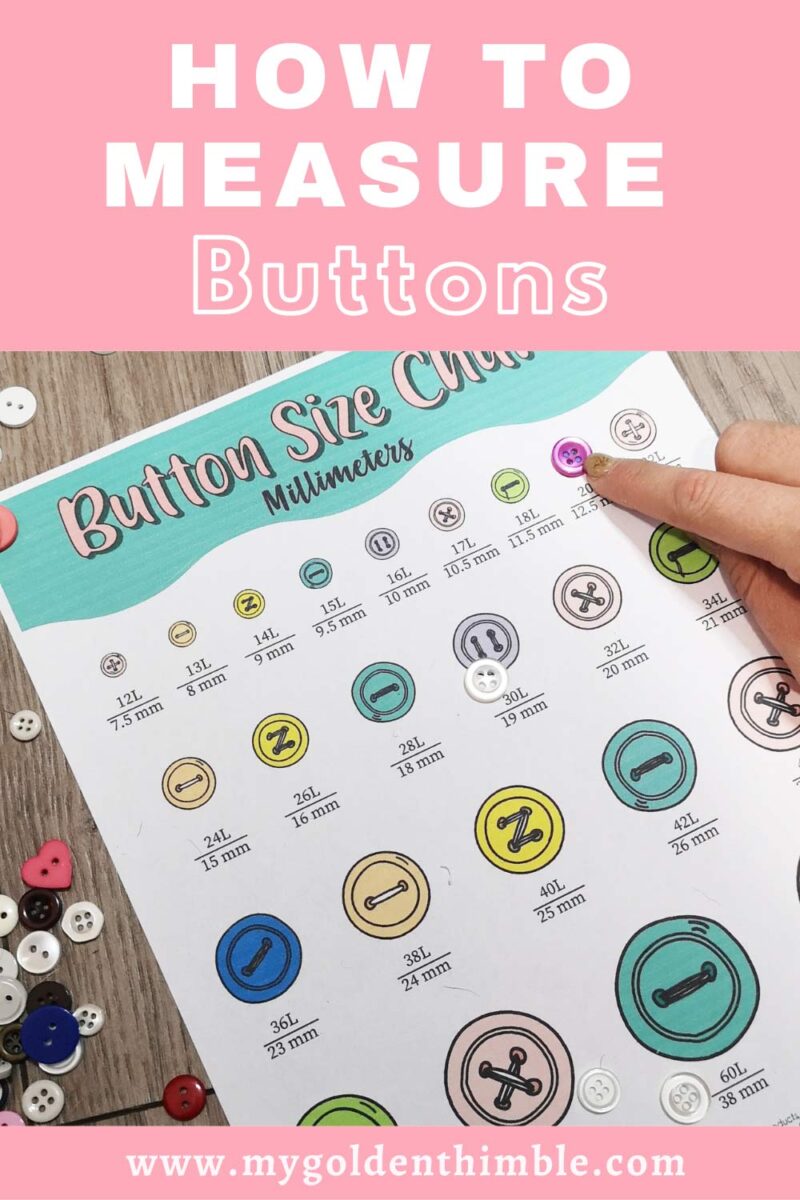
Easy Button Sizes Guide With Free Printable Chart

Learn how to use the HTML button tag to create clickable buttons for your web pages The button tag can contain text images or other elements You can also style and customize your buttons with CSS Follow the examples and tutorials on W3Schools to master the button tag

If you want to learn how to resize a button in HTML using CSS you can find useful answers and examples on Stack Overflow This webpage contains a question and several solutions about resizing a button with different methods and properties You can also compare your code with other related webpages that deal with similar issues

Disabled Buttons Normal Button Disabled Button Use the opacity property to add transparency to a button creates a disabled look Tip You can also add the cursor property with a value of not allowed which will display a no parking sign when you mouse over the button

Step 2 Add CSS To create a full width button add a width of 100 and make it into a block element

This time in our click handler we access the current height and width of the button and increase the size by 50 Here s the code CSS Button Size jsButton style width jsButton
The W3Schools online code editor allows you to edit code and view the result in your browser Using these units you can size something relative to the viewport of the user 1vh is equal to 1 of the viewport height and 1vw is equal to 1 of the viewport width You can use these units to size boxes but also text In the example below we have a box which is sized as 20vh and 20vw
If your button s display property is set to block or inline block make sure its width property is not set to 100 Otherwise it would use the width of its parent element style css btn display inline block width 100 If you still aren t able to set the button s width to fit its text try setting its display property to inline block