How To Run A Curl Command In Cmd How to Run Multiple cURL Commands in Parallel How to use curl to get public IP address - Linux Tutorials - Learn Linux Configuration cURL Command Tutorial with Examples - Boolean World 19 Useful cURL Commands that You Should Know How To Use curl (with lots of helpful examples) - YouTube 1 Download cURL distribution 2 Extract package 3 Update Windows PATH variable 4 Verify cURL installation
Using this command line interface CLI a user specifies a server URL the location where they want to send a request and the data they want All you need to do is run Command Prompt with administrative rights and you can use cUrl The Curl exe is located at C Windows System32 If
How To Use curl (with lots of helpful examples) - YouTube 3 Easy Ways to Run Ruby Code - wikiHow How to Watch Star Wars on Command Prompt: 12 Steps (with Pictures) Command Line for Beginners – How to Use the Terminal Like a Pro [Full Handbook] How to Find Your IP Address From CMD (Command Prompt) Curl command not found - Linux Tutorials - Learn Linux Configuration How to Use the Ping Command to Test Your Network Automate file downloads with Windows FTP or curl – 4sysops How To Write Bash Scripts in Linux | Tom's Hardware
How To Run A Curl Command In Cmd
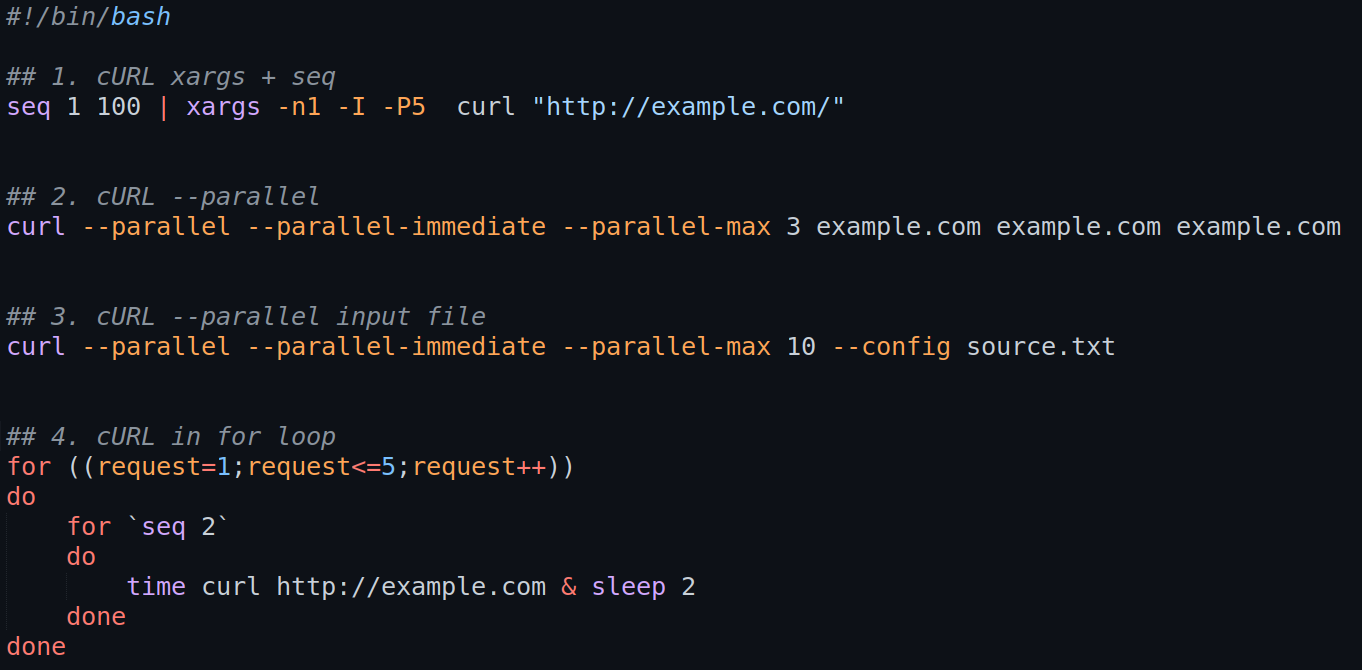 How To Run A Curl Command In Cmd
https://softhints.com/content/images/2023/02/run-multiple-curl-commands-in-parallel.png
Curl Installation on Windows Step 1 Download curl Installer File Step 2 Create a Curl Folder Step 3 Paste Setup Folder Into Curl Folder Step 4 Find
Pre-crafted templates provide a time-saving option for creating a varied range of documents and files. These pre-designed formats and layouts can be made use of for numerous individual and expert projects, consisting of resumes, invitations, flyers, newsletters, reports, presentations, and more, improving the material development procedure.
How To Run A Curl Command In Cmd

Problem with curl.exe (Windows) and package installation - New to Julia - Julia Programming Language

3 Easy Ways to Run Ruby Code - wikiHow

How to Watch Star Wars on Command Prompt: 12 Steps (with Pictures)
Command Line for Beginners – How to Use the Terminal Like a Pro [Full Handbook]

Curl command not found - Linux Tutorials - Learn Linux Configuration

How to Use the Ping Command to Test Your Network
You can use the Windows command prompt to run the curl examples To start the command prompt open the Start menu type cmd in the search box and press Enter

All you need to use Curl is to run Command Prompt as administrator and execute Curl commands For older versions of Windows 7 and 8

Curl client URL is a command line tool powered by the libcurl library to transfer data to and from the server using various protocols

Free Tutorials https automationstepbystep CURL Beginner Tutorial Today we will learn 1

CUrl is a command line tool that Linux users are more than familiar with If you once used Linux
3 Linux installation 1 Enter to the computer s terminal 2 Run the command below in the terminal sudo apt get install curl 3 If a password is required All of the examples in ShipEngine s documentation include an example curl command A free open source command line tool curl s already installed on most
Then in the command prompt use the cd command to change the directory to the folder that contains your file Lastly modify the cURL command as shown below