How To Revert Commit Github Desktop Version Control With Git Undoing Changes How To Revert A Git Commit The Git Revert Command YouTube Going To Another Commit In GitHub Desktop GUI VERSION Stack Overflow Git Reverting To Previous Commit How To Revert To Last Commit Revert Git Commit GitHub Example Google Chrome tips From productivity to customization learn how to get things done more quickly with your browser
If you forgot your password or username or you can t get verification codes follow these steps to recover your Google Account That way you can use services like Gmail Pho Jan 31 2008 nbsp 0183 32 How How a What What a what how
Revert Git Commit GitHub Example Reverting Changes From Remote Branch Mastering Visual Studio 2017 Book Git Reset And Revert Tutorial For Beginners DataCamp How To Undo Pushed Commits With Git Sciencx Committing Changes To GitHub Desktop Git And GitHub Git Revert DEV Community Reverting A Commit GitHub Docs Git Revert File Reverting A File To A Previous Commit Viewing The Branch History GitHub Docs
How To Revert Commit Github Desktop
 How To Revert Commit Github Desktop
https://gcapes.github.io/git-course-mace/fig/git-revert-vs-reset.svg
Official Google Play Help Center where you can find tips and tutorials on using Google Play and other answers to frequently asked questions
Templates are pre-designed documents or files that can be utilized for different purposes. They can save time and effort by offering a ready-made format and design for producing different type of material. Templates can be utilized for personal or expert tasks, such as resumes, invites, flyers, newsletters, reports, discussions, and more.
How To Revert Commit Github Desktop

Git Revert Commit How To Undo The Last Commit

Reverting Changes From Remote Branch Mastering Visual Studio 2017 Book
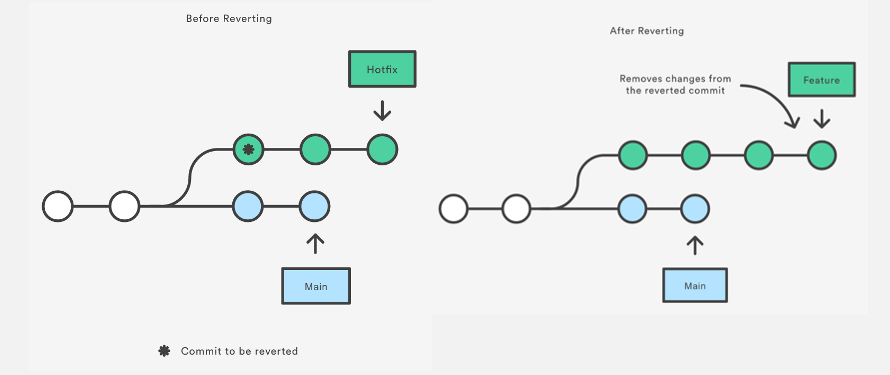
Git Reset And Revert Tutorial For Beginners DataCamp
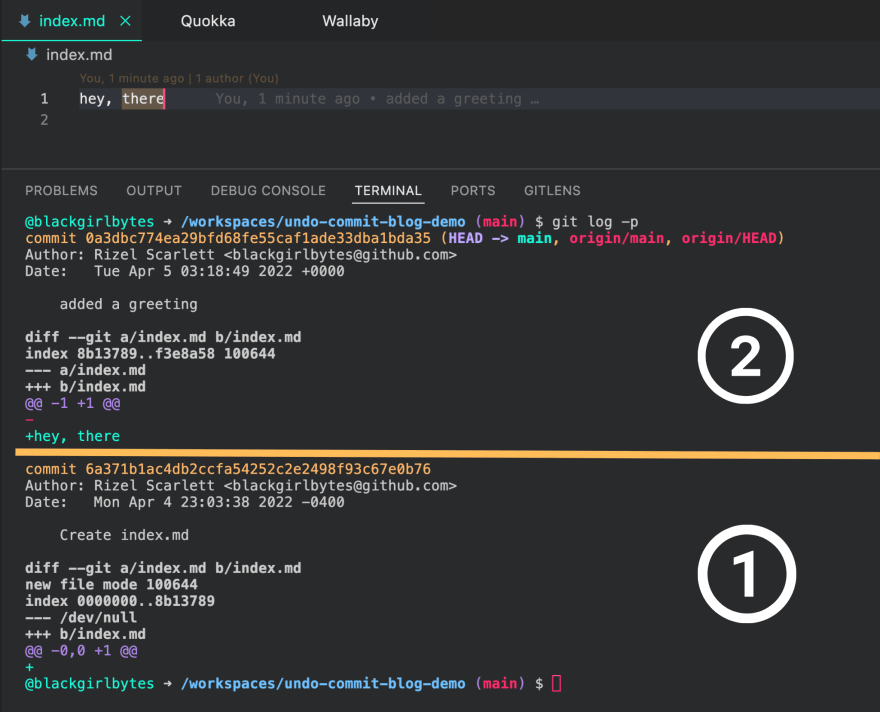
How To Undo Pushed Commits With Git Sciencx

Git And GitHub Git Revert DEV Community
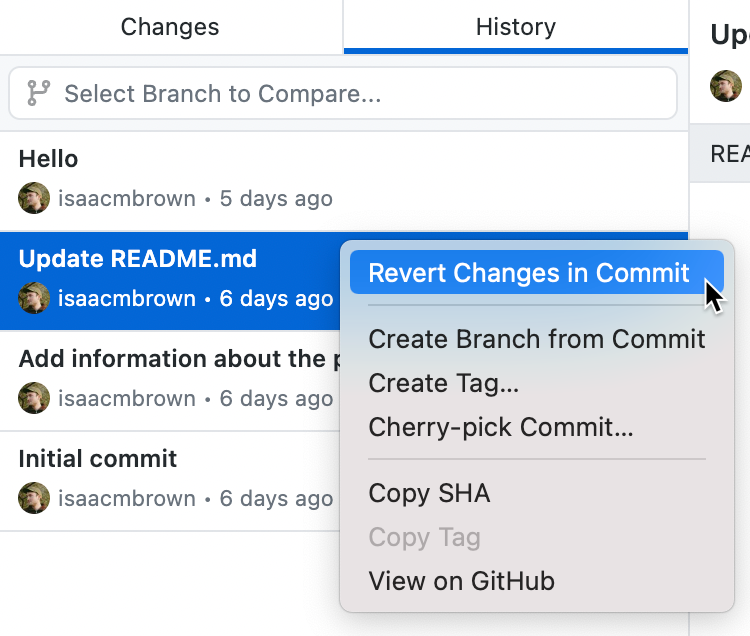
Reverting A Commit GitHub Docs

How to install Chrome Important Before you download you can check if Chrome supports your operating system and other system requirements

Analytics Academy on Skillshop is a collection of free e learning courses designed by Analytics experts to help users get the most out of Google Analytics Google Analytics currently offers 4

Official Gmail Help Center where you can find tips and tutorials on using Gmail and other answers to frequently asked questions

To know whether this is a problem with the webpage or Chrome try to open the page in another browser like Firefox or Safari If it works in another browser try the steps below Uninstall and

Get started with Analytics Collect and manage data Report and explore Advertising and attribution Audiences and remarketing Manage accounts properties and users Google Analytics 360
[desc-11] [desc-12]
[desc-13]