How To Reset Root Password In Ec2 Instance How To Reset Root Password In Ec2 Instance Lifescienceglobal How To Reset Root Password In Ec2 Instance Lifescienceglobal How To Reset Root Password In Ec2 Instance Lifescienceglobal How To Reset Root Password In Ec2 Instance Lifescienceglobal How To Reset Root Password On CentOS 7 Issabel 4 Zivo NiX BLog Quickly Reset the EC2 User Password or Change Any File on Your EC2 EBS if Locked Out by Kevin Summersill AWS in Plain English Write Sign up Sign in So I recently made modifications to the ssh config file to make sure that passwords are rotated every 60 days and require it Well guess what
1 Power Off the instance Example project Server 2 Note the Ebs Volume info dev sda1 and detach the volume from server 3 Create the new instance dummy Instance with minimal Login to your EC2 instance with standard user account This could be ubuntu or ec2 user depending on the AMI you deployed on your instance Once inside switch to root account by executing this command sudo i Now open the SSH configuration file with nano text editor nano etc ssh sshd config Enable Root Account on AWS EC2 Google VM Instance
How To Reset Root Password On CentOS 7 Issabel 4 Zivo NiX BLog Regdax Blog How To Reset Root Password On CentOS 7 Issabel 4 Zivo NiX BLog How To Reset Forgotten Root Password In RHEL 8 Linuxhowto How To Reset Root Password In Debian 11 Mark Ai Code How To Reset Root Password On Ubuntu Linux Mining How To Reset Root Password In Redhat Linux 7 Nsayi How To Reset Root Password In Single User Mode LinuxHelp Tutorials How To Reset Root User Password On CentOS 8 Resetting A Forgotten Root Password In CentOS 8
How To Reset Root Password In Ec2 Instance
 How To Reset Root Password In Ec2 Instance
https://4.bp.blogspot.com/-HwwsdGsGrBo/V4YrNS87-WI/AAAAAAAACac/3pt-dNMoJtUaxAenRObB_tEIVoA4sACTgCLcB/s640/Screenshot%2Bfrom%2B2016-07-13%2B17-15-04.png
To reset your Windows administrator password using EC2Config you need to do the following Step 1 Verify that the EC2Config service is running Step 2 Detach the root volume from the instance Step 3 Attach the volume to a temporary instance Step 4 Modify the configuration file Step 5 Restart the original instance
Pre-crafted templates use a time-saving option for developing a varied variety of documents and files. These pre-designed formats and designs can be used for various personal and expert tasks, consisting of resumes, invites, leaflets, newsletters, reports, presentations, and more, enhancing the material creation procedure.
How To Reset Root Password In Ec2 Instance
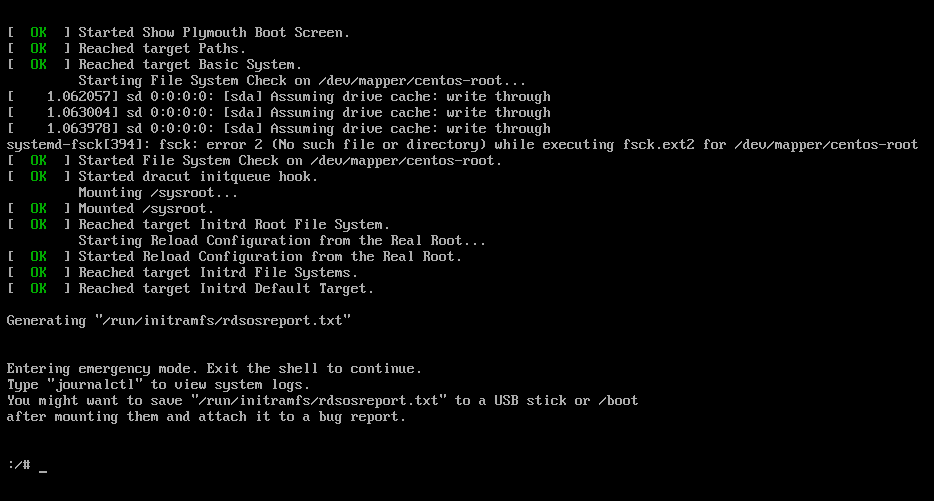
How To Reset Root Password On CentOS 7 Issabel 4 Zivo NiX BLog
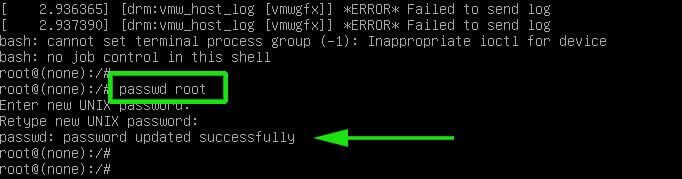
Regdax Blog
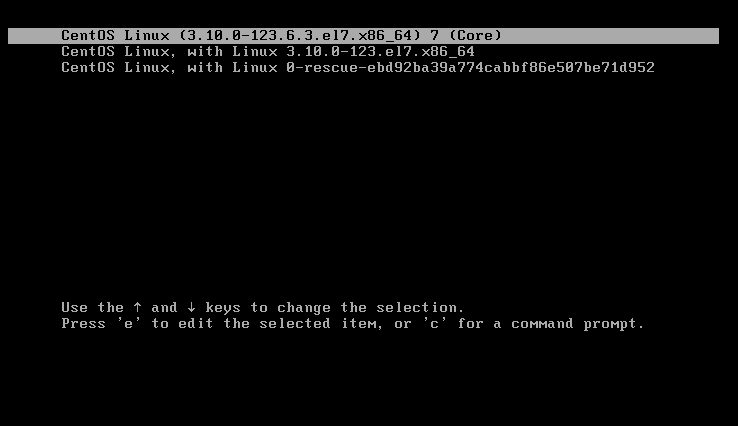
How To Reset Root Password On CentOS 7 Issabel 4 Zivo NiX BLog

How To Reset Forgotten Root Password In RHEL 8 Linuxhowto
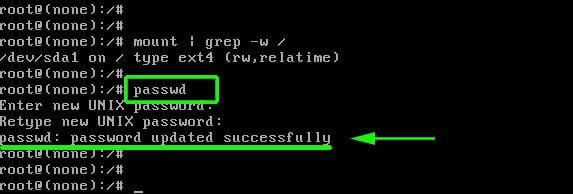
How To Reset Root Password On Ubuntu Linux Mining

How To Reset Root Password In Redhat Linux 7 Nsayi

Your best bet would be to detach your EBS file system and mount it on another instance so that you can go in and fix the authorized keys files or etc sudoers or whatever is appropriate to resolve your problem Once it is fixed you can unmount and detach it then reattach it to your old instance so that it mounts as again
To enable users SSH access to your EC2 instance using a Linux system user you must share the SSH key with the user Alternatively you can use EC2 Instance Connect to provide access to users without the need to share and manage SSH keys For more information see Connect to your Linux instance with EC2 Instance Connect

To reset the administrator password with Systems Manager using the Run Command use the following steps 1 Attach the following policy to the AWS Identity and Access Management IAM role associated with the instance to write the encrypted password to Parameter Store

You can also choose Forgot password on the AWS sign in page to reset your password To change the root user s password you must sign in as the AWS account root user and not as an IAM user To learn how to reset a forgotten root user password see Resetting a lost or forgotten root user password

1 Power Off the instance Example project Server 2 Note the Ebs Volume info dev sda1 and detach the volume from server 3 Create a new instance Dummy Instance with minimal configuration it must be a same region as example project Server 4 Attach the Example project Root volume to New instance Dummy Instance 5
How to set root password on Amazon EC2 instance closed Asked 12 years 5 months ago Modified 12 years 5 months ago Viewed 25k times Part of AWS Collective 4 Closed This question is off topic It is not currently accepting answers Want to improve this question Update the question so it s on topic for Stack Overflow Closed 12 years ago 1 Verify that you have a recent snapshot of the volume where the MariaDB data directory resides You can recreate the volume from this snapshot if needed 2 Stop the MariaDB service sudo systemctl stop mariadb 3 Start MariaDB in safe mode sudo mysqld safe skip grant tables skip networking 4
Connect to the instance and open a command prompt Run the following command If your new password includes special characters enclose the password in double quotes net user Administrator new password Store the new password in a safe place Change a lost or expired password