How To Remove Read Only On Adobe Free Download How To Remove Wallpaper Easy 999x998 For Your Desktop Mobile App How To Remove Read Only On Google Sheets So You Can Edit How To Remove Your Data From The Internet TechRadar The Words How To Remove Crayon Off Anything Written On A Piece Of Paper How To Remove Skin Tags Causes And More Resurchify Web Aug 30 2023 nbsp 0183 32 How to Change a PDF from Read only to Editable Step 1 Install and launch EaseUS PDF Editor on your PC and import the read only PDF Step 2 Go to the quot Protection quot tab and choose the quot Remove Security quot option Step 3
Web Nov 20 2023 nbsp 0183 32 To remove your signature right click the signature and then choose Clear Signature If you got a signed PDF you can request the signer to remove the signature and share the PDF or send an unsigned copy of the PDF Is there a way to retrieve the unsigned PDF and resign it Web Jul 10 2012 nbsp 0183 32 When I open the pdf it will only open in read only mode I want to change the security settings to prevent editing before I send it out but the File gt Properties gt Security gt gt Security Method is greyed out and set to quot No Security quot
How To Remove Skin Tags Causes And More Resurchify How To Remove Duplicate Title Tags In WordPress BLOGSMENTOR COM How To Remove please Read And Accept Adobe General Terms Of Use Popup This Huge Photoshop On IPad Update Could Finally Let You Edit Photos How To Remove Background From Image TechPlanet How To Remove Yourself From FastPeopleSearch Permanently TechCult How To Remove Read Only From Excel File How To Remove Words From IPhone Predictive Text 3 Fixes 2023 How To Remove Read Only From Excel File Step by Step 2024
How To Remove Read Only On Adobe
 How To Remove Read Only On Adobe
https://cdn.wallpapersafari.com/7/69/dm0Lx5.jpg
Web 1 Answer First make sure the PDF has the security set to prevent saving by looking at the quot Security quot tab of the PDF s properties If it is set you will need the password certificate or other feature used to set the security to remove the security lock
Pre-crafted templates offer a time-saving option for developing a varied series of files and files. These pre-designed formats and layouts can be used for numerous personal and expert tasks, consisting of resumes, invites, leaflets, newsletters, reports, presentations, and more, simplifying the content production process.
How To Remove Read Only On Adobe

How To Remove Windows 7 And Install Windows 8 1 Windows 8 1 Upgrade
How To Remove Duplicate Title Tags In WordPress BLOGSMENTOR COM

How To Remove please Read And Accept Adobe General Terms Of Use Popup

This Huge Photoshop On IPad Update Could Finally Let You Edit Photos

How To Remove Yourself From FastPeopleSearch Permanently TechCult
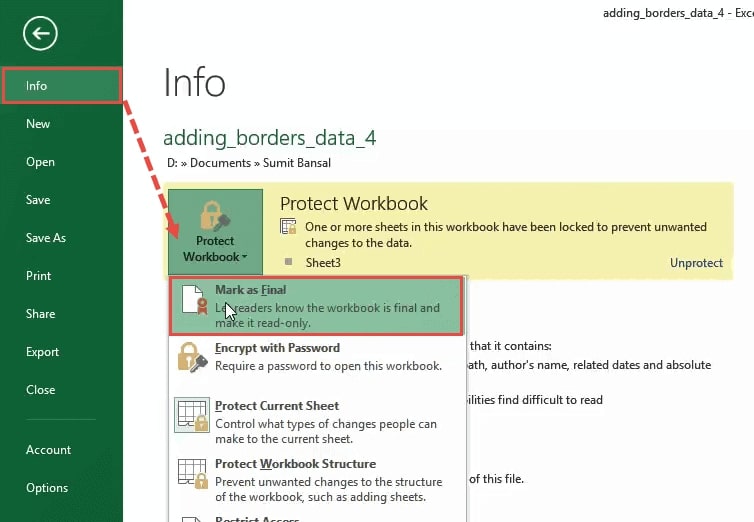
How To Remove Read Only From Excel File
Web Dec 22 2011 nbsp 0183 32 If you are trying to distill it to the same file it could be it is opened in Acrobat and so you can not overwrite it or that the original file is read only in the OS Look at the file properties in that case If you are trying to use a network drive try sending it locally and then copying Upvote

Web Apr 24 2023 nbsp 0183 32 Step 1 Launch UPDF and Open Targeted PDF After downloading and installing UPDF on your computer launch it and use the Open File button to open the targeted read only file Once the file is open click Protect Using Password from the right sidebar Step 2 Remove the Permission Restrictions

Web May 15 2019 nbsp 0183 32 I was wondering if there is any way such as a Registry key that can be altered or a tickbox hidden in the preferences that removes the bar that is available to be pressed within a Read Only document This is the bar that I am referring to We would like a way to remove this bar so that it no longer appears within Read Only mode

Web Jan 19 2017 nbsp 0183 32 I use Adobe Acrobat DC Reader on my PC and the mobile quot ADOBE ACROBAT quot App on my tablet and phone My secretary will draft a document export it to pdf and save it on a shared file When I m out of the office I would open the document on my Samsung tablet and write draw in DC with my S Pen any comments I have on the

Web You can remove read only restrictions on a PDF by using Adobe Acrobat Use these steps to take away the restrictions Upload your read only PDF file to Acrobat to edit
Web Jul 8 2013 nbsp 0183 32 If the PDF is secured with a server based security policy only the policy author or a server administrator can change it In the open PDF do one of the following Select Tools gt Protection gt Encrypt gt Remove In the Security tab of the Document Properties dialog box choose No Security from the Security Method menu Web May 14 2019 nbsp 0183 32 I was wondering if there is any way such as a Registry key that can be altered or a tickbox hidden in the preferences that removes the bar that is available to be pressed within a Read Only document This is the bar that I am referring to We would like a way to remove this bar so that it no longer appears within Read Only mode
Web Nov 20 2023 nbsp 0183 32 Start Adobe Acrobat Pro Press the File tab from the top left corner of page and open the read only PDF for editing For the protected files if you have access to the file s password select Tools gt Protect Find Advanced Options on the top menu bar gt Remove Security Then click OK in the pop up window