How To Remove Password From Adobe Doc How To Remove Password From Pdf File Riset How To Remove Password From Windows 10 Free Nude Porn Photos How To Remove Password From A Pdf File YouTube How To Add Remove Password In Windows 11 2021 Youtube Vrogue Topp 4 Metoder F r Att Ta Bort L senord Fr n Word dokument 2021 Open the PDF in Acrobat and do one of the following Go to All tools Protect a PDF and then select Protect with password from the Protect a PDF toolset in the left pane Select File Protect Using Password macOS If you receive a prompt select Yes to change the security Choose Editing and then type and retype your password
Open Adobe Acrobat DC Click Open File Find the file you wish to remove the password from and click Open Enter the password and click OK Click File Properties Click Security Click the Security Method drop down menu Click No Security Click OK May 28 2015 I need to remove a password from a PDF in Adobe Acrobat Pro 9 5 5 I open the file using the password go to file Properties and select No Security from the Change Security drop down menu I enter the document password when prompted and I get a message saying the password is incorrect What am I missing
Topp 4 Metoder F r Att Ta Bort L senord Fr n Word dokument 2021 Remove Startup Password Windows11 Inc Startup Solved How To Remove Password In Windows 10 Windowsclassroom Vrogue Windows11 Password Remove How To Remove Password From Windows 11 Free How To Set Password For Local User Account In Windows 10 Bitwarsoft Adobe Doc Gen It Seems There Was An Error On The Adobe Support How To Remove Password From PDF Bank Statement How To Remove A Password From PDF File YouTube How To Remove Password From Adobe PDF Files Mashnol
How To Remove Password From Adobe Doc
 How To Remove Password From Adobe Doc
http://www.netnic.org/wp-content/uploads/2019/09/How-to-remove-password-to-pdf1.jpg
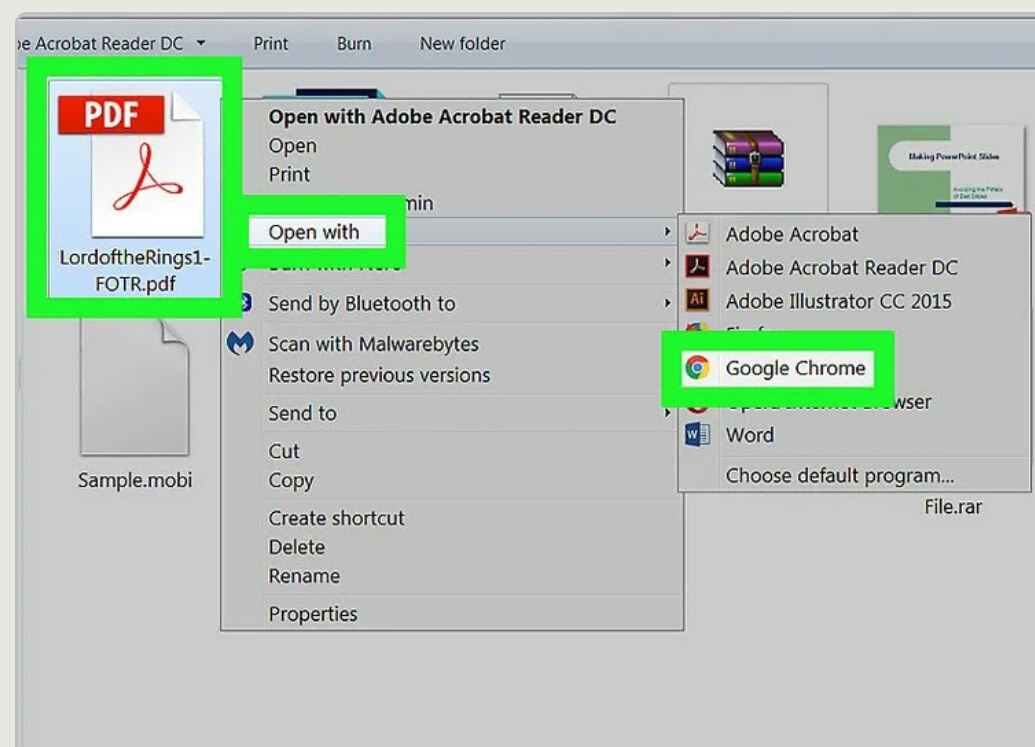
Chrome comes with built in support for PDF Just open your PDF file with Chrome enter the password when prompted then you can click the Print option to make an unprotected copy of the original PDF This method can help you remove document permissions password
Pre-crafted templates use a time-saving option for developing a varied variety of documents and files. These pre-designed formats and designs can be made use of for numerous individual and professional jobs, including resumes, invitations, leaflets, newsletters, reports, presentations, and more, simplifying the content creation procedure.
How To Remove Password From Adobe Doc
How To Remove Password From A PDF File Android IPhone Adobe Etc 5
Remove Startup Password Windows11 Inc Startup

Solved How To Remove Password In Windows 10 Windowsclassroom Vrogue
Windows11 Password Remove How To Remove Password From Windows 11 Free

Adobe Doc Gen It Seems There Was An Error On The Adobe Support

How To Remove Password From PDF Bank Statement

How to remove PDF password in 4 simple steps Learn how to use a PDF password remover and unlock your docs when the password outlives its usefulness Explore Adobe Acrobat

Open the PDF file in Adobe Acrobat Pro and provide its password to view it Click the lock icon at the left side of the window and click Permission Details You can also click File Properties and click the Security tab Click the Security Method box select No Security and click OK to remove the password

Open the PDF in Adobe Acrobat Pro on your Windows PC or Mac Choose Tools Protect Advanced Options Remove Security If the document has a Document Open password click OK to remove it If the document has a permissions password type the correct password in the Enter Password box and then click OK

To remove the password you must go to File Properties click the Security tab and change the security method to None Enter the password when asked Now save the file and close it
1 Open the password protected PDF in Adobe Acrobat Enter the password when directed 2 Click File in the menu bar then choose Properties 3 In the
If you are the owner of the PDF and have applied the security settings using the password only you can make changes in the security settings and can change the password from File Properties after you open the PDF and click the Security tab in the Properties dialog box to change the security settings 6 Answers Sorted by 9 With A PDF Restrictions Remover you can remove the password and other restrictions in a few seconds A PDF Restrictions Remover is shareware 10 try before you buy Share Improve this answer answered Dec 22 2009 at 9 50 Molly7244 The trial version of this worked perfectly I think I ll be registering
Open Acrobat Remove password security If you have the document password follow the steps below to remove security from the PDF Open the PDF in Acrobat From the All tools menu select Protect a PDF From the left panel select Remove security Depending on the type of password For Document Open password select OK to remove it