How To Remove Duplicates In Google Spreadsheets How To Remove Duplicates In Google Sheets Without Using Apps Script How To Remove Duplicates In Google Sheets Z Druhej Ruky portova Kopec Google Spreadsheets Highlight Duplicates Z Druhej Ruky portova Kopec Google Spreadsheets Highlight Duplicates Transpose And Remove Duplicates In Google Sheets Docs Web Feb 3 2021 nbsp 0183 32 Open your Google Sheet Select the area within the sheet you wish to remove duplicates from You can quickly do this by clicking and dragging your mouse from the top left cell to the bottom right cell of your list highlighting all of the cells you want to scan in the duplicate removal process Select Data from the menu bar
Web Oct 28 2023 nbsp 0183 32 On the top toolbar click quot Data quot then in the drop down menu click quot Remove duplicates quot A menu will appear now Click the green quot Remove duplicates quot button After following the steps above the duplicates will be removed from your data To remove duplicates with the UNIQUE function follow these steps Web Step 1 Select your data range that you want to analyze with the Remove duplicates tool Step 2 Click Data in the Google Sheets menu Step 3 Click the Data cleanup option Step 4 Scroll down and select quot Remove duplicates quot
Transpose And Remove Duplicates In Google Sheets Docs Highlight Duplicates In Google Sheets The Easy Way How To Find And Remove Duplicates In Google Sheets Highlight Duplicates In Google Sheets Top 5 Methods Remove Duplicates In Excel How To Remove Duplicates In Google Sheets In 2023 Coupler io Blog Remove Duplicates In Google Sheets How To Remove Duplicates In Google How To Remove Duplicates In Excel Quickly TrendyTarzan How To Remove Duplicates In Google Sheets ExcelNotes
How To Remove Duplicates In Google Spreadsheets
 How To Remove Duplicates In Google Spreadsheets
https://kajabi-storefronts-production.kajabi-cdn.com/kajabi-storefronts-production/blogs/2147485268/images/9833ncMMTQCddah1xK4Q_Blog_-_How_to_Remove_Duplicate_in_Google_Sheets.jpg
Web Apr 19 2016 nbsp 0183 32 To remove duplicates from your Sheet 1 Select the cell where you would like the de duplicated info to begin 2 Enter the function UNIQUE 3 Select the cells you would like to pull data from 4 Close the parentheses Your function should look something like this UNIQUE B B Click here to watch this video on YouTube Categories
Templates are pre-designed files or files that can be utilized for different functions. They can save effort and time by providing a ready-made format and design for creating various kinds of content. Templates can be utilized for personal or expert projects, such as resumes, invitations, flyers, newsletters, reports, presentations, and more.
How To Remove Duplicates In Google Spreadsheets

How To Highlight Duplicates In Google Sheets Layer Blog

Highlight Duplicates In Google Sheets The Easy Way

How To Find And Remove Duplicates In Google Sheets
Highlight Duplicates In Google Sheets Top 5 Methods

How To Remove Duplicates In Google Sheets In 2023 Coupler io Blog

Remove Duplicates In Google Sheets How To Remove Duplicates In Google

Web On your computer open a spreadsheet in Google Sheets Select the data range that you d like to remove duplicates in Cells with identical values but different letter cases formatting or

Web Sep 27 2023 nbsp 0183 32 How To Remove Duplicates in Google Sheets Select the dataset with the duplicate data Go to the Data gt Data cleanup Click on the Remove duplicates option Ensure Select All is selected in the Columns to analyze section Click on the Remove duplicates button
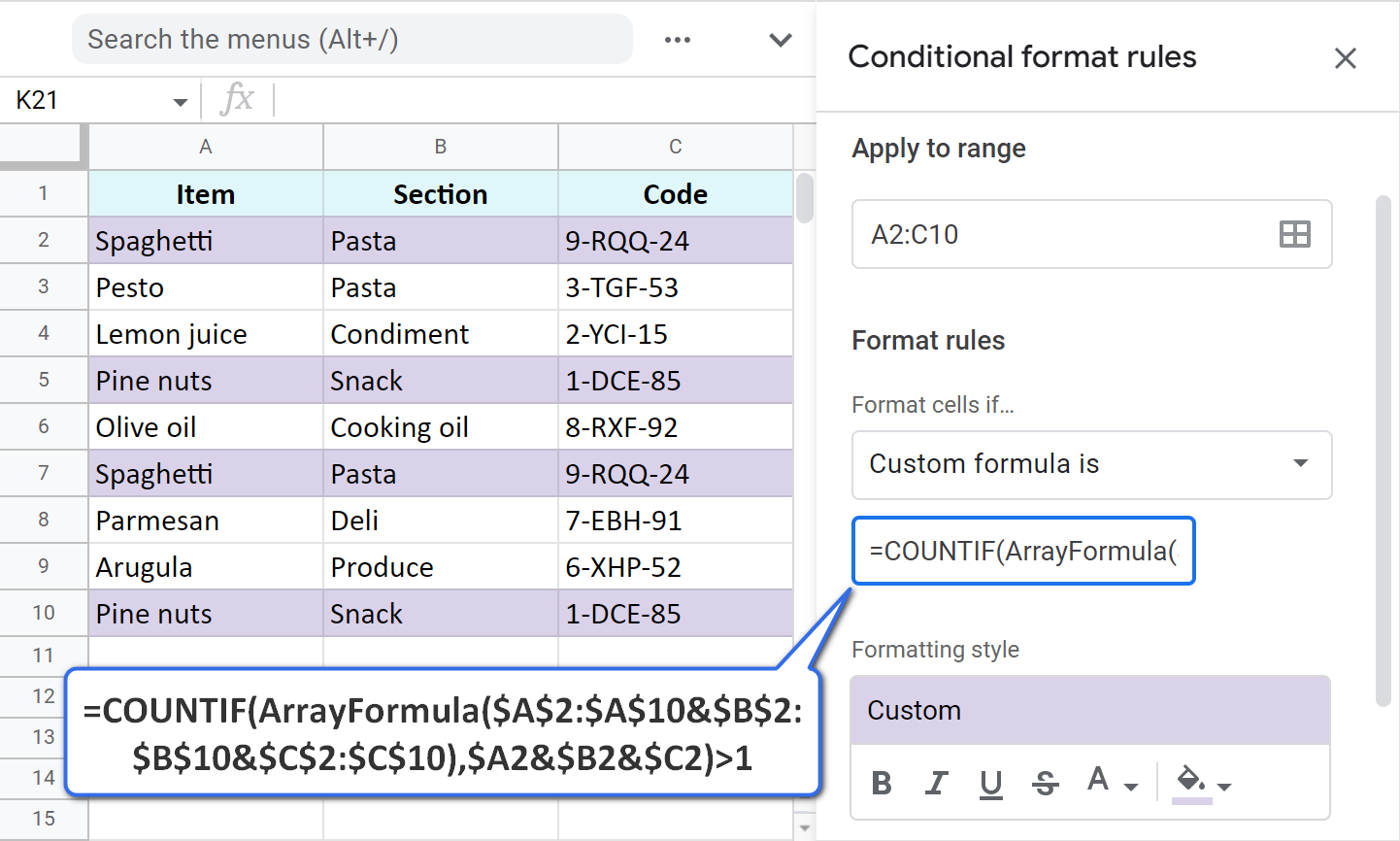
Web Feb 8 2023 nbsp 0183 32 Here s how to remove duplicate data in Google Sheets Click any cell that contains data Then select the Data tab gt Data cleanup gt Remove duplicates From the Remove duplicates window that appears select which columns you d like to include in your search for duplicate data Click Remove duplicates
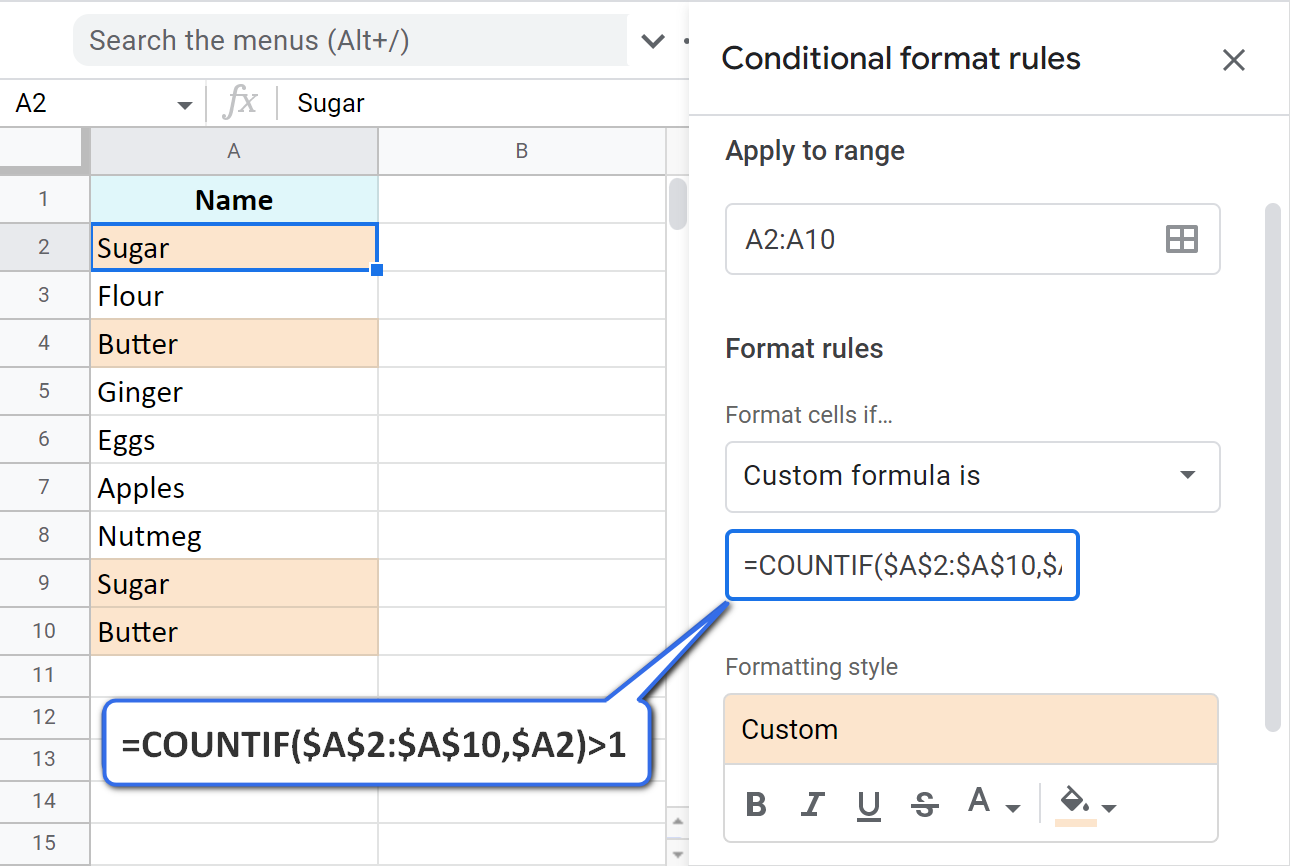
Web Jun 29 2022 nbsp 0183 32 Remove Duplicates Select cell range columns to search gt Data gt Data Cleanup gt Remove Duplicates UNIQUE function Select first cell in column for unique returns gt Insert gt Function gt Filter gt Unique Next Select search range gt press Enter gt Sheets will create new column table of unique entries

Web Mar 14 2022 nbsp 0183 32 Contents Method 1 How to remove duplicates with the Remove Duplicates tool Method 2 How to remove duplicates with formulas Method 3 How to find duplicates with Pivot Tables Method 4 How to highlight duplicates with Conditional Formatting Method 5 How to remove duplicates with Apps Script
Web Select the range you want to process and go to Extensions gt Remove Duplicates gt Quick dedupe Tip If you don t select your table before running the add on it will automatically pick up the used range cells with data till the first blank row amp column Tip You can also spot Quick Dedupe in the Dedupe amp Compare group in Power Tools Web Oct 16 2022 nbsp 0183 32 But you need not worry as you can easily remove duplicate entries from your Google Sheets spreadsheet Let us see some ways in which you can get rid of duplicates in Google Sheets Method 1 Using the Remove Duplicates Option Google Sheets has a built in option to remove entries that are repetitive duplicate entries
Web Dec 7 2018 nbsp 0183 32 There are two main ways to remove duplicates in Google Sheets use the Unique function or use an add on Open the spreadsheet you want to sort and click on an empty cell a few rows over from the data you want to de dupe Type UNIQUE into the formula box above the data Select all the cells you want to sort with the mouse and they