How To Remove Data Validation From A Cell In Excel How To Remove Data Validation From A Cell In Excel Valladares Rins1990 How To Remove Data Validation From A Cell In Excel Valladares Rins1990 How To Remove Data Validation From A Cell In Excel Valladares Rins1990 How To Remove Data Validation From A Cell In Excel Valladares Rins1990 How To Remove Data Validation From A Cell In Excel Valladares Rins1990 Web Dec 16 2017 nbsp 0183 32 3 Data Validation only checks whether the entered data is as per the rules list or not Since the Cell is editable that s the reason Excel allows you to Delete the entered data but not allowing to write out of the list If you don t allow the validated data to be deleted then you need to Disable the Delete key
Web Oct 12 2023 nbsp 0183 32 In your spreadsheet select the cells you want to use in the drop down list Either choose Data gt Validation from the menu bar or the Data Validation icon in the Data ribbon The Data Validation Web Sep 18 2018 nbsp 0183 32 How can I force Excel to disallow changing or removing the ID value in the 1st sheet as long as a corresponding ID value exists in the validated column in the 2nd sheet microsoft excel data validation
How To Remove Data Validation From A Cell In Excel Valladares Rins1990 Duncan s Diurnal Diatribe Remove Data Validation From A Cell In Excel How To Remove Data Validation In Google Sheets YouTube How To Apply Data Validation To Cells In Microsoft Excel Xl In Excel How To Remove Data Validation Restrictions In Excel 3 Ways Excel 5 Data Validation Cai Dat Rang Buoc Du Lieu Otosection Clear Remove Data Validation In Excel Google Sheets Automate Excel How To Set Up Data Validation Based On Another Cell In Google Sheets Use Validation Lists In Excel To Control User Input GilsMethod
How To Remove Data Validation From A Cell In Excel
 How To Remove Data Validation From A Cell In Excel
https://www.exceldemy.com/wp-content/uploads/2022/02/remove-data-validation-in-excel-5-767x632.png
Web Nov 25 2019 nbsp 0183 32 The following are my test steps 1 Create a sheet with Data Validation 2 On the Review tab click Protect Sheet 3 In the Allow all users of this worksheet to list select the elements you want people to be able to change 4 I checked the two options below and click OK
Pre-crafted templates offer a time-saving service for developing a diverse variety of documents and files. These pre-designed formats and layouts can be used for various individual and professional tasks, consisting of resumes, invitations, leaflets, newsletters, reports, discussions, and more, streamlining the content development procedure.
How To Remove Data Validation From A Cell In Excel
How To Remove Data Validation In Microsoft Excel YouTube
Duncan s Diurnal Diatribe Remove Data Validation From A Cell In Excel
How To Remove Data Validation In Google Sheets YouTube
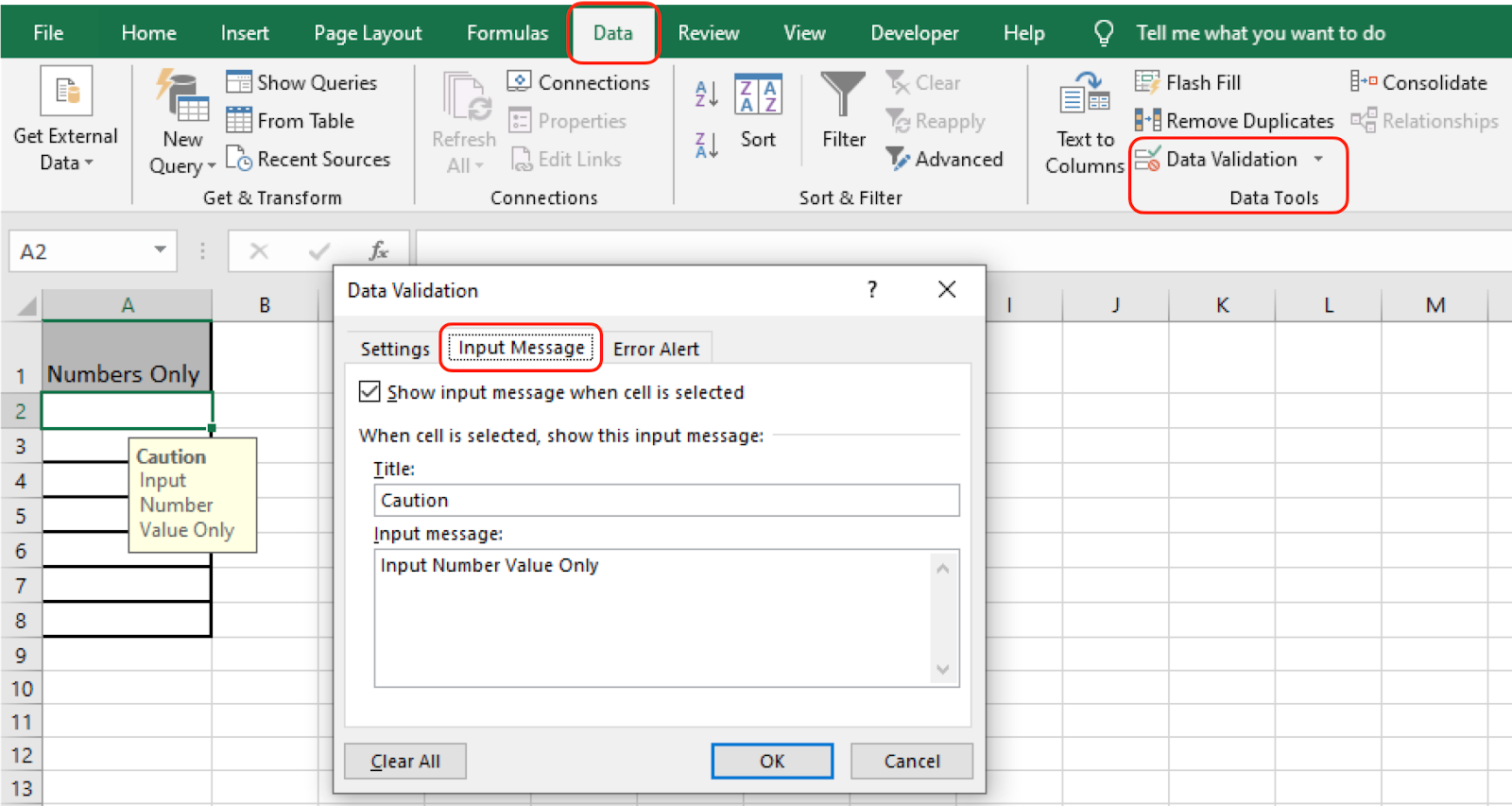
How To Apply Data Validation To Cells In Microsoft Excel Xl In Excel

Excel 5 Data Validation Cai Dat Rang Buoc Du Lieu Otosection
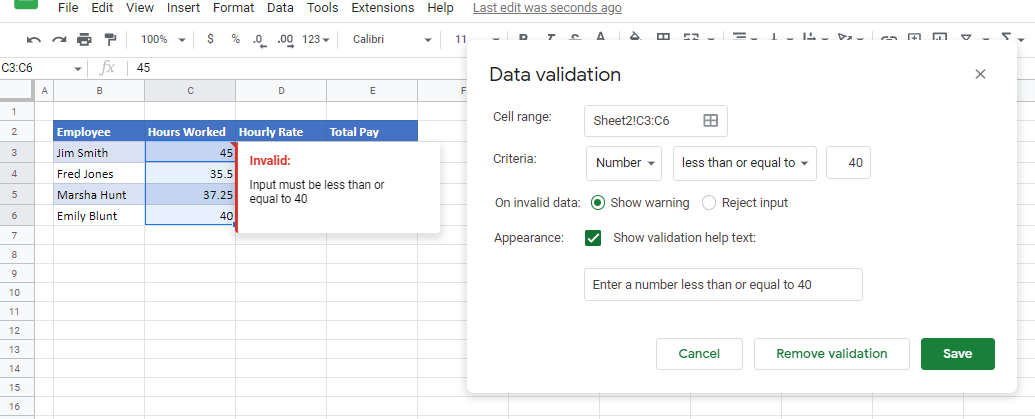
Clear Remove Data Validation In Excel Google Sheets Automate Excel

Web To remove a drop down list click the cell with the list then click Data gt Data Validation and then on the Settings tab click Clear All then OK A drop down list is also known as a drop down box or drop down menu

Web Oct 5 2023 nbsp 0183 32 1 Removing Data Validation Restrictions in Excel Regular Ways 1 1 Selecting Clear All Option 1 2 Allowing Any Values in Data Validation Criteria 2 Using Excel Paste Special Command to Remove Data Validation Restrictions 3 Applying VBA Codes to Remove Data Validation Restrictions in Excel Things to Remember Conclusion

Web Remove data validation Ways that users are notified about validation errors For a form that is designed to be filled out by using InfoPath you can set a data validation message to be displayed as a ScreenTip After viewing the ScreenTip your users can optionally display a detailed alert that you provide

Web Select an empty cell with no data validation and press Ctrl C to copy it Select the cells from which the data validation is to be removed Press Ctrl Alt V shortcut for Paste Special then press N shortcut for Data Validation Press Enter And Now the Data validations applied to the cells will be removed

Web May 26 2022 nbsp 0183 32 Remove Data Validation Selected Range Select the range of cells where the data validation is set In the Ribbon select Data gt Data Tools gt Data Validation gt Data Validation Click the Clear All button and then click OK There are now no data validation rules in the selected cells
Web Oct 5 2023 nbsp 0183 32 Here s how you can remove the data validation rule from a cell in Microsoft Excel Step 1 On the Excel spreadsheet select the cells you would like to remove data Web Jun 27 2023 nbsp 0183 32 The Step by Step Process of Removing Data Validation in Excel Using the Ribbon to Remove Data Validation in Excel Removing Data Validation from a Single Cell or Range of Cells Removing Data Validation from an Entire Worksheet or Workbook How to Delete Specific Data Validation Rules in Excel
Web Oct 13 2023 nbsp 0183 32 Bernie Deitrick Replied on October 12 2023 Report abuse Fill in what you want in the column next to the top two entries and then select the next cell and use Data Flash fill Excel will process all the entries based on