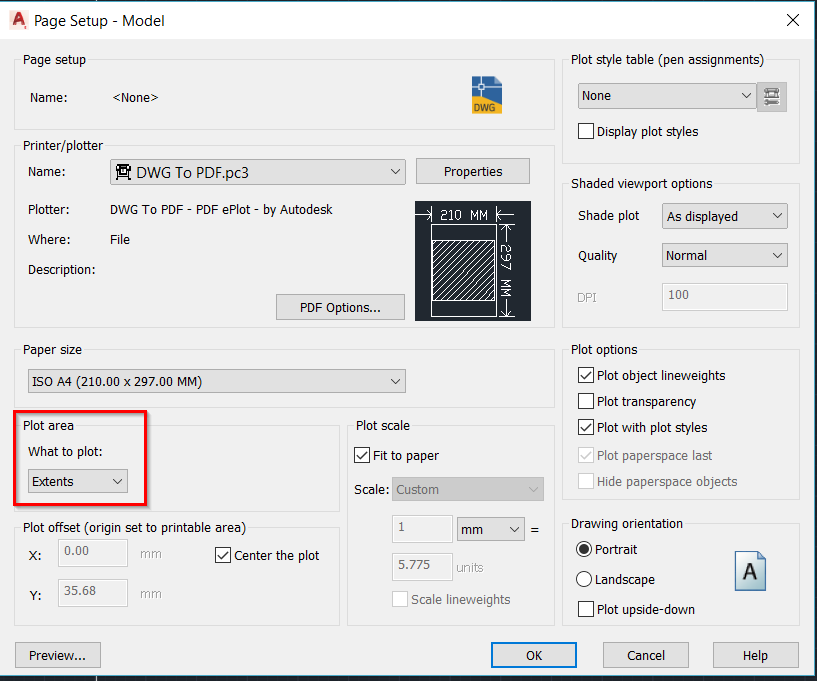
How To Plot Area In Autocad Publish Or Plot Using Extents Option For Plot Area Does Not Fill Up The Output Page Size In How To Setup Plot Area In Autocad For Mac Turkpin How To Calculate Floor Area Ratio FAR For A Building PARAM VISIONS How To Plot Area Chart In Seaborn AiHints How To PLOT PROPERTY BEARINGS In AutoCAD 2023 YouTube How to set up the plot area when using batch plot command PUBLISH in AutoCAD based products Follow these steps Open the options in AutoCAD based products and switch to tab Display Check option Display Layout and Model tabs Close the options with Ok Right click the model tab and choose Page Setup Click button Modify
Click the Add area option from the command line and then click on all the points making the boundary of room A and press enter key Now click on on the points making the boundary of room B and press enter again The final area of both regions will now show up on the command line as shown in the following image Click the layout tab for which you want to set the plot area and adjust the display From the click In the Page Setup Manager Page Setups area select the page setup that you want to modify Click Modify Layout Prints all objects within the printable area of the paper This option is only available from a layout tab Limits
How To PLOT PROPERTY BEARINGS In AutoCAD 2023 YouTube How To Draw Irregular Plot In AutoCAD Irregular Plot Design How To Plot Irregular Area In Map Singapore How To Draw Irregular Plot Area In AutoCAD AutoCAD Tips Tricks ReoCAD YouTube How To Make Bubble In Autocad Update New Abettes culinary How To Plot A Graph In Excel A Complicated Function Pitkse Apply Pattern Fills To Plot Area Of Charts In PowerPoint 2013 For Windows Majstrovstv Odtie Spojen How To Calculate Area In Draftsight O ak va Hypot za Prevl da Best Answer Fill Area Between Two Horizontal Lines
How To Plot Area In Autocad
https://help.autodesk.com/sfdcarticles/img/0EM3g000000diK7
Commands for Print or Plot Settings Learn how to create a layout scale views and plot a drawing
Pre-crafted templates use a time-saving solution for developing a varied series of files and files. These pre-designed formats and layouts can be made use of for different personal and professional tasks, including resumes, invites, flyers, newsletters, reports, discussions, and more, streamlining the content creation process.
How To Plot Area In Autocad

Floor Area Ratio FAR Formula And Calculation Guide WTN

How To Draw Irregular Plot In AutoCAD Irregular Plot Design How To Plot Irregular Area In
Map Singapore

How To Draw Irregular Plot Area In AutoCAD AutoCAD Tips Tricks ReoCAD YouTube
How To Plot A Graph In Excel A Complicated Function Pitkse
Apply Pattern Fills To Plot Area Of Charts In PowerPoint 2013 For Windows
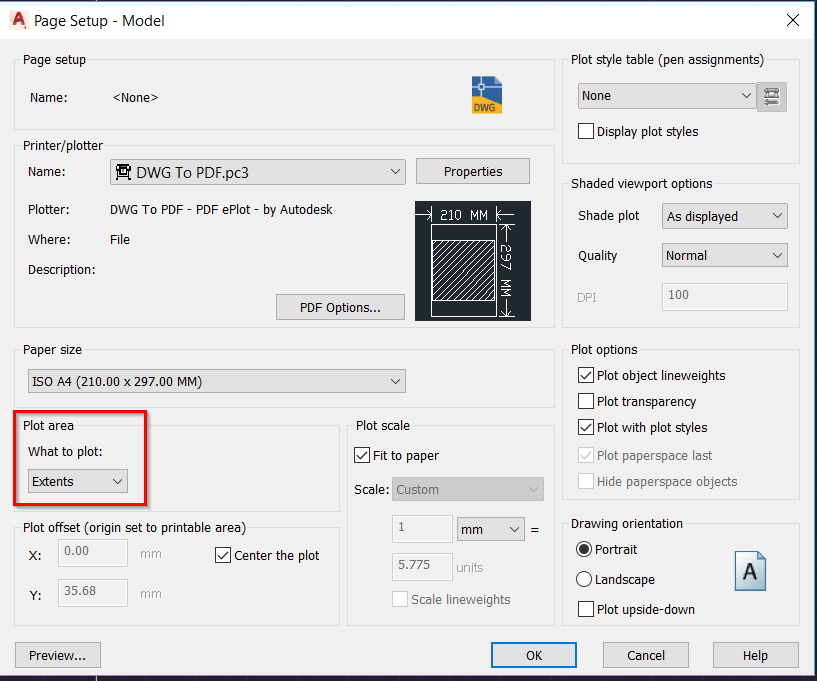
To Plot a Drawing Click Output tab Plot panel Plot Select a plotter Select paper size plot area plot scale orientation and other options For additional options click the More Options button Related Concepts About Adjusting the Plot Offset of a Layout Related Tasks To Set Plot Options To Adjust the Plot Offset of a Layout

Click the Window button to use a pointing device to specify opposite corners of the area to be plotted or enter coordinate values To set the drawing area as you plot Home tab Parent topic Plot Drawings When plotting a drawing you must specify the area of the drawing to plot The Plot dialog box provides the following options under Plot Area
.jpg?w=186 "How To Calculate Floor Area Ratio FAR For A Building PARAM VISIONS")
Plotting from model space If needed switch to the Model tab Go to Application Menu Print Plot default shortcut Ctrl P to open the Plot dialogue window In the Printer plotter section select a plotter from the drop down list Set the other plot options as needed Page size Drawing orientation Plot style table Plot offset
Press Enter Make sure that the Area option is selected The calculated area is displayed in the command window and in a dynamic tooltip If the results aren t visible press F2 to open the command window Another way to display the perimeter and area is using the Quick option of the MEASUREGEOM command
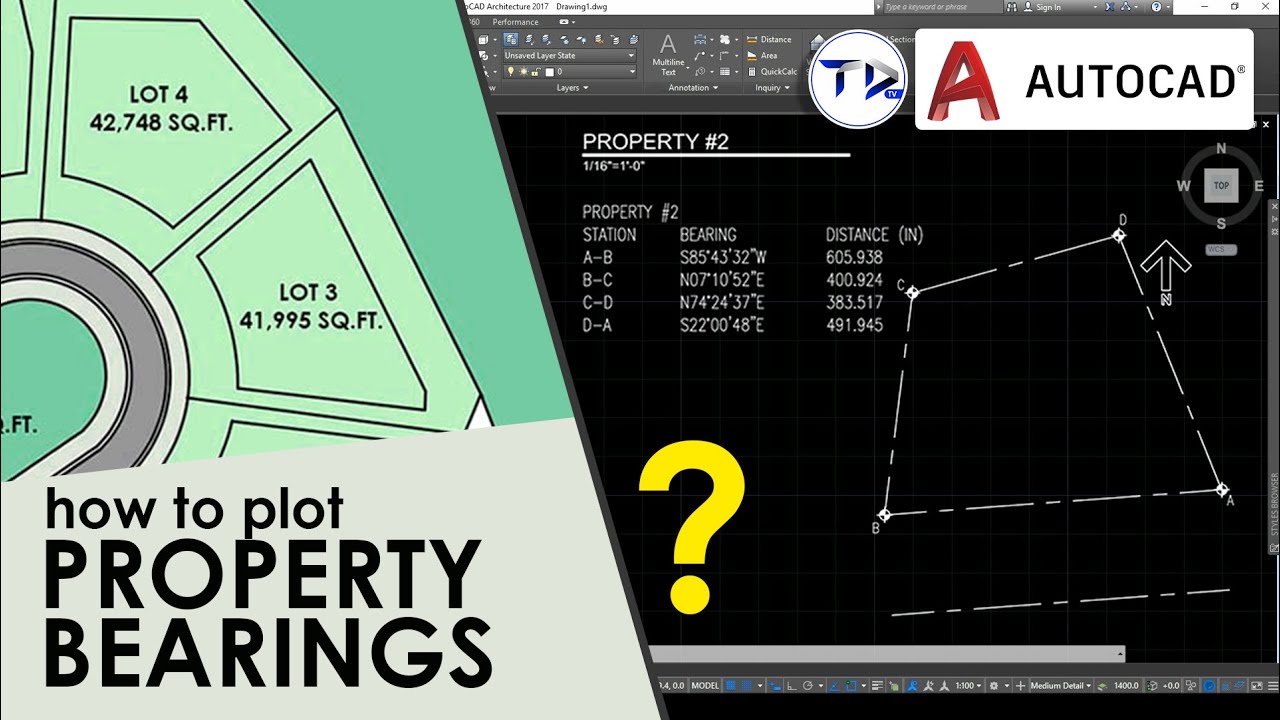
How to set plot area layout AutoCAD 2015 This video will guide you how to set plot area layout in AutoCAD 2015
Calculate Plot area using AutoCAD in 4 Minutes You can calculate the area for any shape plot regular or irregular by using provided ste How to set plot area in autocad Starting with this article which is the answer to your question How to set plot area in autocad CAD Elearning has what you want as free AutoCAD tutorials yes you can learn AutoCAD software faster and more efficiently here Millions of engineers and designers in tens of thousands of companies use AutoCAD
AutoCAD Plot a Drawing Layout Engineering World 31 6K subscribers Subscribe 114 Share 20K views 2 years ago Autodesk AutoCAD 2021 Essential Training Course Plot a Drawing Layout Learn how