How To Paste Data Horizontally In Excel How To Copy Horizontal Paste Vertical Or Vice Versa In Excel How To Center A Worksheet Horizontally And Vertically In Excel How To Paste Horizontal Data Vertically In Excel Excel Spy How To Center Worksheet Horizontally In Excel Black Haday1959 Correct Method To Paste Data Into Templates Indzara Support Web Select the cells that contain the data or other attributes that you want to copy On the Home tab click Copy Click the first cell in the area where you want to paste what you copied On the Home tab click the arrow
Web Nov 8 2012 nbsp 0183 32 You can use the Transpose option to paste Horizontal data to the Vertical using the same method It s a really simple tool that can save significant time and allow you to develop your worksheets without having Web Select the first cell where you want to paste the data and on the Home tab click the arrow next to Paste and then click Transpose Pick a spot in the worksheet that has enough
Correct Method To Paste Data Into Templates Indzara Support How To Paste Data As A Picture In A Sheet WPS Office Academy Learn How To Filter Data Horizontally In Excel YouTube How To Filter Data Horizontally In Excel How To Map Data Horizontally Using Formula In MS Excel 2016 Fabric Flower Tutorial How To Center A Page Horizontally In Excel SpreadCheaters How To Center Horizontally When Printing In Excel Master Your Tech 30 Excel Copy Value From One Cell To Another Formula PNG Formulas How To Center Contents Horizontally In Excel PostureInfoHub
How To Paste Data Horizontally In Excel
 How To Paste Data Horizontally In Excel
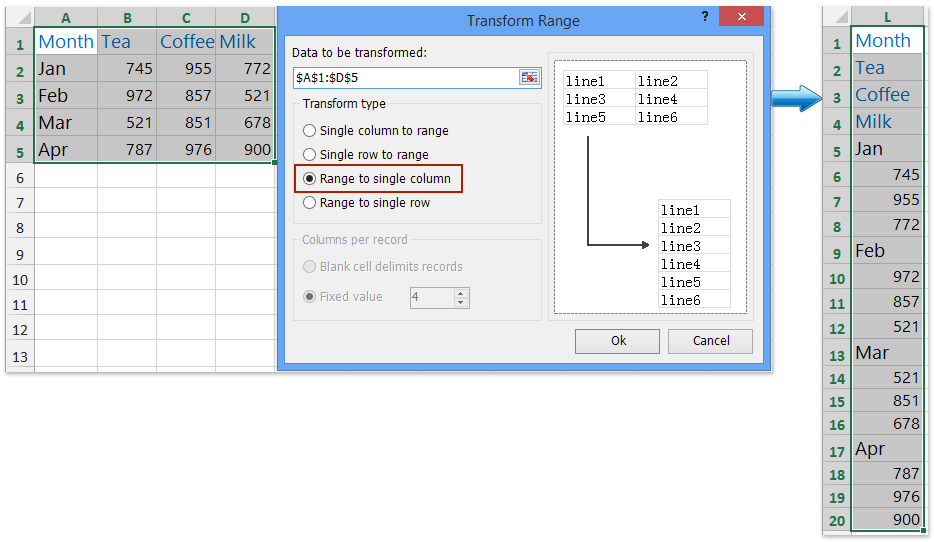
https://www.extendoffice.com/images/stories/doc-excel/copy-horizontal-paste-vertical/doc-copy-horizontal-paste-vertical-7.png
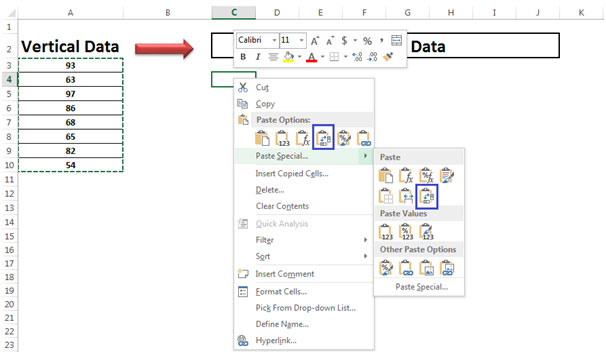
Web Oct 1 2023 nbsp 0183 32 1 Use Paste Option Microsoft Excel has a built in feature to copy and paste data horizontally and vertically This paste option is known as transpose Follow the instructions below to learn this simple
Templates are pre-designed files or files that can be used for various purposes. They can conserve time and effort by supplying a ready-made format and layout for developing various kinds of content. Templates can be used for personal or professional projects, such as resumes, invites, leaflets, newsletters, reports, discussions, and more.
How To Paste Data Horizontally In Excel
C mo Copiar Y Pegar Vertical Horizontal En Microsoft Excel 2010 Office skill

How To Paste Data As A Picture In A Sheet WPS Office Academy

Learn How To Filter Data Horizontally In Excel YouTube
How To Filter Data Horizontally In Excel
How To Center A Page Horizontally In Excel SpreadCheaters

How To Center Horizontally When Printing In Excel Master Your Tech
Web 1 Select the row you will copy horizontally right click and select the Copy from the right clicking menu See 2 Select the first cell of destination column right click and

Web Select the range of data you want to rearrange including any row or column labels and press Ctrl C Note Ensure that you copy the data to do this since using the Cut command or Ctrl X won t work Choose a new

Web Another way to copy data which is vertical amp paste ithorizontallyis by using the Transpose Function In cell C4 type TRANSPOSE A3 A10 using Ctrl Shift Enteron the keyboard This is how our output looks after
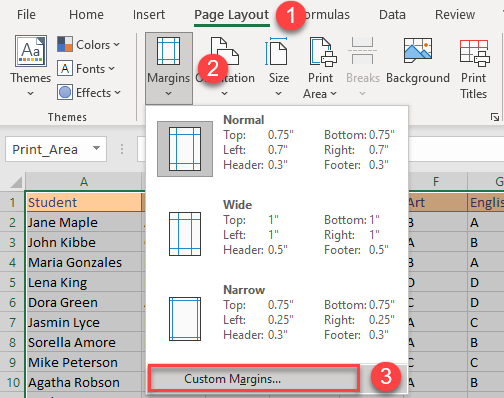
Web Jun 15 2023 nbsp 0183 32 To paste the data we can position ourselves on the destination cell and click CTRL P or right click in the cell and choose any of the pasting options One of
Web Aug 15 2020 nbsp 0183 32 How to copy vertical data and paste it horizontally in Excel Microsoft Excel is a spreadsheet developed by Microsoft for Windows macOS Android and iOS It
Web Mar 25 2022 nbsp 0183 32 How to copy horizontal paste vertical or vice versa in Excel ExtendOffice 1 69K subscribers Subscribe 2K views 1 year ago For example you need to copy a Web Mar 20 2023 nbsp 0183 32 Flip columns using formulas Reverse data order in columns with VBA Flip data preserving formatting and formulas How to flip data in Excel horizontally How to
Web This easy Excel Video is about pasting data in excel vertically and horizontally