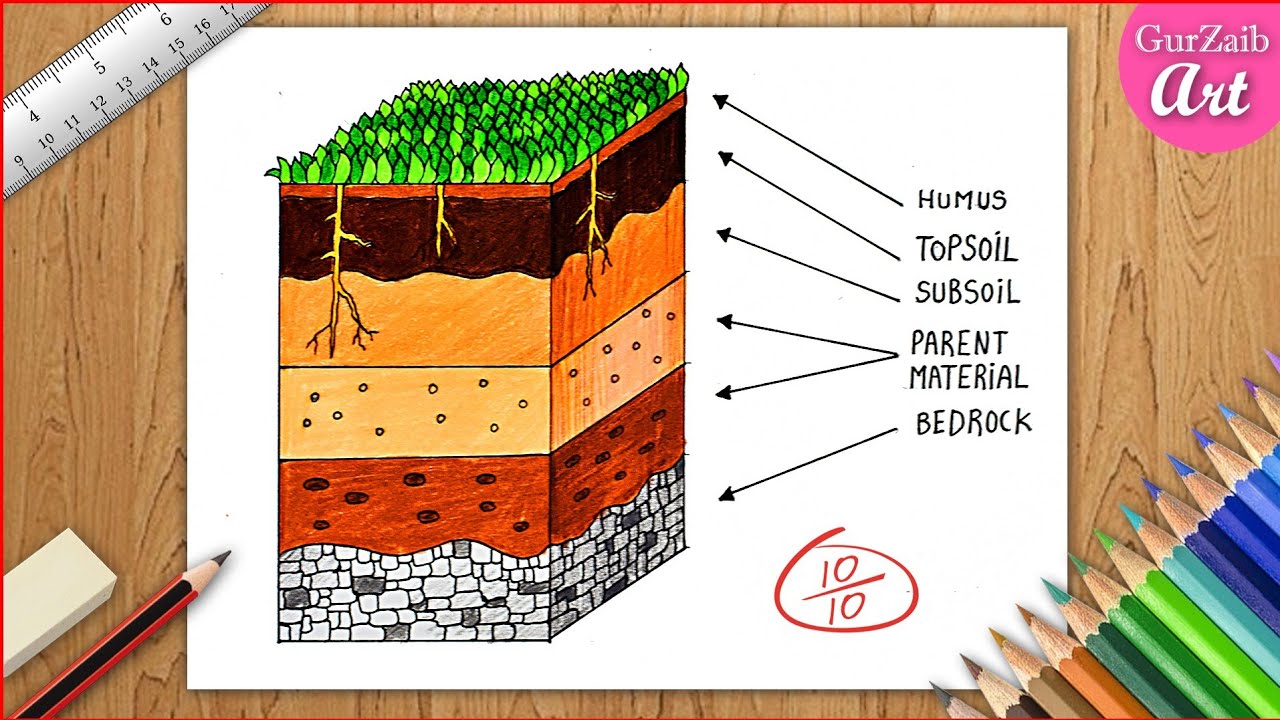
How To Label Soil Sample How To Draw Layers Of Soil Diagram Drawing Soil Profile Poster Chart Soil Profile Diagram Drawing Layers Of Soil How To Draw Soil Layer How To Draw Diagram Of Soil Profile Drawing Of Science Projects How To Draw Soil Layer Diagram Soil Profile Drawing Easy Layers Of Soil Investigation Lecture 01 Number Of Boreholes And Their Depth How to install Chrome Important Before you download check if Chrome supports your operating system and you ve met all other system requirements
To find any of these features tap your profile picture or initial Location Sharing Choose who can find your location and whose location you can find on Google Maps Settings Manage your Wi Cookies save browsing information to make your online experience easier Discover how to turn cookies on or off while using the Google Chrome browser
Soil Investigation Lecture 01 Number Of Boreholes And Their Depth How To Draw Layers Of Soil Diagram Drawing layers Of Soil Diagram YouTube Soil Profile Diagram How To Draw Soil Profile Soil Profile And Soil Samples Extension Manitowoc County Soil Profile Drawing how To Draw Soil Profile Easy 58 OFF Soil Sedimentation Test Ingridscience ca Soil Profile To Label WS1 PDF Worksheets Library Geography Worksheets Social Studies Worksheets Geography Animal Cell Worksheets Free Printable Cells Worksheet Animal Cells
How To Label Soil Sample
 How To Label Soil Sample
https://i.ytimg.com/vi/_LcU9obV47Y/maxresdefault.jpg
Learn how to change more cookie settings in Chrome For example you can delete cookies for a specific site In other browsers If you use Safari Firefox or another browser check its support
Pre-crafted templates offer a time-saving option for creating a diverse range of documents and files. These pre-designed formats and layouts can be used for different individual and professional tasks, consisting of resumes, invitations, leaflets, newsletters, reports, presentations, and more, simplifying the content production procedure.
How To Label Soil Sample

Soil Profile Drawing Layers Of Soil Diagram How To Draw Soil

How To Draw Layers Of Soil Diagram Drawing layers Of Soil Diagram YouTube

Soil Profile Diagram How To Draw Soil Profile Soil Profile And

Soil Samples Extension Manitowoc County

Soil Sedimentation Test Ingridscience ca

Soil Profile To Label WS1 PDF Worksheets Library
Sign in to Gmail Tip If you sign in to a public computer make sure to sign out before you leave the computer Learn how to sign in on a device that s not yours

Important Before you set up a new Gmail account make sure to sign out of your current Gmail account Learn how to sign out of Gmail From your device go to the Google Account sign in

Important When you create a Google Account for your business you can turn business personalization on A business account also makes it easier to set up Google Business Profile

To find your username follow these steps You need to know A phone number or the recovery email address for the account The full name on your account Follow the instructions to

Want advanced Google WoTo edit a document On your computer open a document in Google Docs To select a word double click it or use your cursor to select the text you want to change
[desc-11] [desc-12]
[desc-13]