How To Install Multiple Node Versions In Windows Using Nvm Windows Downgrade Node Js Version Installing Node LTS With The Latest NPM Using NVM Chris Wiegman Manage Multiple Node js Versions With NVM Leonardo Montini How To Install Node js With NVM On Windows LaptrinhX How To Install Multiple Node js Versions On MacOS M1 M2 Step 1 Head over to the nvm windows repository and click on Download Now You ll be taken to a page containing different versions of nvm windows Step 2 Click on the latest version to download it For now it is the April 28 2022 version Step 3 Locate the installer on your computer and open it Follow the installation wizard to install it
1 You can find the binary path to the npm and node when you are on specific node version by typing which node which npm and then run the node from its binary path like so in my pc home sina nvm versions node v14 17 3 bin node index js first project home sina nvm versions node v12 22 3 bin node index js second project Share Step 2 Install NVM Node Version Manager NVM is a tool that allows you to easily install and manage multiple versions of Node js on your computer With NVM you can switch between different versions of Node js with just a few commands making it easier to test your code on different versions or use different versions for different projects
How To Install Multiple Node js Versions On MacOS M1 M2 How To Switch Node js Versions With NVM LogRocket Blog Install And Manage Multiple Node js Versions Using nvm Install Nvm On Windows Ksemay How To Use Node Version Manager nvm For Windows To Handle Different Node versions Multiple Node Versions In MacOS SkillsHats How To Install And Switch Node js Versions With NVM RoseHosting How To Use Multiple Node Version TutsCoder Change Node Versions SOOS
How To Install Multiple Node Versions In Windows Using Nvm
 How To Install Multiple Node Versions In Windows Using Nvm
https://i.stack.imgur.com/6Fd2L.png
The quickest way for windows is to use the installer while for Linux MacOS you can use the curl command copy paste it into your terminal Usage Once installed you can use the nvm command in your terminal The first thing you need to do is to install the Node js version you want to use
Templates are pre-designed documents or files that can be used for numerous functions. They can conserve effort and time by providing a ready-made format and design for creating different sort of material. Templates can be utilized for personal or professional tasks, such as resumes, invitations, flyers, newsletters, reports, presentations, and more.
How To Install Multiple Node Versions In Windows Using Nvm

Nvm Install Node Windows Widebinger
How To Switch Node js Versions With NVM LogRocket Blog
Install And Manage Multiple Node js Versions Using nvm

Install Nvm On Windows Ksemay
Multiple Node Versions In MacOS SkillsHats
How To Install And Switch Node js Versions With NVM RoseHosting

First we need to do a little preparation uninstall any existing versions of Node delete any existing Node js installation directories such as C Program Files nodejs delete the existing

Run the installer and follow the installation steps We will explain it here in case you need it When running the executable you will have to accept the license agreement After that you should define the default installation path of NVM It s recommended to use the following directory USERPROFILE AppData Roaming nvm

Run the below command in your terminal brew install nvm After the installation finishes open your profile file nano bash profile or nano zshrc or nano profile or nano bashrc and add the following lines to it at the end export NVM DIR nvm source brew prefix nvm nvm sh
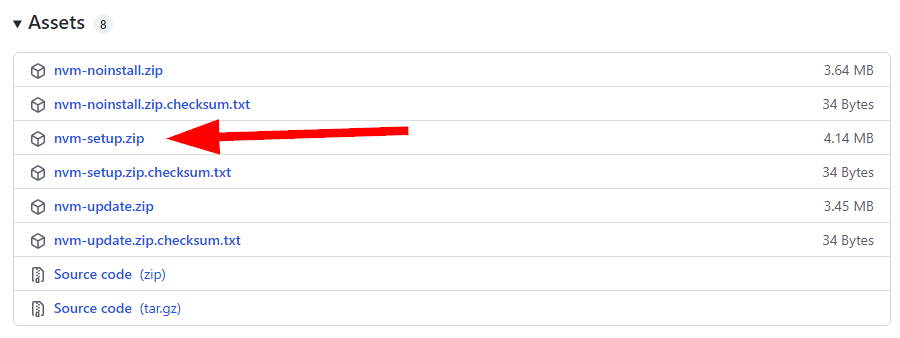
Open cmd with administrator rights and type the following node version Uninstall Node Press Windows Key and search for Add or remove programs Search node in the search box and click Uninstall by clicking the three dots Install NVM Download nvm setup exe from this link
Install Visual Studio Code Install Git Use Windows Subsystem for Linux for production If you are new to developing with Node js and want to get up and running quickly so that you can learn follow the steps below to install Node js directly on Windows Note
Using nvm Node js Version Manager makes it easier to install and manage multiple versions of Node js on a single local environment Even if you only need a single version of Node js right now we still recommend using nvm because it allows you to switch between different versions of Node depending on the requirements of your project with minimal hassle 7 Answers Sorted by 61 There are several node managers which you can use to achieve this but the most popular are NVM n Share Follow answered Dec 10 2011 at 9 01 alessioalex 62 8k 16 156 122 N seems really awesome but it doesn t seem to override my running version of node js
Using NVM Using NVM is simple let s take a look at some of the most common commands you ll use Installing a New NodeJS Version To install a new NodeJS version you can use one of the below commands To get the latest version you can run