How To Install Linux Mint Without Cd Or Usb How To Install Linux Mint 19 3 Cinnamon With Manual Partitions Linux Instalar Linux Mint Sem Cd Ou Pendriver Install Linux Mint Without Cd How To Install Linux Mint Step By Step Guide Install Linux Mint With Windows 11 Dual Boot Complete Guide How To Install Linux Mint 20 1 On Laptop Or Desktop TechViewLeo [desc-7]
[desc-6] [desc-8]
How To Install Linux Mint 20 1 On Laptop Or Desktop TechViewLeo How To Install Linux Mint 19 From USB Drive Linux Hint Install Linux Ubuntu 11 04 Without USB And CD Or Virtualbox Full How To Install Linux Mint Step By Step Guide Lab Setup Part 5 Install Linux Mint As A Virtual Machine Step By Step Guide Can I Install Windows 7 Without CD Or USB CodezClub How To Install Linux Mint On HP 15q From USB Infofuge Install Linux Mint 19 From A Bootable USB Drive H2S Media How To Install Linux On A Mac Linux Embedded Linux Used Macbook Pro
How To Install Linux Mint Without Cd Or Usb
 How To Install Linux Mint Without Cd Or Usb
https://i.ytimg.com/vi/I67NvWZhSEM/maxresdefault.jpg
[desc-9]
Templates are pre-designed documents or files that can be utilized for various functions. They can conserve time and effort by supplying a ready-made format and design for creating various sort of content. Templates can be utilized for individual or expert projects, such as resumes, invitations, flyers, newsletters, reports, discussions, and more.
How To Install Linux Mint Without Cd Or Usb

How To Install Linux Mint 9 KDE TOP SHARE YouTube
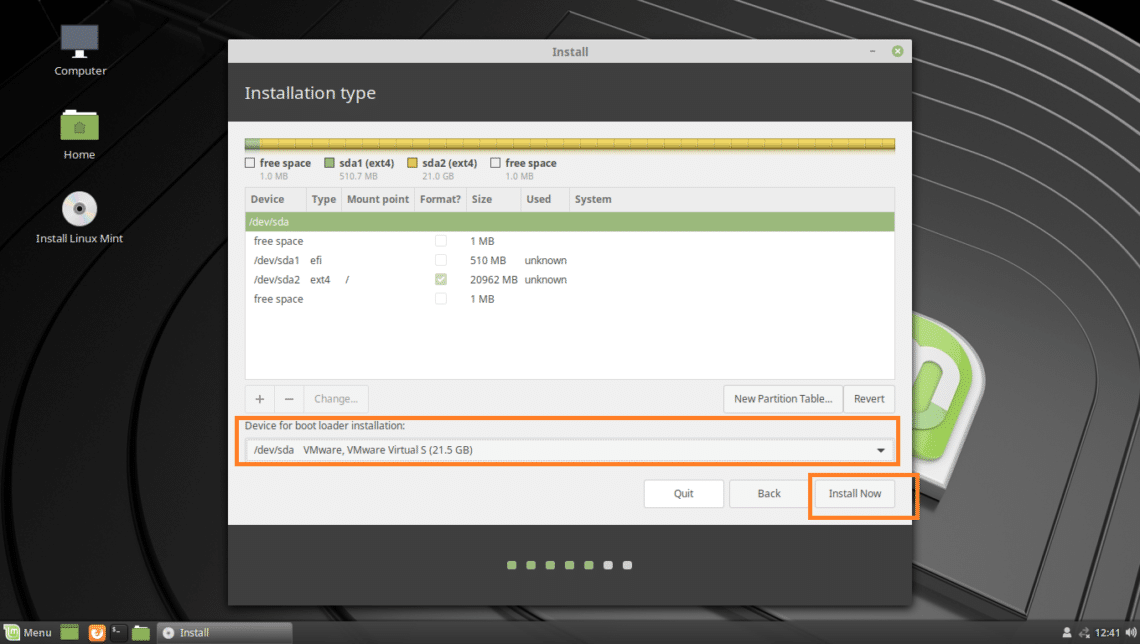
How To Install Linux Mint 19 From USB Drive Linux Hint

Install Linux Ubuntu 11 04 Without USB And CD Or Virtualbox Full

How To Install Linux Mint Step By Step Guide Lab Setup Part 5

Can I Install Windows 7 Without CD Or USB CodezClub

How To Install Linux Mint On HP 15q From USB Infofuge
1 Closed This question needs to be more focused It is not currently accepting answers Want to improve this question Update the question so it focuses on one problem only by editing this post Closed 6 years ago Improve this question I want to install Kali and have that as my only operating system but I don t have a USB how can I do this
Hi I want to do a full install to an external usb drive without affecting the internal windows drive There is an internet opinion that marking boot to will do the trick but reader comments to that suggest that this does not work
Click Open Leave all the settings as default as shown below Partition scheme should be MBR Target System should be BIOS or UEFI You can label your drive under Volume Label Be sure that File
Reboot your computer after the USB drive is ready You ll need to set your computer to boot from the USB drive The process for this varies from computer to computer

[desc-5]
[desc-11] [desc-12]
[desc-13]