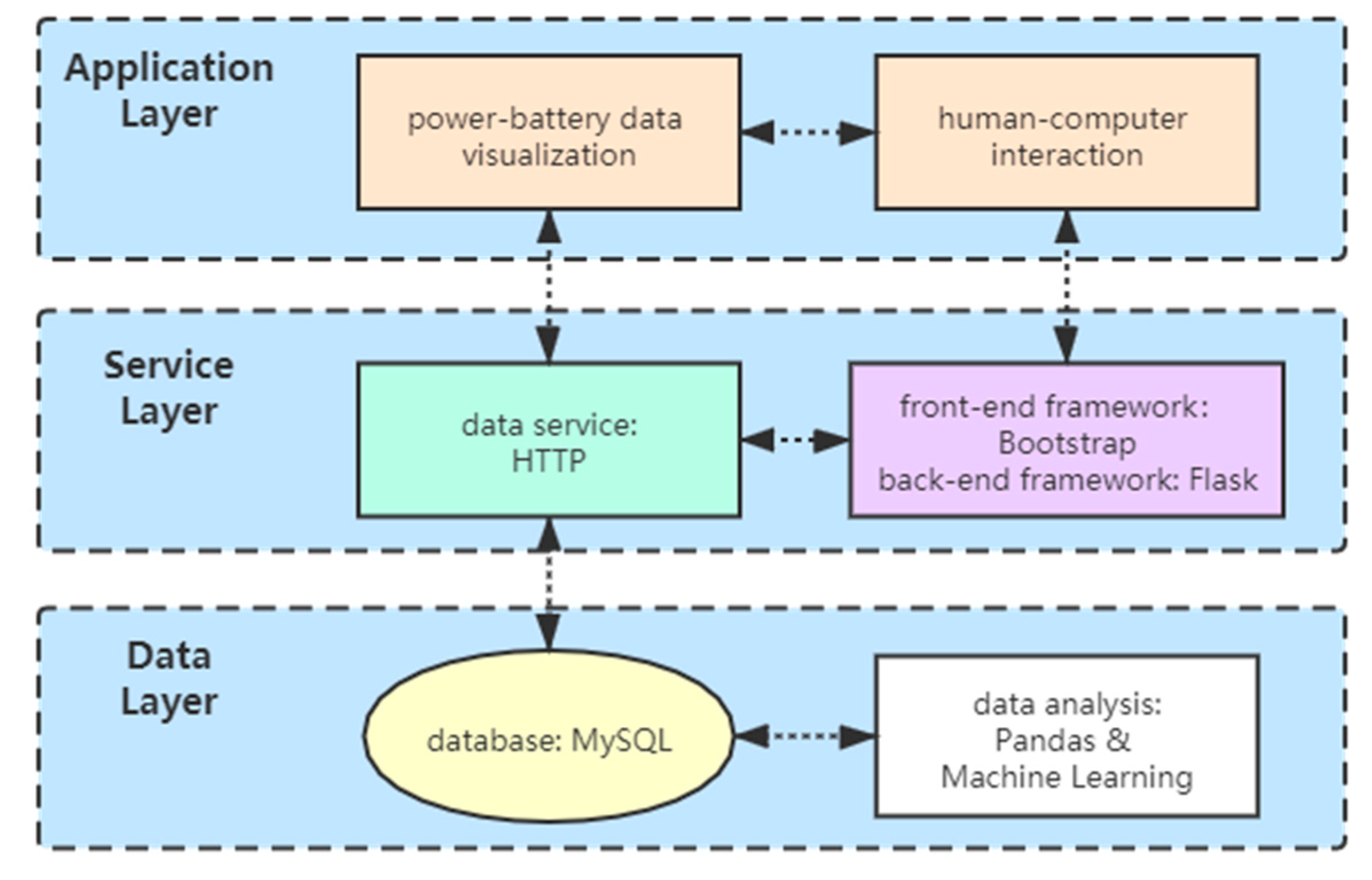
How To Install Flask Module In Visual Studio Code flask app run How To Install Flask In Visual Studio Code YouTube How To Install Flask On Ubuntu 18 04 With UWSGI Nginx On Google Cloud WEVJ Free Full Text Data Analysis And Visualization Platform Design How To Connect To A PostgreSQL Database In Visual Studio Code To define unit tests you need to open Code s command palette using Ctrl Shift P Windows Linux or Cmd Shift P Mac In the command palette you can type tests to search and filter the long list of available functions Once you locate the function Python Discover Tests select it The Discover Tests function will detect that unit testing
In this tutorial we will learn how to install flask and set up a development environment for Flask in Visual Studio Code 1 Flask is a lightweight python fr How to Install Flask in Visual Studio Code with Sample API The Code City 7 52K subscribers Subscribe 0 No views 1 hour ago python flask restapi In this video I ll show you how
How To Connect To A PostgreSQL Database In Visual Studio Code Install Framework Flask Python Di Visual Studio Code Ilmuendah Python And Flask Tutorial In Visual Studio Code Select Matching Element rename HTML Tag In Visual Studio Code Gang Of How To Sync Visual Studio Code Settings Images Visual Studio Code Forge Visual Studio Code Autodesk Forge Download Flask Installation And Setup In Visual Studio Code Flask In Webgl fundamentals webgl qna how to get code completion for webgl in
How To Install Flask Module In Visual Studio Code
 How To Install Flask Module In Visual Studio Code
https://www.pianshen.com/images/987/b8d89b9d5032e1207fdfdecc52e8d13b.png
Setting Up a Flask Application in Visual Studio Code Miguel Grinberg 13 8K subscribers Subscribe Subscribed 397 24K views 4 years ago This is a demonstration of how to set up a Flask
Pre-crafted templates offer a time-saving solution for developing a diverse series of files and files. These pre-designed formats and designs can be utilized for different personal and expert jobs, including resumes, invites, flyers, newsletters, reports, presentations, and more, simplifying the material production process.
How To Install Flask Module In Visual Studio Code

Python Flask Tutorial For Beginners Full Course In 3 Hours 2020
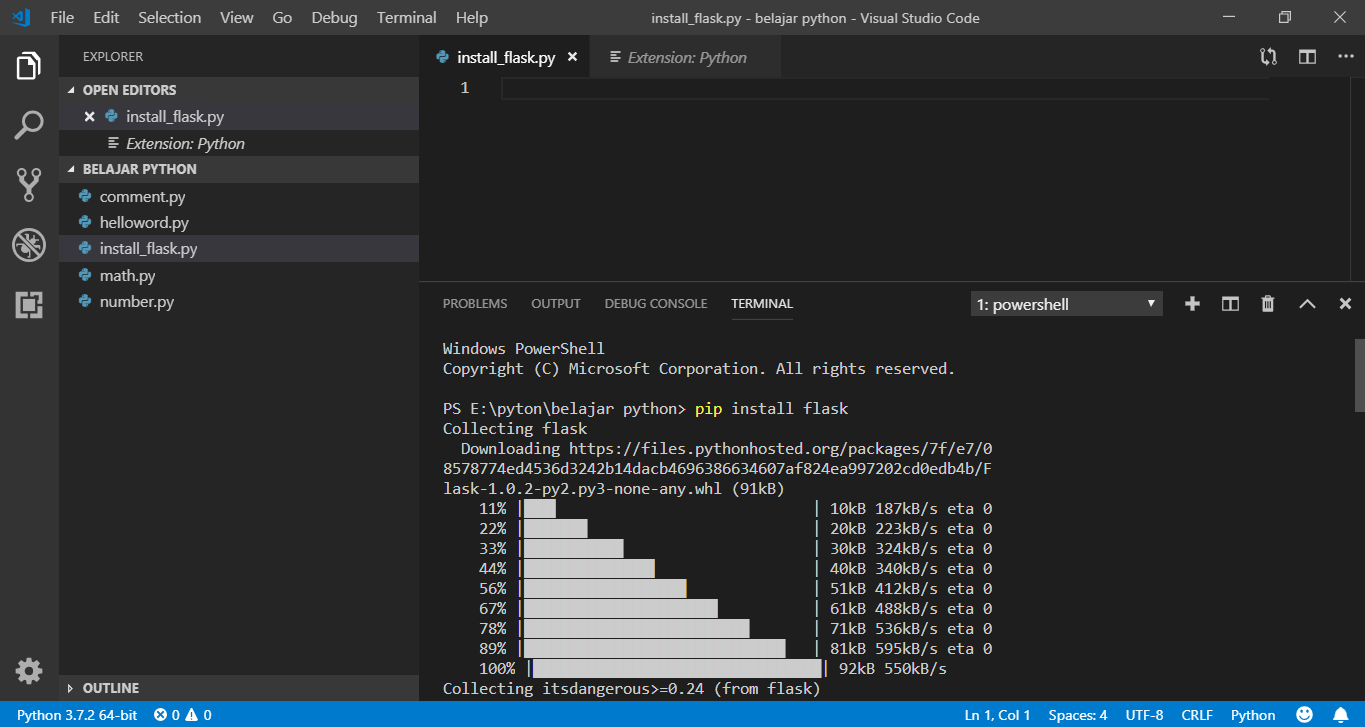
Install Framework Flask Python Di Visual Studio Code Ilmuendah

Python And Flask Tutorial In Visual Studio Code

Select Matching Element rename HTML Tag In Visual Studio Code Gang Of

Visual Studio Code

Forge Visual Studio Code Autodesk Forge

How to Install and Run Flask in VS Code Navigate this page hide Step 1 Install Python Step 2 Open a new project folder Step 3 Install a new virtual environment Step 4 Install Flask Step 5 Create a web page with Flask Step 6 Run the Flast application Flask is a Python web application framework used to create websites and APIs
Step 1 1 Create a Visual Studio project and solution Step 1 2 Examine the Git controls and publish to a remote repository Step 1 3 Create the virtual environment and exclude it from source control Show 3 more Flask is a lightweight Python framework for web applications that provides the basics for URL routing and page rendering

Select Flask from the dropdown and VS Code will populate a new code launch json code file with a Flask run configuration
Select the View Other Windows Python Environments menu command The Python Environments window opens as a peer to Solution Explorer and shows the different environments available to you The list shows both environments that you installed using the Visual Studio installer and environments you installed separately

Step 1 Install Python Before installing Flask we need to install Python on our Windows machine Go to the official Python website and download the latest version of Python for Windows Once the download is complete run the installer and follow the instructions to install Python on your system
1 The Problem I have moved over to Visual Studio Code in order to try to learn to program in a real IDE however I am low in experience What I have done I have done the following to get it up and running Installed VS Code Python Postgres PGAdmin pip I have Changed the path of python following a tutorial Step 2 1 Refactor the project to support further development Step 2 2 Use a template to render a page Next steps Go deeper Applies to Visual Studio Visual Studio for Mac Visual Studio Code Previous step Create a Visual Studio project and solution In step 1 of this tutorial you created a Flask app with one page and all the code in a
How to install Flask in visual studio code Check out the complete code on https medium thetechsatsang how to install flask in visual studio code 57122