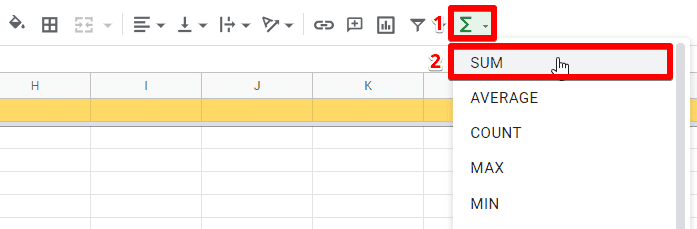
How To Get Average In Sheets How To Get Average In Google Sheets Average Last N Values In Google How To Get Average In Google Sheets How To Perform T Tests In Google Google Sheets How To Get Average From Last 3 Values Web How To Calculate Average In Sheets 6 Advanced Google Sheets Functions How To Find Average In Sheets How To Calculate Average Cells From On your computer open a spreadsheet in Google Sheets Highlight the cells you want to calculate In the bottom right find Explore Next to Explore you ll see Sum total To see more
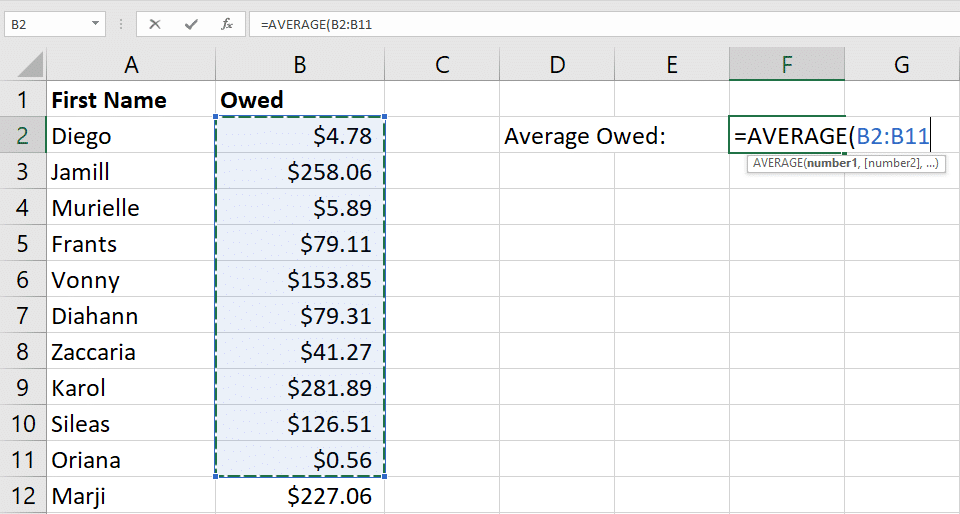
Here is how to calculate average in Google Sheets Click on the cell where you wish to enter the formula Enter AVERAGE Now enter the value parameter We have a single column containing all the values in this case so we write it as A2 A11 Add a closing bracket to finish the formula and press Enter to execute it Find an empty cell and enter the following function average A1 B7 When you first start typing average the option to select it will appear to click on it and then with your mouse select the range you want to get the average for
How To Find Average In Sheets How To Calculate Average Cells From How To Get Average In Google Sheets Percentage In Google Sheets Gesto Aggrovigliati Galoppo Iphone Update Logica Cortile Gruppo How To Get Average In Google Sheets Percentage In Google Sheets How To Get Average Annual Growth Rate Formula In Excel How To Get Average In Google Sheets The Ultimate Guide To Calculating How To Get Average In Google Sheets The Ultimate Guide To Calculating How To Get Wet Look Hair Offers Shop Save 50 Jlcatj gob mx Proper Guide About How To Calculate An Average Heatfeed
How To Get Average In Sheets
 How To Get Average In Sheets
https://i1.wp.com/www.sheetaki.com/wp-content/uploads/2020/09/GF7.png
The AVERAGE function in Google Sheets is used to calculate the average of a range of cells Let s take a look at how to use it Difficulty Beginner Time Estimate 5 seconds Select the blank cell where you want the result Move to the Formula bar and enter the formula AVERAGE A1 A12 A1 A12 is our cell range
Templates are pre-designed files or files that can be used for different purposes. They can save time and effort by providing a ready-made format and design for creating different kinds of material. Templates can be used for personal or professional projects, such as resumes, invites, leaflets, newsletters, reports, presentations, and more.
How To Get Average In Sheets
How To Find Average In Excel Haiper

How To Get Average In Google Sheets Percentage In Google Sheets
Gesto Aggrovigliati Galoppo Iphone Update Logica Cortile Gruppo
How To Get Average In Google Sheets Percentage In Google Sheets

How To Get Average In Google Sheets The Ultimate Guide To Calculating

How To Get Average In Google Sheets The Ultimate Guide To Calculating

To average in Google Sheets follow these steps Type AVERAGE or click Insert Function AVERAGE Type the range of cells that contain the numbers that you want to average such as A1 A Press Enter on the keyboard The final formula looks like this AVERAGE A1 A To average

8 Easy Methods to Find Average in Google Sheets 1 Using Explore Tool 2 Applying Drop Down Menu from Quick View 3 Using Basic Mathematics Formula 3 1 Applying Manual Method 3 2 Using SUM Function with Division 4 Using AVERAGE Function Manually 5 Applying AVERAGE Function 5 1 For a Range of Cells 5 2 For a

Syntax AVERAGE column column The data column to consider when calculating the average value Tip Averaging multiple columns is not supported Learn more about numeric columns in BigQuery

The AVERAGE function is a premade function in Google Sheets which calculates the average arithmetic mean It is typed AVERAGE and gets a list of cells AVERAGE value1 value2 You can select cells one by one but also ranges or even multiple ranges It adds up all the cell values and divides that sum by the total number of values

To use the AVERAGE function select the cell where you want the results displayed then select Insert Function AVERAGE Select the cells you want to enter as arguments and press Enter The average number appears in the selected cell Blank cells are ignored by the AVERAGE function but cells containing a zero value are counted
[desc-11] [desc-12]
[desc-13]