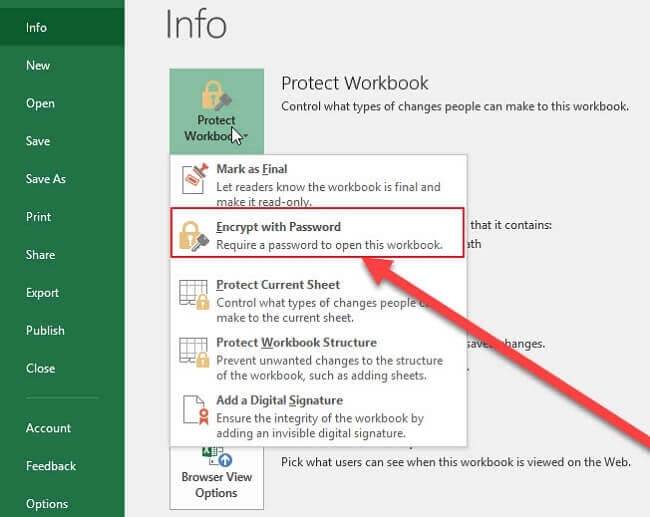
How To Encrypt Values In Excel Excel Protection How To Encrypt Excel Files On Windows Mac EaseUS How To Encrypt Your Data Software Business IT How To Encrypt Microsoft Excel Documents YouTube How To Encrypt A File Microsoft Excel YouTube How To Encrypt Your Data And Protect Your Security Online Our Code World Step 1 Open Your Excel File Start by opening the Excel file you wish to encrypt Step 2 Password Protection Click on File in the upper left corner of the Excel window Select Info from the left hand menu Click on Protect Workbook and choose Encrypt with Password Step 3 Set a Strong Password
Lock only specific cells and ranges in a protected worksheet Follow these steps If the worksheet is protected do the following On the Review tab click Unprotect Sheet in the Changes group Click the Protect Sheet button to Unprotect Sheet when a worksheet is protected If prompted enter the password to unprotect the worksheet 466 views 1 year ago Excel Tips Tricks Supposing you have a workbook which contains some important information couldn t be viewed by others In this case you would like to encrypt the cell
How To Encrypt Your Data And Protect Your Security Online Our Code World PDF Encrypt Search Encrypt The Privacy Based Search Engine With Images Search Data Encryption How To Encrypt Excel File 2019 2016 TechnoWikis How To Encrypt And Decrypt Data Into Excel Sheet YouTube How To Encrypt Excel Workbook YouTube Excel Password Protection And Encryption In VB NET EasyXLS Guide Encrypt Excel Files Using Microsoft Excel In Mac OS X University Of
How To Encrypt Values In Excel
 How To Encrypt Values In Excel
https://toolbox.easeus.com/images/toolbox/file-lock/microsoft-encrypt-excel-files.jpg
How to Encrypt Data in Excel Sensitive Data In Excel Encrypting data in Excel is a simple process Here are the steps to follow 1 Open the Excel file that you want to encrypt
Pre-crafted templates offer a time-saving solution for creating a diverse range of files and files. These pre-designed formats and layouts can be made use of for various personal and professional tasks, including resumes, invites, leaflets, newsletters, reports, discussions, and more, improving the content production process.
How To Encrypt Values In Excel

Encryption Of Confidential Numbers In Excel YouTube
PDF Encrypt

Search Encrypt The Privacy Based Search Engine With Images Search
Data Encryption
How To Encrypt And Decrypt Data Into Excel Sheet YouTube

How To Encrypt Excel Workbook YouTube

To learn the difference between protecting your Excel file workbook or a worksheet see Protection and security in Excel Select File Info Select the Protect Workbook box and choose Encrypt with Password Enter a password in the Password box and then select OK Confirm the password in the Reenter Password box and then select OK

1 Open the sheet containing the data you want CellShield to encrypt Note that only some of the encryption routines available in IRI FieldShield including format preserving encryption are supported in CellShield 2 Select the range of cells to encrypt 3 Click on the CellShield tab in the Excel ribbon 4

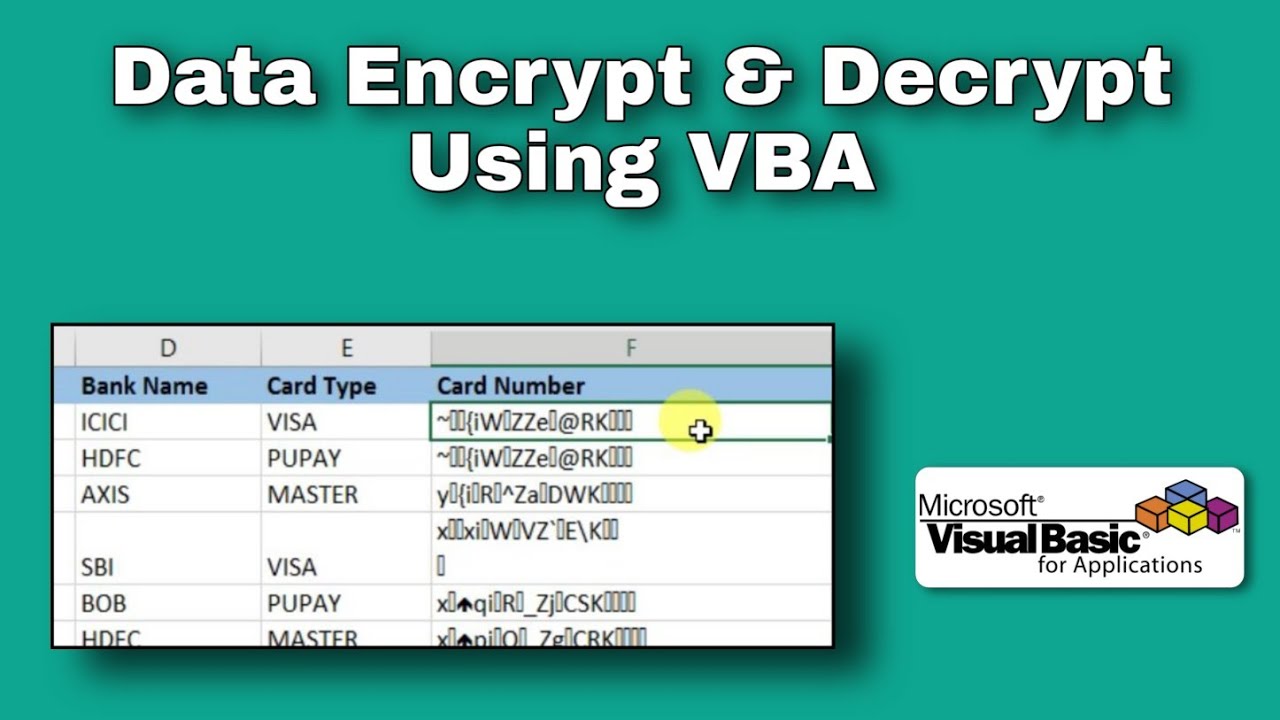
1 Press Alt F11 keys to display Microsoft Visual Basic for Applications window 2 Click Insert Module and paste below VBA code to the new Module window VBA Encrypt or decrypt selected cells
Setting a password to open or modify a file You specify a password to open or modify a file Use this option when you need to give Read only or edit access to different users For more information see Protect an Excel file

Encrypt a Workbook with a Password For the best protection you can encrypt the file with a password Whenever someone tries to open the document Excel prompts them for a password first To set it up open your Excel file and head to the File menu You ll see the Info category by default
Yes you can encrypt an already existing Excel file by using the steps outlined in the article After opening the file click on the File tab choose Info from the menu to open the file information page then click on the Protect Workbook button and select Encrypt with Password and finally entering the password you want 1 Please select the cells which have been encrypted with Encrypt Cells 2 Click Kutools Plus Decrypt Cells to apply this utility See screenshots 3 Type in the password and click OK You will see the encrypted cells values become as follows see screenshots GIF Easily encrypt and decrypt selected cell values or contents in Excel
1 i want to encrypt numeric data ie 1 a 2 b 3 c 0 j now for number 123 i want return values as abc can anybody please help urgent Excel Facts Format cells as currency Click here to reveal answer 1 2 Next Sort by date Sort by votes C Comfy Well known Member Joined Dec 21 2009 Messages 3 386 Feb 23 2016 2 Try this