How To Enable Ssh In Linux Ubuntu Kisteheraut Piros Inspir l Enable Root Login Ssh Mosoda Kir lyi Csal d t H z How To Enable SSH In Ubuntu 20 04 Install Ssh Server YouTube Enable SSH On Ubuntu 22 04 Jammy Jellyfish Linux Linux Tutorials Learn Linux Configuration Szalv ta rtalmatlan tani Vend gszeretet Enable Root Login Ubuntu Megel z s Gy m lcs Z lds gf l k t Linux Commands With Examples And Syntax Pdf Canadian Examples User Tutorials This quick tip shows how to enable Secure Shell SSH service in Ubuntu 20 04 LTS both desktop and server to allow secure remote login and other network communications Ubuntu includes OpenSSH a suite of secure networking utilities based on the Secure Shell protocol in its main repositories
In order to install a SSH server on Ubuntu 20 04 you need to have sudo privileges on your server Note there are no practical differences between adding a user to sudoers on Ubuntu and Debian To check whether you have sudo privileges or not you can launch the following command sudo l Learn how to set up an SSH server on an Ubuntu system so that you can connect to the server remotely from your PC Chris Patrick Carias Stas 05 Sep 2023 6 min read SSH has become the default method of accessing a remote Linux server these days
Linux Commands With Examples And Syntax Pdf Canadian Examples User Tutorials Redhat Disable Firewall Start Stop Enable Disable Linux Tutorials Learn Linux Configuration How To Enable SSH In Kali Linux How To Connect To Kali Linux Via SSH Ethical Hacking And How To Enable SSH On Kali Linux System Administrator DevOps Ethical Penetration Tester How To Set Up And Use SSH In Linux Make Tech Easier How To Install Configure And Enable SSH Service In Linux Linux Port Forwarding Digital How To Enable SSH Root Login On Ubuntu 16 04 Step By Step How To Enable SSH In Ubuntu How To Enable SSH On Linux Ubuntu Easy Step By Step Guide YouTube
How To Enable Ssh In Linux Ubuntu
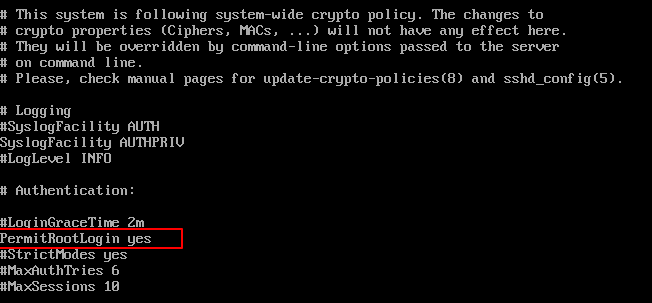 How To Enable Ssh In Linux Ubuntu
https://www.tecmint.com/wp-content/uploads/2012/11/Enable-Root-Login-in-Linux.png
Install SSH on Ubuntu Before you install the server package ensure your system is up to date with sudo apt update sudo apt upgrade Install the OpenSSH server package with sudo apt install y openssh server If you need to set up the OpenSSH client on older systems you can use sudo apt install openssh client Verify the installation by running
Pre-crafted templates offer a time-saving option for creating a diverse series of documents and files. These pre-designed formats and layouts can be utilized for various individual and expert projects, consisting of resumes, invitations, leaflets, newsletters, reports, presentations, and more, improving the content development process.
How To Enable Ssh In Linux Ubuntu
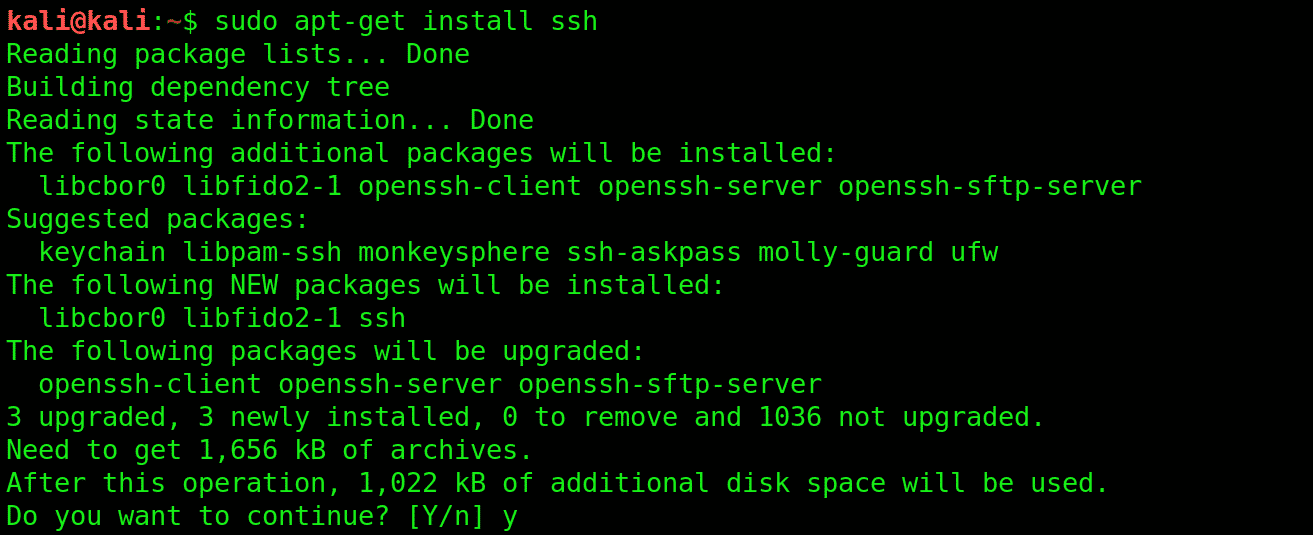
How To Enable SSH In Kali Linux 2020 Kirelos Blog

Redhat Disable Firewall Start Stop Enable Disable Linux Tutorials Learn Linux Configuration

How To Enable SSH In Kali Linux How To Connect To Kali Linux Via SSH Ethical Hacking And

How To Enable SSH On Kali Linux System Administrator DevOps Ethical Penetration Tester

How To Install Configure And Enable SSH Service In Linux Linux Port Forwarding Digital

How To Enable SSH Root Login On Ubuntu 16 04

1 Install SSH Server Firstly connect to your Ubuntu server or press Ctrl Alt T on keyboard to open terminal in Ubuntu desktop When it opens run the command below to install the server package sudo apt install ssh Type user password for sudo authentication though there s no asterisk feedback

1 Open the terminal either by using the CTRL ALT T keyboard shortcut or by running a search in Ubuntu Dash and selecting the Terminal Icon 2 Before starting the installation process check if an SSH server has already been installed on your computer with the following ssh command ssh localhost

How to Enable SSH on Ubuntu Server Client Enable SSH on Ubuntu Linux How To How to Enable SSH on Ubuntu Pratham Patel Jun 27 2022 Table of Contents The SSH Secure SHell protocol is what almost every UNIX and UNIX like operating systems use for remotely logging into a machine as if it were a local shell

First we will update the repository cache using the following apt command sudo apt update Next install openssh server by executing the following command sudo apt install openssh server Install SSH in Ubuntu

If you want to enable SSH on Ubuntu server use the following command sudo apt install openssh server Read the rest of the article for more detailed information Every system admin and developer has experienced the need for remote logins into the systems for quicker administration and debugging purposes
To install and enable SSH on your Ubuntu system complete the following steps Open your terminal either by using the Ctrl Alt T keyboard shortcut or by clicking on the terminal icon and install the openssh server package by typing sudo apt update sudo apt install openssh server The SSH service can be controlled through systemd Use the following commands to start the SSH service and optionally enable the SSH service to start automatically upon each system boot sudo systemctl start ssh sudo systemctl enable ssh Check whether the SSH server is running by using the systemctl status command
Start by opening a terminal and opening the SSH server configuration file You can use nano or your preferred text editor for this as long as you open the file with root permissions sudo nano etc ssh sshd config At the end of this file use the directive AllowUsers to specify which user accounts you want to enable SSH access for