How To Enable Snipping Tool How To Disable Or Enable Snipping Tool In Windows 10 YouTube How To Enable Or Disable Snipping Tool In Windows 10 YouTube How To Create A Keyboard Shortcut For Snipping Tool In Windows 10 7 QSI Automation HelpDesk 2 Ways To Disable Or Enable Snipping Tool In Windows 10 Apple Mac Tips Tricks Snipping Tool Screenshots Scroll Bars FunkyKit [desc-7]
Web Oct 16 2022 nbsp 0183 32 Double click on DisableSnippingTool and change its value data from 0 to 1 to disable the Snipping Tool in Windows 10 To enable the Snipping Tool again you may change its value back to 0 [desc-8]
Apple Mac Tips Tricks Snipping Tool Screenshots Scroll Bars FunkyKit How To Enable Snipping Tool In Windows 2008 And 2012 Step By Step With Screenshots Keyboard Shortcut For Snipping Tool Lasopaposts Windows 10 Keyboard Shortcut For Snipping Tool 2017 Fecolyou How To Enable Or Disable Windows 11 s Snipping Tool Auto Save Screenshots Why Is The Group Policy Blocking Snipping Tool Fix Snipping Tool Not Working opening In Windows 11 YouTube How To Restore Old Snipping Tool In Windows 11 TeckLyfe The Snipping Tool In Windows 11 Is Becoming A Screen Recorder
How To Enable Snipping Tool
 How To Enable Snipping Tool
https://i.ytimg.com/vi/XYGAiwxpNWY/maxresdefault.jpg
[desc-9]
Pre-crafted templates use a time-saving service for creating a diverse variety of files and files. These pre-designed formats and layouts can be utilized for numerous personal and professional jobs, consisting of resumes, invites, flyers, newsletters, reports, discussions, and more, improving the material creation procedure.
How To Enable Snipping Tool

How To Enable Or Disable Snipping Tool In Windows Tutorials

How To Enable Snipping Tool In Windows 2008 And 2012 Step By Step With Screenshots

Keyboard Shortcut For Snipping Tool Lasopaposts
Windows 10 Keyboard Shortcut For Snipping Tool 2017 Fecolyou

Why Is The Group Policy Blocking Snipping Tool

Fix Snipping Tool Not Working opening In Windows 11 YouTube

Web Open Snipping Tool Select the Start button enter snipping tool then select Snipping Tool from the results Press Windows logo key Shift S for a static image snip Press Print Screen PrtSc for a static image snip Press Windows logo key Shift R for a video snip

Web Mar 24 2023 nbsp 0183 32 1 How to open Snipping Tool with a keyboard shortcut The fastest way to open Snipping Tool is with a keyboard shortcut Windows Shift S When you press these keys simultaneously in Windows 11 the screen darkens and you see five icons at the top of the screen alongside the encouragement to Draw a shape to create a screen snip

Web Press Windows logo key Shift S The desktop will darken while you select an area for your screenshot Rectangular mode is selected by default You can change the shape of your snip by choosing one of the following options in the toolbar Rectangular mode Window mode Full screen mode and Free form mode

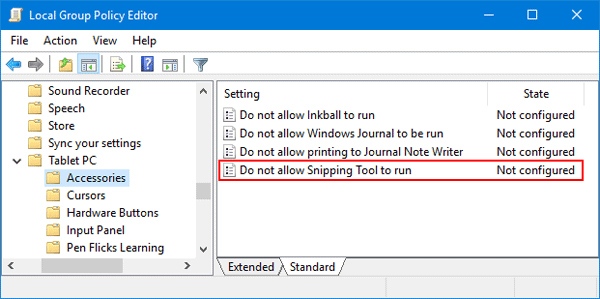
Web Oct 11 2017 nbsp 0183 32 Enable or disable the Snipping Tool via Group Policy Step 1 Open Local Group Policy Editor by typing Gpedit msc in the Start or taskbar search box and then pressing Enter Step 2 In the Local Group Policy window navigate to the following folder Step 3 Now on the right side double click

Web Aug 14 2021 nbsp 0183 32 The fastest and easiest way to capture a screenshot snip in Windows 11 with the snipping tool is by pressing the keyboard shortcut Window Logo Key Shift S Once you press the shortcut keys you would see the four snipping modes options at the top of your screen as shown below
[desc-11] [desc-12]
[desc-13]