How To Enable Network In Centos How To Enable Network Discovery Via Group Policy TECHNIG How To Enable Network Sharing Files On Your Windows And Android 2020 Guide YouTube Windows 7 How To Enable Network In Start Menu YouTube nemsiz Embriyo K saca Hp Laptop Uefi Bios Kiratreligion CentOS RHEL8 IPv6 How to Install the ifconfig Command The ifconfig command is part of the net tools package available in the YUM repository 1 Open the terminal window and update the repositories sudo yum update 2 Next download and install net tools using yum sudo yum install net tools y
06 00 0 Network controller Intel Corporation PRO Wireless 3945ABG Golan Network Connection rev 02 08 08 0 Ethernet controller Intel Corporation PRO 100 VE Network Connection rev 01 lspci nn k fgrep i ether 08 08 0 Ethernet controller 0200 Intel Corporation PRO 100 VE Network Connection 8086 1092 rev 01 After installing a minimal version of CentOS 8 you will need to setup the network interface in your system so you can communicate with other systems By default the network interface is disabled in the minimal version of CentOS 8
CentOS RHEL8 IPv6 CentOS VLAN How To Enable Network Discovery And Configure Sharing Options In Windows 10 Configure Static IP Address On CentOS 7 What Is Network Discovery And How To Turn On In Windows PureVPN Blog How To Enable Network Discovery In Windows 11 PC WebNots Enable A Repository From The Command Line On CentOS 7 BENISNOUS How To Enable Network Discovery Server 2012 YouTube How To Enable Network Scanning In Windows Defender On Windows 11 10
How To Enable Network In Centos
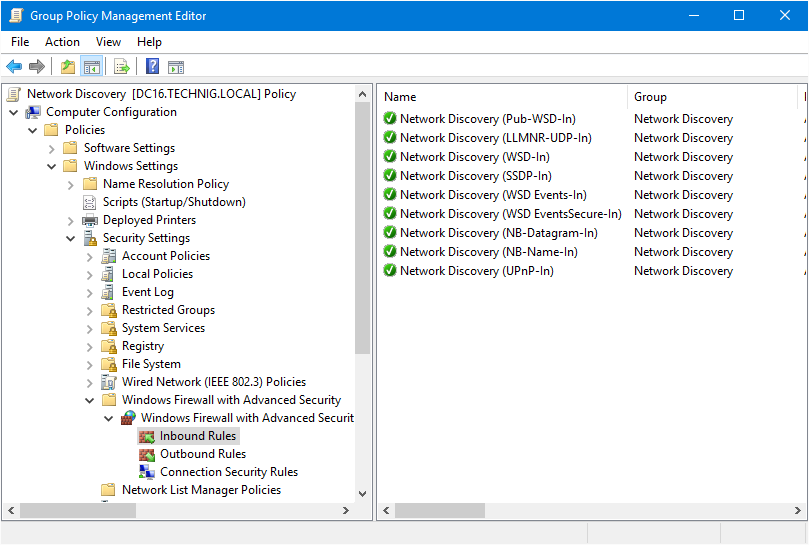 How To Enable Network In Centos
https://www.technig.com/wp-content/uploads/2016/02/Enable-Network-Discovery-via-Group-Policy-1.png
How to Configure CentOS 7 Network In CentOS 7 Linux the default networking service is provided by a dynamic network control and configuration daemon named NetworkManager The NetworkManager tries to keep network devices and connections up and active when they are available
Templates are pre-designed documents or files that can be used for different functions. They can conserve effort and time by providing a ready-made format and layout for producing various kinds of material. Templates can be utilized for individual or professional projects, such as resumes, invitations, flyers, newsletters, reports, discussions, and more.
How To Enable Network In Centos

How To Enable Networking In Kali Linux Systran Box

CentOS VLAN

How To Enable Network Discovery And Configure Sharing Options In Windows 10

Configure Static IP Address On CentOS 7

How To Enable Network Discovery In Windows 11 PC WebNots

Enable A Repository From The Command Line On CentOS 7 BENISNOUS
Edit the file from the below location etc sysconfig network scripts ifcfg enp number Change the ONBOOT option to YES and restart network service service network restart This will enable the network whenever VM is brought up To know the network status use the nmcli d command STATE column output Share Improve this answer Follow

Open the configuration file for your network interface vi etc sysconfig network scripts ifcfg eth0 Add the following settings to the file DEVICE enp3s0 ONBOOT yes IPADDR 192 168 1 10 NETMASK 255 255 255 GATEWAY 192 168 1 1 Save your changes and exit Your new settings will not apply until the network interface is restarted or brought online

Method 1 The Command line way We will be configuring network interfaces for static Ip and DHCP It is noteworthy that in older versions of CentOS below CentOS 9 the configuration files for the network were stored in ifcfg format but now that method is deprecated The newer version of CentOS follows keyfile system

Setup network on CentOS 7 minimal First type nmcli d command in your terminal for quick list ethernet card installed on your machine nmcli d command output Type nmtui command in your terminal to open Network manager After opening Network manager chose Edit connection and press Enter Use TAB button for choosing

The ifup command is the really old way of doing things and requires manual configuration For wireless on CentOS 7 you almost certainly want to use NetworkManager directly either through GUI Gnome KDE settings or nm applet and nm connection editor for lightweight WMs or using nmcli
Step 1 Find the Network Interface Name step 2 Edit the Network Configuration File step 3 Edit the Configuration File step 4 Restart the Network Service step 5 Verify the Changes CentOS 7 Network Config Through the GUI Configure a Static IP Address step 1 Open the Network Manager Checking the status of NetworkManager A minimal installation of CentOS RHEL 8 should have NetworkManager started and enabled to automatically start at boot time by default You can use the following commands to check if NetworkManager is active enabled and print runtime status information of the NetworkManager
Enable SSH in Linux Rescue Mode Once your server has booted from RHEL CentOS 7 8 DVD Press TAB under Rescue a Red Hat Enterprise Linux System Add inst sshd 1 as shown below to enable SSH in Linux rescue mode Next boot your system using the customized GRUB2 menu verify the GRUB2 command line ALSO READ nmcli