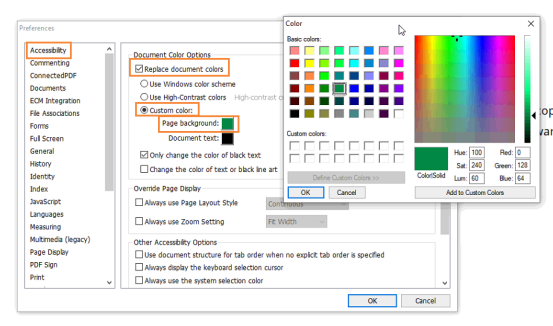
How To Enable Highlight In Foxit Reader How To Customize The Background Color Help Center Foxit Software 6 More Tips Tricks For Expeditions Rome GameGrin Why A New Font Type And Size That I Selected For Pop up Note Cannot Be Saved Help Center Nau iti Misija Ohrabrenje How To Merge Pdf Files Foxit Konjugirana Brodogradnja Parfem How To Change The Color And Set Default Color Of Text Markup Like Highlight Help Center Open your PDF in Adobe Acrobat Reader DC Select the Highlight text icon from the toolbar at the top of the screen Once you select it the Highlight text tool will be active indicating it as the chosen option Locate the text or sentence you want to highlight
You can change the color of the highlighter within the Search Highlight function Choose the word you wish to highlight and click the tool for highlighting If the color is not the color you want you can bring up the format panel by clicking the arrow panel on the right to hide the panel and click again to bring back up with the format tab Here s how to a edit PDF document using Foxit PDF Editor Open the document Click on the Edit Text button near the top center of the screen To change text simply locate it and click to highlight it then type your new text To delete it just select text and then hit backspace Or type the new text directly over the highlighted text
How To Change The Color And Set Default Color Of Text Markup Like Highlight Help Center I Cannot Highlight And Edit On A Standard Document Help Center Foxit Software Improve Your High Contrast Shots With Your Canon EOS Rebel T8i 850D Dummies I Cannot Highlight And Edit On A Standard Document Help Center Foxit Software How To Edit Or Change Scan based PDF Help Center Foxit Software How To Switch The User Interface UI Language In Foxit PDF Editor Foxit PDF Reader Help Top 10 PDF Highlighter Tools For Windows And Mac Inkit Foxit Reader Phantom Kiwigarry How To Change The Color And Set Default Color Of Text Markup Like Highlight Help Center
How To Enable Highlight In Foxit Reader
 How To Enable Highlight In Foxit Reader
https://kb.foxit.com/hc/article_attachments/360089398432/mceclip0.png
Viewed 4k times 1 When highlighting text in Foxit Reader it introduces spaces in between the letters and highlights letter wise since the last update Screenshot attached for you on other pages of the document the Highlight Function worked perfectly I experienced the same problem in other documents I worked with over the last couple of days
Templates are pre-designed documents or files that can be utilized for various purposes. They can save time and effort by offering a ready-made format and design for developing different type of content. Templates can be utilized for individual or expert jobs, such as resumes, invites, leaflets, newsletters, reports, discussions, and more.
How To Enable Highlight In Foxit Reader
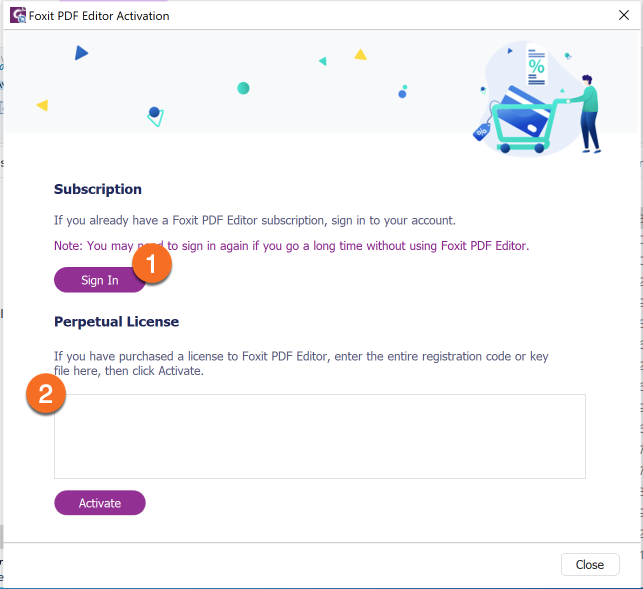
How To Activate Foxit PDF Editor Help Center Foxit Software

I Cannot Highlight And Edit On A Standard Document Help Center Foxit Software
Improve Your High Contrast Shots With Your Canon EOS Rebel T8i 850D Dummies
I Cannot Highlight And Edit On A Standard Document Help Center Foxit Software
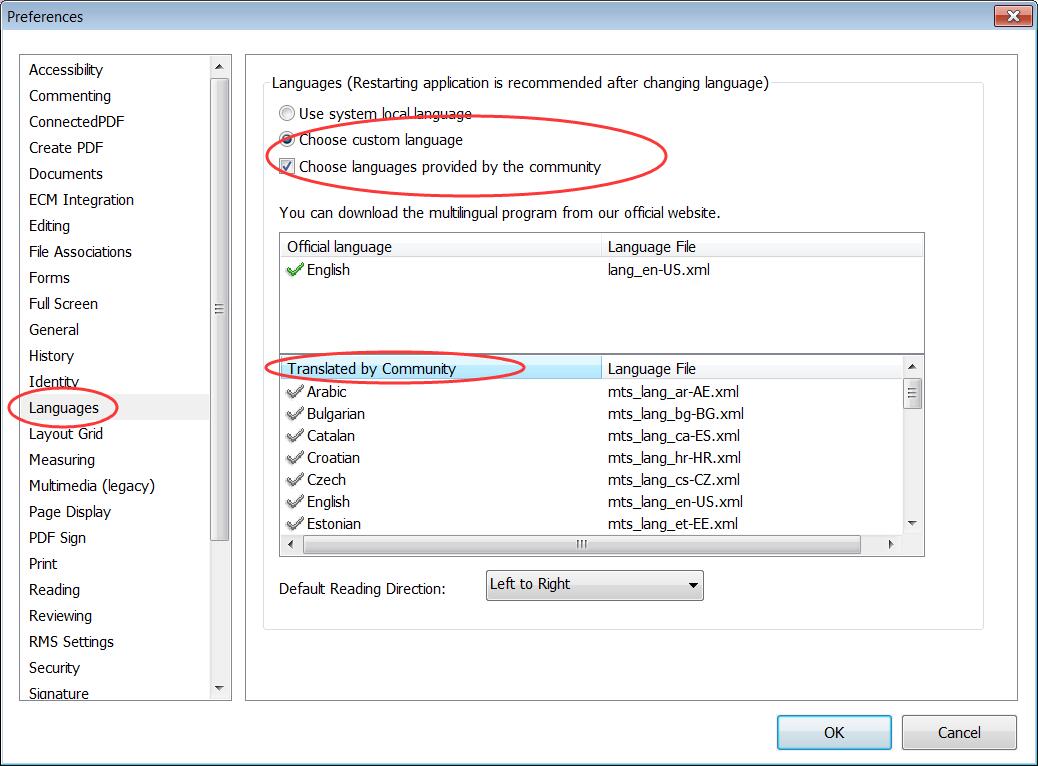
How To Switch The User Interface UI Language In Foxit PDF Editor Foxit PDF Reader Help

Top 10 PDF Highlighter Tools For Windows And Mac Inkit

This article will tell you how to mark up an area with a highlight color in PDF with Foxit PDF Editor You can use the Area Highlight command to mark important area as a means of memory retention or for later reference

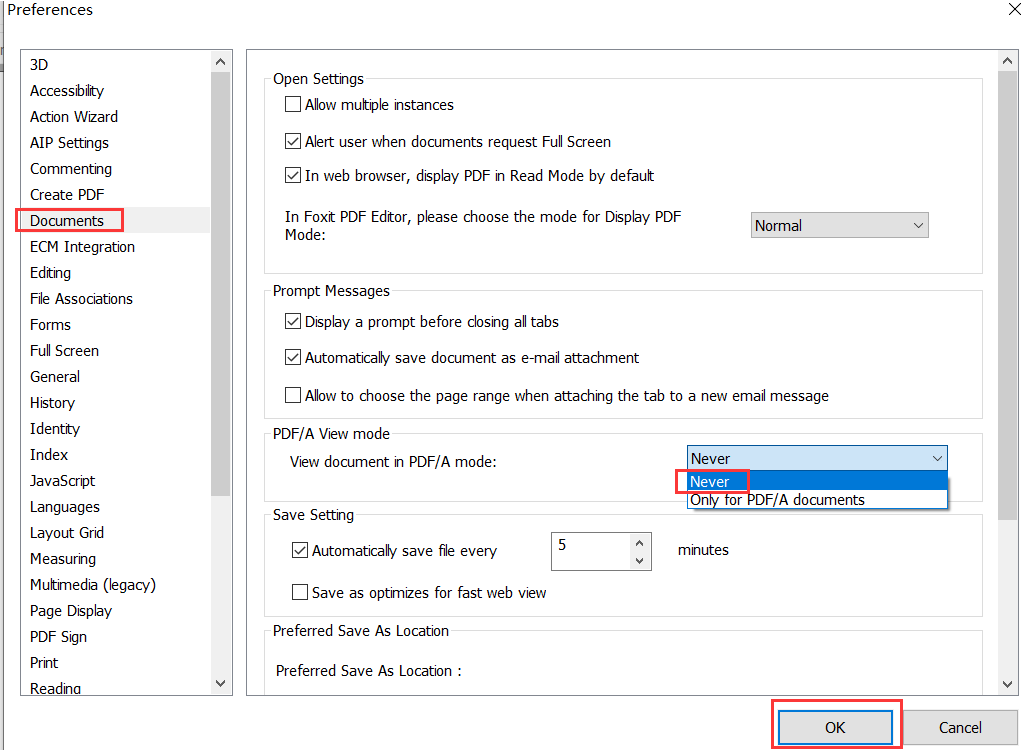
To check the document restrictions navigate to File Properties Security 4 PDF document is image based or scanned which doesn t contain editable text To check if the document has editable text navigate to Comment Text Viewer to see if there is any text If no text appears that indicates the document is an image based document

Area Highlight keep using multiple times Colin Pearson 2 months ago Hey forum Is there a way to use the Area Highlight function repeatedly without having to go back and click it on the ribbon every time Thanks 0 Facebook Twitter LinkedIn Hey forum

How to Highlight text or font of PDF file using Foxit PDF reader easily and quickly Highlight any sentence of PDF file you can also highlight the complete

Install and Uninstall You can easily install Foxit PDF Reader by double clicking the downloaded setup file and doing the following operations according to the prompts Alternatively you can also install Foxit PDF Reader by command line Please refer to the User Manual of Foxit PDF Reader for details
Simply go to Adobe Acrobat online services from any web browser and follow these three easy steps Select the highlighter tool from the horizontal toolbox located at the top of the PDF editor Select the desired color of your highlighter tool Click and drag the cursor to select the text area to highlight releasing when you ve finished When the sliders are showing if you double click a word underneath to select it the Reader assumes you want to comment on the text above forcing one to click surprisingly far outside the area in order to switch the sliders off If the sliders are off to select text underneath the cursor has to be precisely positioned or the highlighted text
Here are the most common cases a Scanned PDF document containing no real text Try selecting text instead of highlighting text If you cannot select text at all no matter how hard you try your PDF document is likely a scanned PDF You can only add Text Markup annotations Highlight Underline Strikeout to real text not to image of text