How To Edit Crontab In Linux Can t Start A Job With Cron On Ubuntu Startup Super User Running A Cron Every 5 Minutes TecAdmin crontab In Linux With Examples GeeksforGeeks Change Set The Default Crontab Editor Exploiting The Cron Jobs Misconfigurations Privilege Escalation VK9 Security Web Nov 19 2022 8 min read Understanding Crontab in Linux With Examples Learn the concept of crontab in Linux See how you can set up cron jobs to automatically run scripts and command at predefined time Christopher Murray The crontab is used to automate all types of tasks on Linux systems
Web Mar 19 2016 nbsp 0183 32 2 Answers Sorted by 24 crontab should respect the EDITOR environment variable so you can just do for the root crontab for example sudo EDITOR vi crontab e From man crontab The e option is used to edit the current crontab using the editor specified by the VISUAL or EDITOR environment variables Share Web Apr 16 2019 nbsp 0183 32 e edit option in a Bash terminal you re asked to pick the editor you d like to use Type crontab a space e and press Enter crontab e The editor you select is then used to open your cron table In this example nano was chosen by pressing the 1 key
Exploiting The Cron Jobs Misconfigurations Privilege Escalation VK9 Security Linux Crontab Reference Guide Linux Tutorials Learn Linux Configuration How To Edit Your Crontab File Systran Box How To Edit Crontab With Nano How To Use The Crontab Command In Unix Linux Crontab With Examples Of Cron Jobs Linuxhowto How To Schedule A Cron Job To Run A Script On Ubuntu 16 04 BENISNOUS How To Run Cron Jobs Every 5 10 Or 15 Minutes Linuxize Cron Examples How To Write A Crontab Schedule By Rakesh Jain Medium
How To Edit Crontab In Linux
 How To Edit Crontab In Linux
https://i.stack.imgur.com/LUwmX.png
Web Changing default crontab editor Ask Question Asked 12 years 1 month ago Modified 9 months ago Viewed 245k times 188 I am trying to change the default editor from nano to vim I have run the following commands sudo update alternatives config editor and update alternatives config editor Both now output
Templates are pre-designed files or files that can be utilized for different functions. They can conserve effort and time by supplying a ready-made format and layout for developing different type of material. Templates can be utilized for individual or professional jobs, such as resumes, invitations, leaflets, newsletters, reports, presentations, and more.
How To Edit Crontab In Linux

Crontab Editor Commands Vastcooking

Linux Crontab Reference Guide Linux Tutorials Learn Linux Configuration

How To Edit Your Crontab File Systran Box
How To Edit Crontab With Nano

Linux Crontab With Examples Of Cron Jobs Linuxhowto
How To Schedule A Cron Job To Run A Script On Ubuntu 16 04 BENISNOUS

Web May 18 2022 nbsp 0183 32 Each user can have their own crontab and though these are files in var spool they are not intended to be edited directly The documentation further states that the crontab command should be used to edit your crontab file and you specifically edit the file with the crontab e command
Web Dec 15 2022 nbsp 0183 32 To manipulate scheduled cron jobs you can edit the crontab file for system wide tasks or create files inside the user s cron d directory for specific tasks with the necessary parameters inside them Below are the most common crontab parameters l displays the current crontab jobs from the current user on standard output

Web Editing crontab duplicate 1 answer How do I set up a Cron job 8 answers Closed 4 years ago This is intentionally a duplicate of the following question because the answers there are not completely correct and as a new user I somehow cannot comment there Editing crontab ADDED NOTE The quot How do I set up a Cron job quot

Web Feb 17 2020 nbsp 0183 32 Although you can edit the user crontab files manually it is recommended to use the crontab command The etc crontab file and the scripts inside the etc cron d directory are system wide crontab files that can be
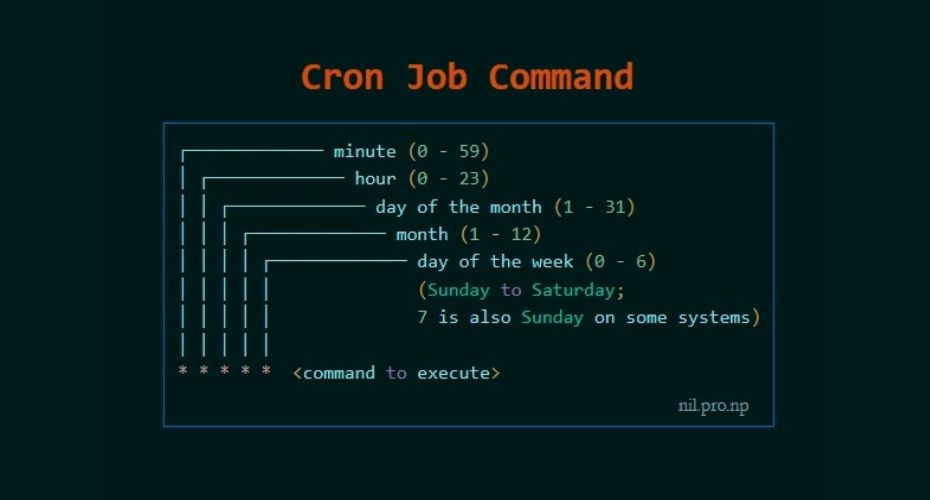
Web Dec 8 2022 nbsp 0183 32 How to edit crontab crontab e The most common way to edit your crontab is to use the e flag with the crontab command crontab e Edit the crontab file directly not recommended The operating system stores crontab on your file system so you can Remove crontab file To remove the current
[desc-11] [desc-12]
[desc-13]