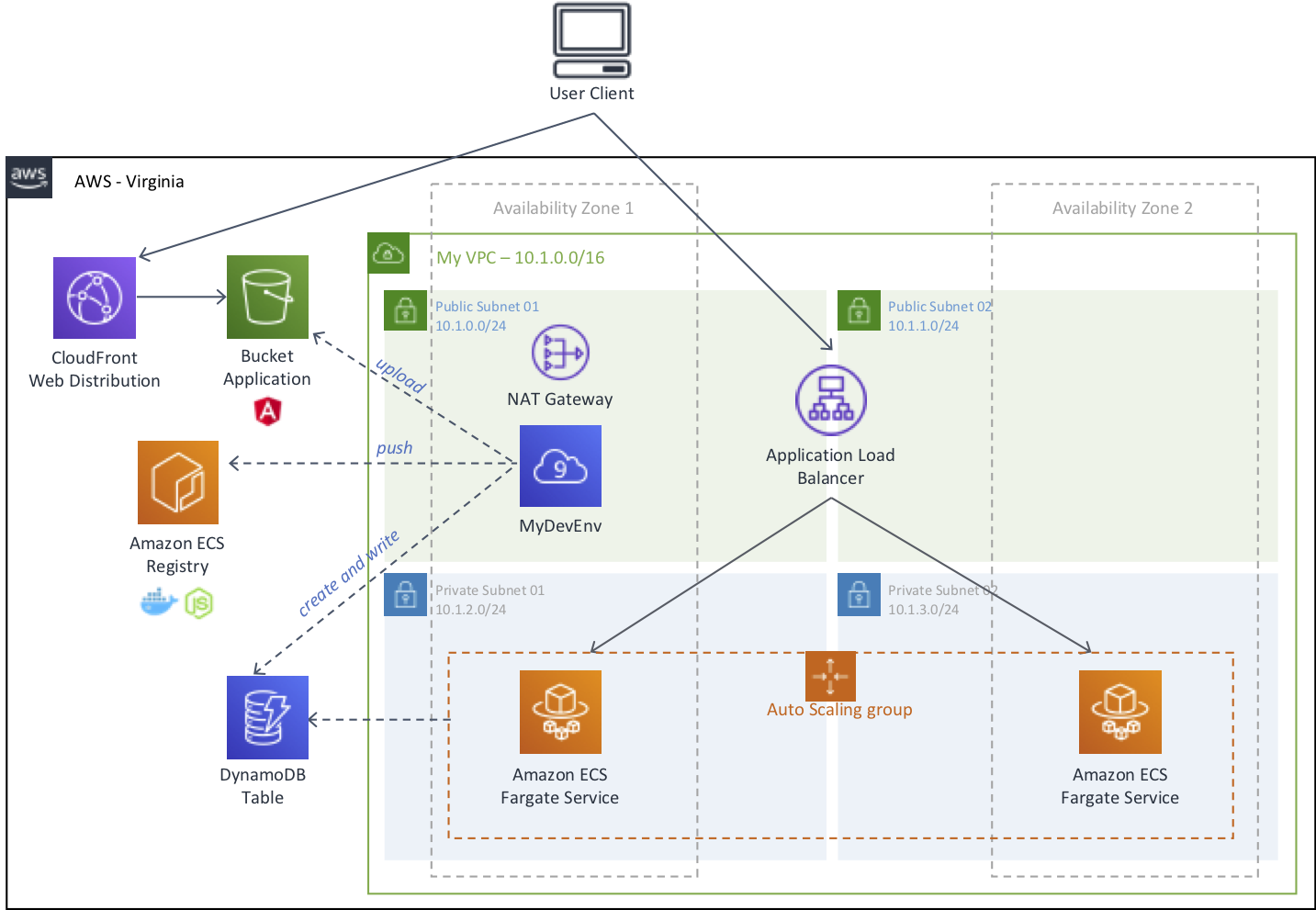
How To Deploy Node Js Application In Aws Beanstalk Arch overview Albert Web How To Build A Node js Application With Express And Pug Better Stack Node Js Failed To Deploy Asp Net Core Angular App To Azure From Www How To Deploy A Next js App To Production Use Azure Pipelines To Build And Deploy An HPC Solution Azure Batch Steps name Checkout uses actions checkout master name Setup node env uses actions setup node v2 1 2 with node version matrix node name Cache node modules uses actions cache v2 with path npm key runner os node hashFiles package lock json restore keys runner os
In this AWS video tutorial you ll learn how to deploy and manage applications with AWS Elastic Beanstalk We ll take a hands on approach to deploying a Node Select IAM from the list of services Under the IAM service let s click on the Users section on the left menu and click Add user In this section let s name our user as deploy eb and select Programmatic access Click on Next to continue In the next section click on Create group Let s name our group
Use Azure Pipelines To Build And Deploy An HPC Solution Azure Batch How To Deploy Spring Boot Application In Tomcat Mobile Legends Blue Green Deployment With AWS Developer Tools On Amazon EC2 Using Prepare Node js Apps Production Ready For Kubernetes Cisco Tech Blog Node js Deploy Nextjs App To Cpanel 500 Internal Server Error Stack Deploy A Node js Web App Deploying An Http Api On Aws Using Elastic Beanstalk Deployment Deploy Kubernetes Deploy A Node Express Application Node js Hosting Configuration And Installing Node js Apps CPanel Blog
How To Deploy Node Js Application In Aws Beanstalk
 How To Deploy Node Js Application In Aws Beanstalk
https://www.albert-yu.com/wp-content/uploads/2018/10/arch_overview-1024x751.png
Phase 2 Creating Your App on AWS Elastic Beanstalk Create an app following the prompts Phase 3 Setting up AWS CodePipeline with AWS CodeBuild for the Build Stage Deploy Node JS application on AWS Elastic Beanstalk The main objective of this article is to deploy a simple web application to the AWS cloud platform Our plan is to deploy
Templates are pre-designed documents or files that can be used for numerous purposes. They can conserve effort and time by offering a ready-made format and layout for creating various kinds of material. Templates can be utilized for personal or expert jobs, such as resumes, invites, flyers, newsletters, reports, presentations, and more.
How To Deploy Node Js Application In Aws Beanstalk
Node JS Development Company In India Node JS Web Development Services

How To Deploy Spring Boot Application In Tomcat Mobile Legends
Blue Green Deployment With AWS Developer Tools On Amazon EC2 Using

Prepare Node js Apps Production Ready For Kubernetes Cisco Tech Blog
Deploy A Node js Web App

Deploying An Http Api On Aws Using Elastic Beanstalk Deployment Deploy
To deploy the newly created application navigate to your AWS Elastic Beanstalk environment and click on Create Application On the Create a web app page do the following Give your application a name Select Node js under Platform Leave Sample application as the selected option under Application code Click on Create Application
The first thing you have to do is setup an AWS account If you already have an account make sure you have an IAM user that has API keys and the appropriate access Create an Account Pretty straightforward Create an account The signup process should walk you through everything pretty easily
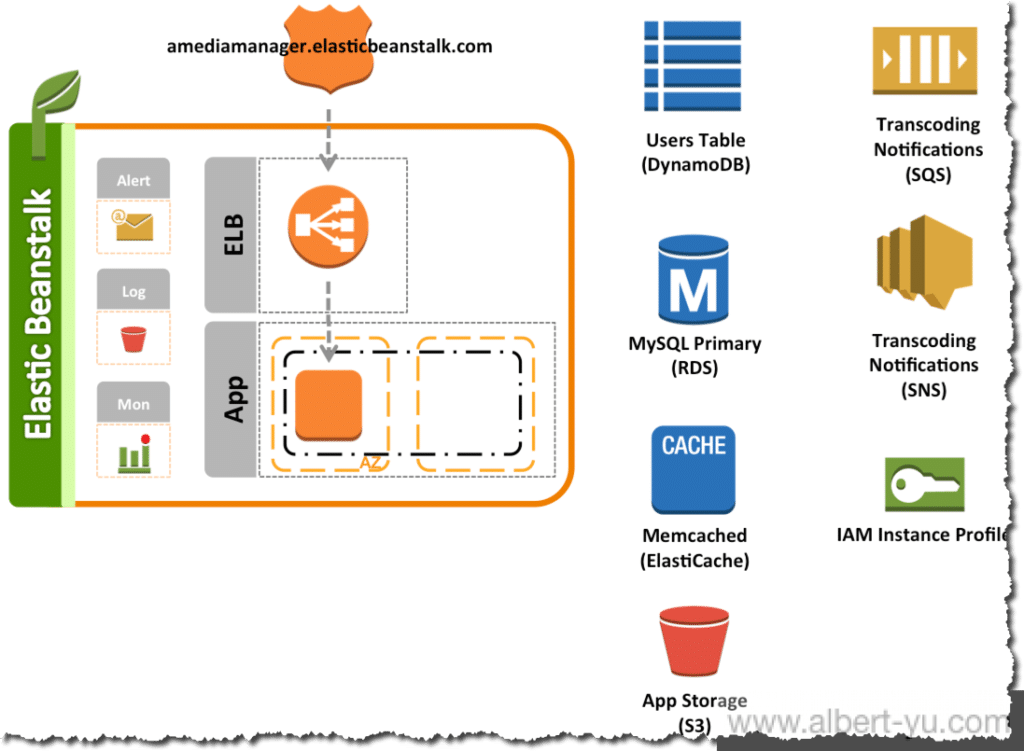
What is Elastic Beanstalk AWS Elastic Beanstalk is a fully managed service that helps you deploy manage and scale applications on AWS It takes care of provisioning the required resources such as EC2 instances RDS databases and load balancers
Today we ll show you how to create an Elastic Beanstalk environment and deploy your Node js application to it with a single eb deploy command We ll assume you already have a Node js

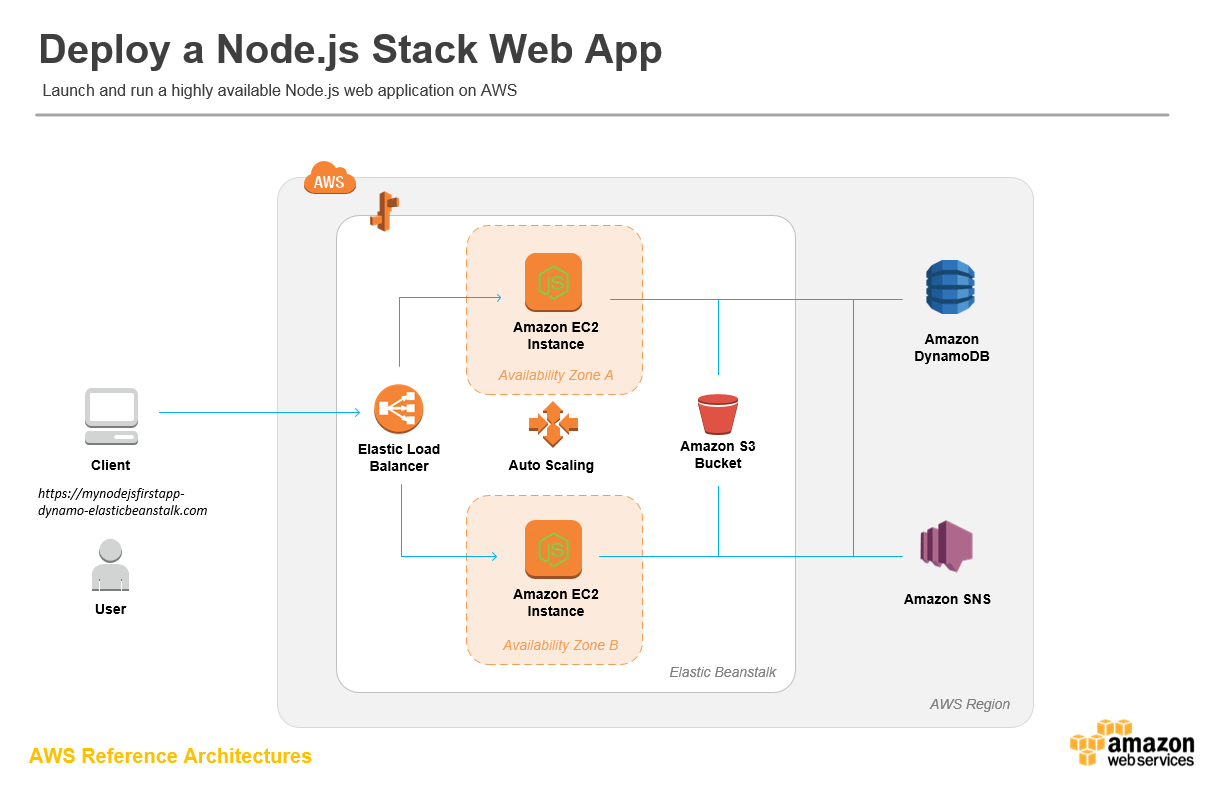
This tutorial and its example application nodejs example dynamo zip walks you through the process of deploying a Node js application that uses the AWS SDK for JavaScript in Node js to interact with the Amazon DynamoDB service
Landon Schlangen 5 23K subscribers 3 1K views 5 months ago Programming tips This video demonstrates the steps to deploy a Node js application to AWS Elastic Beanstalk I decided to use This tutorial will show you how to deploy a Node js application in AWS using Elastic Beanstalk and DynamoDB Node js is an open source cross platform back e
The first step is to go to the AWS Management Console and select Elastic Beanstalk from the Services menu Press the Create Application button Select the Web server environment and give a