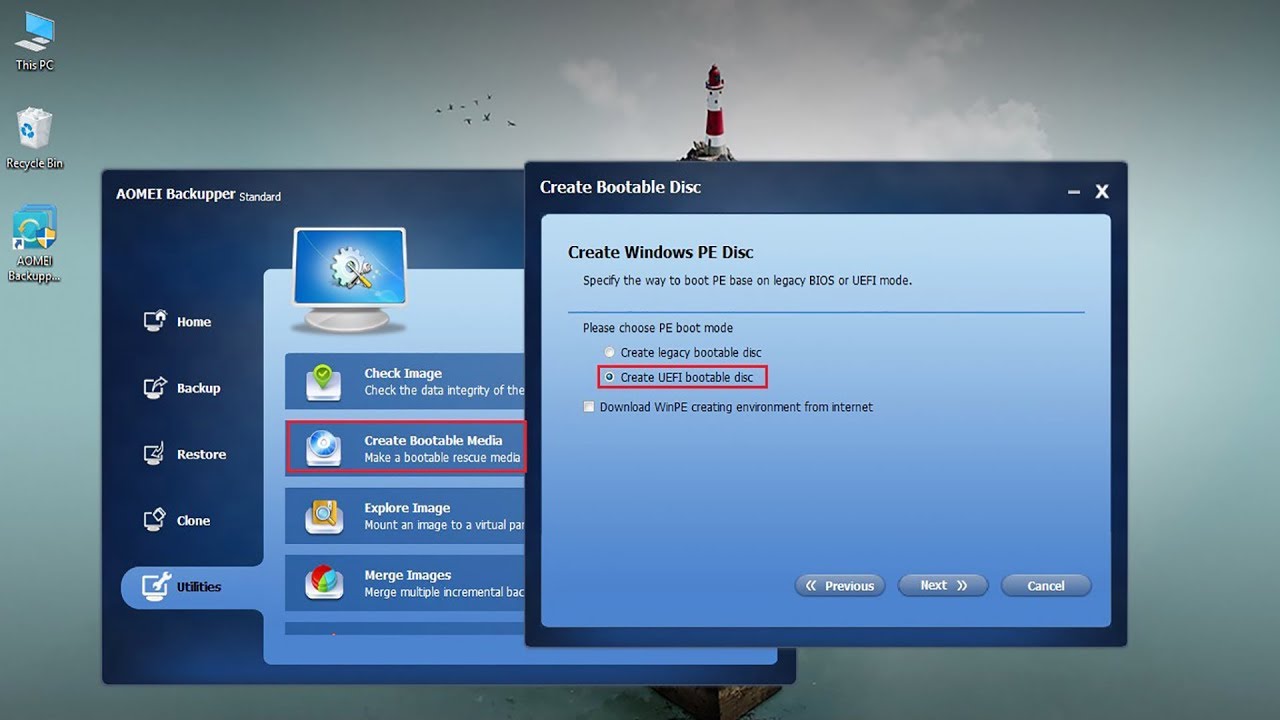
How To Create Uefi Bootable Usb Using Cmd How To Create UEFI Bootable USB For Windows 10 Windows 10 UEFI How To Create Ventoy Bootable Usb Aerovse How To Create Bootable USB For All Windows Using CMD YouTube How To Create UEFI Bootable Image AOMEI YouTube Alice Monitor Po i a How To Make Bootable Usb With Rufus Windows 10 Here s how Press F10 and ESC or Delete keys when booting your computer to open the BIOS Setup utility Go to the Boot tab and select the UEFI BIOS Boot Mode by using the arrow keys and press Enter Select the UEFI Boot Mode by pressing the up and down arrow keys and press Enter Press F10 keys to save the changes
Step 1 To create a bootable disk of EaseUS Partition Master you should prepare a storage media like a USB drive flash drive or a CD DVD disc Then correctly connect the drive to your computer Step 2 Launch EaseUS Partition Master and find the Bootable Media feature on the left Click on it Go to where you ve stored the Windows 10 ISO file select it and click on the Open button 6 The above action will add the file path to the tool Click on the Next button 7 In the next screen since we want to create a UEFI bootable USB drive click on the USB device button 8
Alice Monitor Po i a How To Make Bootable Usb With Rufus Windows 10 How To Create UEFI Bootable USB Drive For Windows 10 Rufus YouTube How To Create UEFI Bootable USB Drive To Install Windows 7 Windows OS Hub How To Create UEFI Bootable USB For Windows 10 Windows 10 UEFI 3 Easy Ways To Create UEFI Or Legacy Bootable USB Windows 10 How To Creat A Bootable UEFI USB Flash Drive Using cmd How To Create A UEFI Bootable USB Use It To Boot Your Computer How To Create UEFI Bootable USB Media Easily Rufus RushInformation How To Create UEFI Bootable USB To Install Windows 10 8 1 8
How To Create Uefi Bootable Usb Using Cmd
 How To Create Uefi Bootable Usb Using Cmd
https://g6k7x4j6.stackpathcdn.com/wp-content/uploads/2017/01/Create-UEFI-Bootable-USB-for-Windows-10.jpg
Run the Rufus utility and pick your USB drive under the Device section Select the partition scheme for UEFI computers with MBR If your PC has a GPT partition scheme GUID Partition Table then pick the appropriate option from the combobox Click on the CD DVD drive icon to browse to the Windows 10 ISO image file
Pre-crafted templates provide a time-saving service for producing a varied series of files and files. These pre-designed formats and designs can be used for different personal and expert projects, including resumes, invitations, flyers, newsletters, reports, presentations, and more, enhancing the content development procedure.
How To Create Uefi Bootable Usb Using Cmd
DOWNLOAD How To Use Rufus To Create A Uefi Bootable Windows 10

How To Create UEFI Bootable USB Drive For Windows 10 Rufus YouTube

How To Create UEFI Bootable USB Drive To Install Windows 7 Windows OS Hub

How To Create UEFI Bootable USB For Windows 10 Windows 10 UEFI
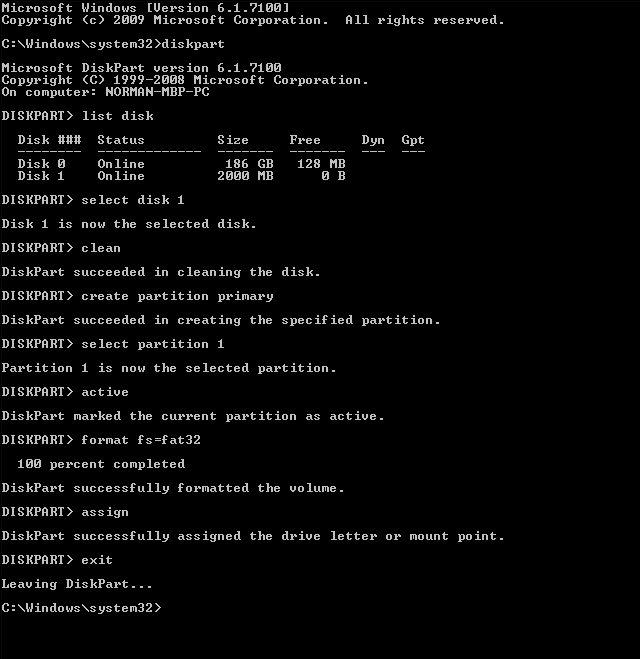
How To Creat A Bootable UEFI USB Flash Drive Using cmd
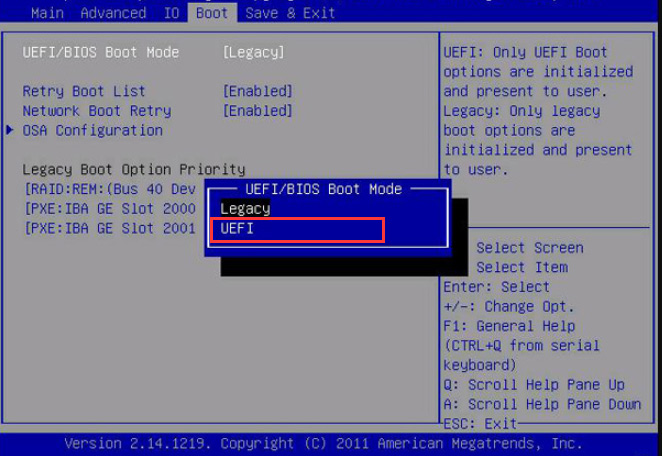
How To Create A UEFI Bootable USB Use It To Boot Your Computer

Step 1 I nsert a USB drive into the running computer All data in the USB drive will be formatted you can backup files before reformatting Open a Command Prompt window as an administrator and type diskpart Remember to press Enter key after each move Step 2 Type the following commands in order
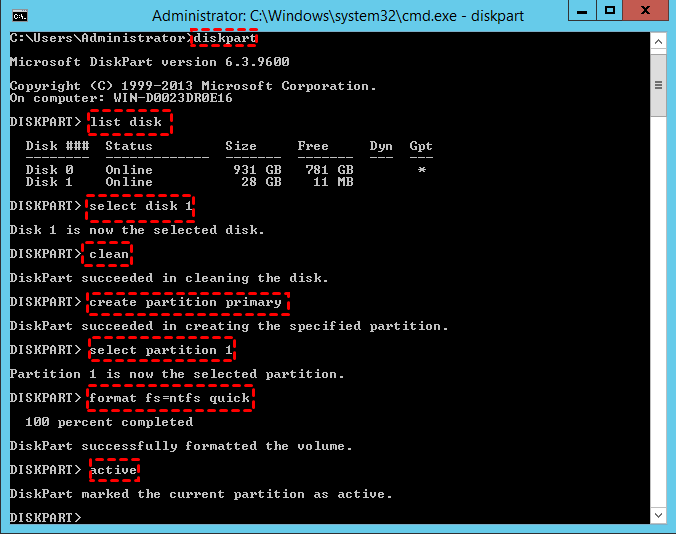
Go to the Command Prompt Select Start and type CMD in the search field right click on CMD exe and select Run as administrator Alternatively go to Start All programs Accessories right click on Command Prompt and select Run as administrator A User Account Control UAC dialog Window may appear Click Yes to Continue

To create a USB flash drive to install Windows 10 use these steps Open Start on Windows 10 Search for Command Prompt right click the top result and select the Run as Administrator option Type the following command to open DiskPart and press Enter diskpart Type the following command to determine the USB flash drive and press Enter
To create a USB flash drive to install Windows 11 with Command Prompt download the ISO file and use these steps Open Start Search for Command Prompt right click the top result and select the Run as Administrator option Type the following command to open DiskPart and press Enter diskpart
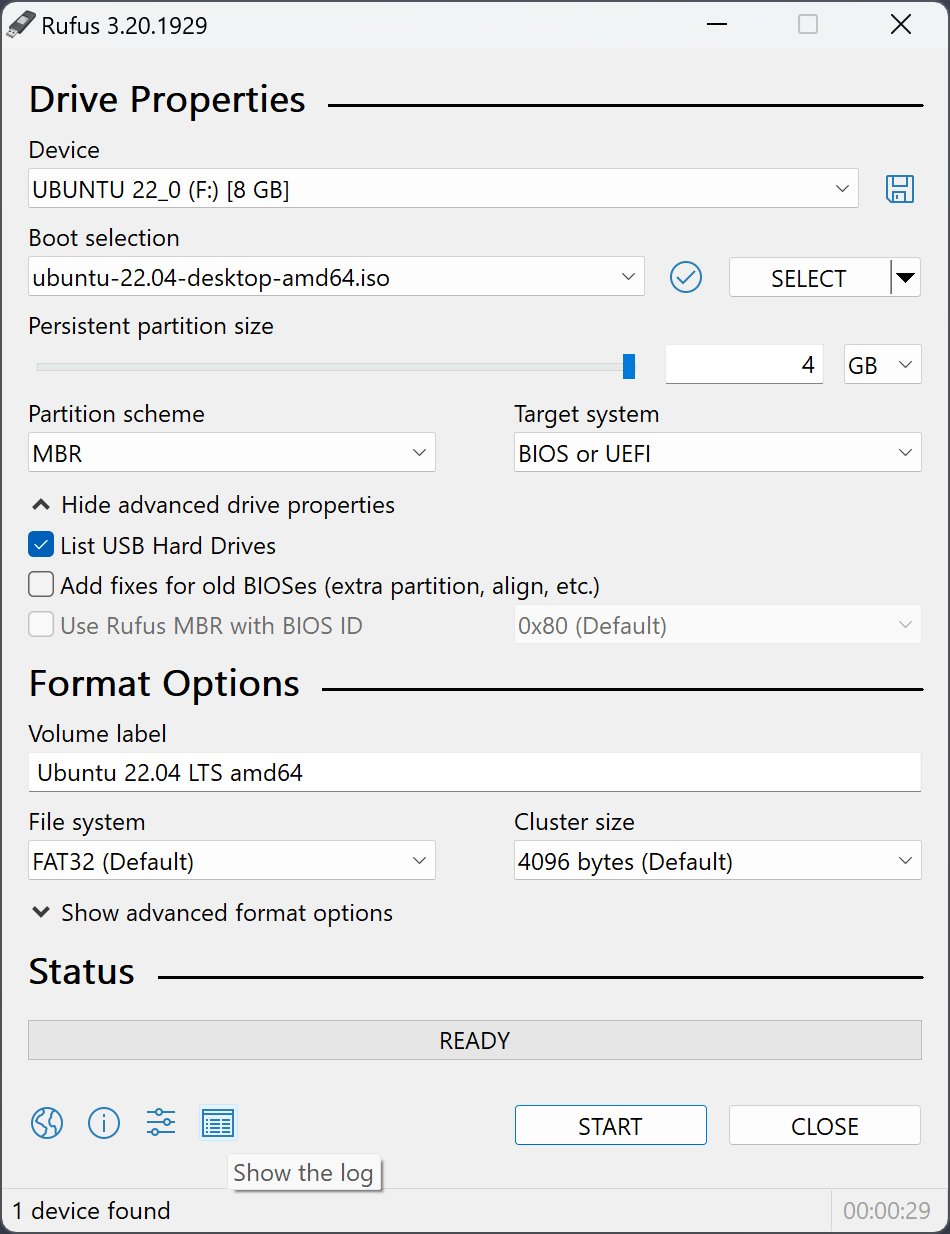
To create a USB media with an existing Windows 10 ISO file connect a flash drive of at least 8GB of space and use these steps Open Rufus download page Under the Download section click the
To create a bootable UEFI USB drive using this tool download it from the official website and follow the steps below Connect your USB drive to the computer Run Media Creation Tool as administrator and click Accept to agree with the terms and conditions Select DVD DVD or ISO file for another PC and click Next Steps to Create a Bootable Windows Linux USB Using CMD Step 1 Run the Command Prompt in Administrator mode There are two ways to do the same Search for CMD in the Start menu right click on the command prompt and click on Run as Administrator Open Task Manager go to File Run new task search for CMD and press enter
This video shows how to make a bootable USB drive pendrive using Command prompt CMD for windows it is the safest method to create a bootable pendrive